NETGEAR is aware of a growing number of phone and online scams. To learn how to stay safe click here.
rbk750
78 Topics
AX4200 with 3 satellites hard wired
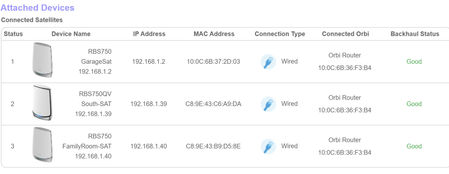
I have 3 RBS750 plugged directly into the back of the RBR750. My wireless devices all drop wifi at random times. Google AI is telling me that a backhaul status of Good is not correct for a wired connection. Also now that I have a Netgear unmanaged switch next to the RBR750 can I wire the Sats to the switch instead of the router?Numerous DHCP requests Tesla Powerwall 3
Good morning, I have a Netgear Orbi 753 router and two satellites connected to Wireless Backhaul, satellite one connected to the router and satellite two connected to satellite one. I have a Tesla Powerwall 3 solar battery that is connected to Wi-Fi. I've noticed that it often switches bands continuously from 5GHz to 2.4GHz and vice versa. Consequently, when checking the Orbi router logs, I also see numerous DHCP requests, one after the other, for the battery's IP address. Is there a way to prevent this band switching and constant DHCP requests from happening? I've noticed (I don't know if this has an impact) that it often does this when, after a reboot of the Orbi, Orbi uses 40MHz for 2.4GHz Wi-Fi. Currently, it is active, but I've never turned it off—the 2.4GHz 20/40MHz Wi-Fi option. I look forward to your replies and thank you.New systems can connect but can't access internet
I'm trying to get my son's new laptop up & running but have hit a brick wall. I have an Netgear Orbi RBK753S Mesh network set up in my home using the router & 1 satellite. My family has been using it without any problems until recently. The new laptop connects to the wireless network but can't access the internet. I even tried connecting via CAT5 cable, but it didn't matter. However, when I use my phone as a hotspot, I am able to connect to the internet. I'm wondering if I have changed the configuration on my router so that it's "filtering" out the new system from accessing the internet. Is there a setting that would prevent "new" systems from accessing the internet? Thanks!Printer Connect
I have a new printer, Epson ET-3958 and an Orbi RBS 760 mesh system.After reading many post, I now know the problem is the printer can only connect at 2.4 but the router wants to connect at 5g. Last night I tried reducing the power on the 5g to 25%, unpluging the close Orbi and reconnecting the printer. It worked, then I connectedthe close Orbi and chaged the 5g power to 100%, This morning the printer was disconnected. What can I do to keep the printer using the 2.4g and not attempt to reconnect at 5g? Thanks is advance JohnOrbi RBK760 firmware issues
i have a Orbi 760 with 2 satellites , recently i updated the router to newest firmware V6.3.8.11_1.4.83 , now all control functions not working , sleep time , pause internet or security options all not functioning , plus once i reboot i have to setup the network all over again !! i tried to downgrade to previous firmware but even that not working , i need a solution to revert back to earlier firmware that at least works when i reboot ! help pleaseLosing internet connection after reboot
I am experiencing a strange problem. I have been an Orbi user and for many years. My setup is an AT&T BGW320 gateway and my RBR760 with 2 RBS760 satellites connected to it in router mode. No bridging or IP passthrough I just have the Orbi running on it's own network with it's own IP range 10.0.0 with my BGW320 on 192.168.1 Just recently if I unplug and replug the Ethernet cable or reboot the 760 it loses internet connection. I can access the web gui interface but it says no internet connection. If I reset and reinstall the 760 then all works fine again and it will continue to do so until the next reboot. Over the years I have rebooted, reset, unplugged and re-plugged ethernet cables and never experienced this issue. What could be causing this all of a sudden?Problem with satellite
When I use speedtest.net on my laptop beside my main RBR750P router, I get a download speed of ~500 Gbps, which is what I am paying for. At my satellite, 30-40 feet away (two walls) it drops to 1-6 Gbps. Any ideas why? Are there any internal tests or checks I can do to help diagnose this? How can I be sure whether my phone or computer is connected to the main or satellite router? Also, is there a way to determine the router speed (main and/or satellite) from the web interface? thanks for any help.SolvedRBS750 Firmware Won't Upgrade
Hello. I picked up an additional Orbi satellite second hand, an RBS750 to go with my RBR750 and an existing satellite. Needed to extend coverage in the house. The satellite is stuck on firmware V4.6.14.93. My own RBR and satellite are on 7.2. It's connected to the mesh without a problem, it's synced and working fine. I've tried updating the firmware on the satellite, and have had no luck. I've done it via the Web UI, using the Manual Firmware update on WiFi, then tried using Wired LAN, nothing. It keeps saying the firmware upgrade failed and I should "check my update file". I'm getting the firmware files from Netgear's official KB. It's really odd, it's been documented that 4.x to 7.x updates have been an issue and hence a manual updates have been required, which is what I'm trying - but it's still failing. Also, tin-foil hat, but I can't find firmware V4.6.14.93 for the RBS750 anywhere. Since I picked it up second-hand, hoping it's not some kind of custom firmware up to no good. Has anyone had any similar issues, and have you found a solution? Any ideas?