NETGEAR is aware of a growing number of phone and online scams. To learn how to stay safe click here.
Forum Discussion

l27
Dec 13, 2016Guide
Mirror uplink on a stack
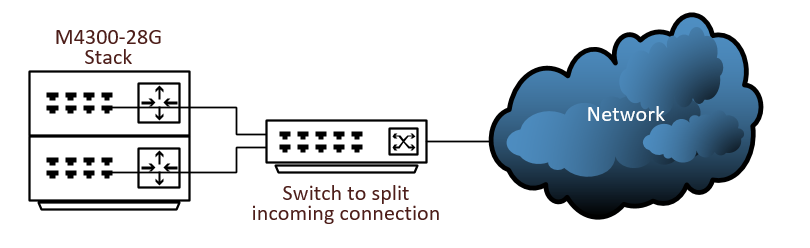
I have enabled OSPF across a connection coming in and I want to split that connection and plug it in to both switches. Is this possible? I cannot add the same IP address to a port on the other switch. I guess I could configure a second IP address and enable routing on it. Any suggestions?
Thanks,
John
13 Replies
- DaneANETGEAR Employee Retired
Hi l27,
Based on the diagram, the M4300-28G switches are in a stack which means that it will function as one switch. Is the switch that will split the incoming connection also a NETGEAR switch? If yes, what is the model of it?
Let me share the article below as reference guide about planning your network setup:
Regards,
DaneA
NETGEAR Community Team
 l27Guide
Thanks for the reply. It's an HP 2910al. Maybe I could create a trunk between the switches?
- l27Guide
To add one more point. I have ospf working. I just want to split the incoming connection from the ISP which is a layer 2 connection so it's plugged into each switch should one fail. I know I still have a single point of failure with the additional switch and the ISP's equipment but it would make me feel a little better. I did ask the ISP if they would give me 2 routers, (They really aren't a router because it's a layer 2 connection so I'm not sure what to call them, I didn't put it in the diagram but it's between the switch and the cloud.), but they said no eventhough they brought in 2 pairs of fiber for redundancy.
- l27Guide
Sorry I haven't had allot of time to look at this. From the Netgear perspective how would I do this because I cannot figure out how to assign the same ip address to both ports.
I probably won't have time to look at this for a week or so. Thanks for helping me with this. Retired_Member
Hi l27,
As your reqirement, you could configure as below:
Step1: add two ports to one LAG port; refer to the link (Page258 Link Aggregation Groups).
Step2: create a VLAN, add the LAG port to VLAN; refer to the link (Page169-175 Configure VLANs).
Step3: enable L3 VLAN routing port and set IP address; refer to the link (Page315 Configure VLAN Routing).
Regards
Ericz
Netgear Employee
- l27Guide
That makes perfect sense. I will give that a shot. Because of the nature of these changes I will not be able to do this without scheduling maintenance downtime. So please be patient if I don't reply within the next week or 2.
Thanks,
John

Related Content
NETGEAR Academy

Boost your skills with the Netgear Academy - Get trained, certified and stay ahead with the latest Netgear technology!
Join Us!
