Forum Discussion

AOS-STAHL-IT
Dec 07, 2016Aspirant
VLAN splitted IT and Telephone configuration
Dear Community,
I'm currently setting up a configuration and this point the problem is that the telephones do not send their DHCP Request to the Router behind the Switch. I assume this might be a VLAN issue. I will be at the site tommorow and will do some fine tinkeling but I just wanted to get some feedback.
Okay now to our Setup:
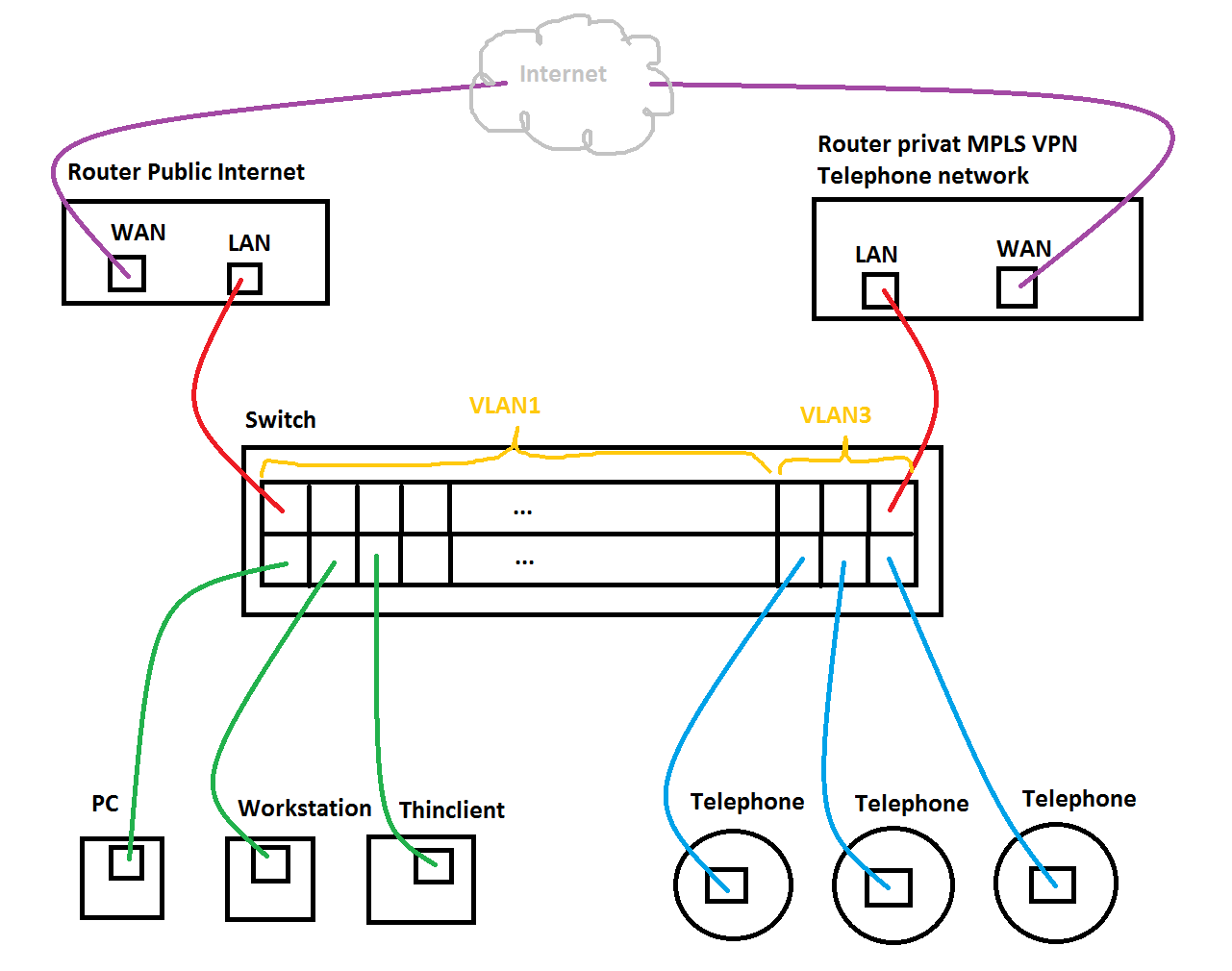
The switches ports are devided into 2 seperate segments via VLANs.
Segment for IT Stuff:
- Ports 1 to 36 are untagged VLAN 1
- on the Port 1 there is the Router for Public Internet Connection.
- all PCs work fine in this segment.
Segment for Telephones:
- Ports 37 to 46 are untagged VLAN 3
- on the Port 45 there is an other Router to the private Voice network from a Carrier
- all the Telephones in this segment dont request IPs towards the Router on Port 45
as I said I assume it is a VLAN configuration issue
but now a diagram of the setup for those how didn't unterstand the text:
Okay okay. I know your guys are interested in my config.
I Upload the Entire Config and took out some sensitive data but all relevant information is untouched.
!Current Configuration:
!
!System Description "M4100-50G-POE+ ProSafe 48-port Gigabit L2+ Intelligent Edge PoE Managed Switch, 10.0.2.20, B1.0.1.1"
!System Software Version "10.0.2.20"
!System Up Time          "29 days 3 hrs 16 mins 52 secs"
!Additional Packages     QOS,IPv6 Management,Routing
!Current SNTP Synchronized Time: SNTP Last Attempt Status Is Not Successful
!
vlan database
vlan 2-3
vlan name 2 "Auto VoIP"
vlan name 3 "Static VoIP"
vlan routing 1 1
exit
configure
sntp server "xxx.xxx.xxx.xxx"
clock timezone 2 minutes 0
time-range
ip domain name "SW-01"
no ip routing
username "admin" password grertw45t5we4ez35zzfhwetghwegrzerseghegsetghsetghseth level 15 encrypted
username "guest" password sdfgsdfgsdfg078sdg90d8g90d8f909ghydf9080ß8g0ßdf8g8dfg level 1 encrypted
voice vlan
line console
exit
line telnet
exit
line ssh
exit
interface 0/47
addport lag 1
exit
interface 0/48
addport lag 1
exit
interface 0/49
addport lag 2
exit
interface 0/50
addport lag 2
exit
snmp-server sysname "SW-01"
snmp-server location "EDV-1 Podest"
snmp-server contact "[email protected]"
!
auto-voip vlan 2
interface 0/1
exit
interface 0/2
exit
interface 0/3
exit
interface 0/4
exit
interface 0/5
exit
interface 0/6
exit
interface 0/7
exit
interface 0/8
exit
interface 0/9
exit
interface 0/10
exit
interface 0/11
exit
interface 0/12
exit
interface 0/13
exit
interface 0/14
exit
interface 0/15
exit
interface 0/16
exit
interface 0/17
exit
interface 0/18
no auto-negotiate
speed 100 full-duplex
exit
interface 0/19
no auto-negotiate
speed 10 half-duplex
exit
interface 0/20
no auto-negotiate
speed 100 full-duplex
exit
interface 0/21
exit
interface 0/22
exit
interface 0/23
exit
interface 0/24
exit
interface 0/25
no auto-negotiate
speed 100 full-duplex
no spanning-tree port mode
exit
interface 0/26
no auto-negotiate
speed 100 full-duplex
no spanning-tree port mode
exit
interface 0/27
no auto-negotiate
speed 100 full-duplex
no spanning-tree port mode
exit
interface 0/28
exit
interface 0/29
exit
interface 0/30
exit
interface 0/31
exit
interface 0/32
exit
interface 0/33
exit
interface 0/34
exit
interface 0/35
exit
interface 0/36
exit
interface 0/37
vlan participation auto 1
vlan participation include 3
exit
interface 0/38
vlan participation auto 1
vlan participation include 3
exit
interface 0/39
vlan participation auto 1
vlan participation include 3
exit
interface 0/40
vlan participation auto 1
vlan participation include 3
exit
interface 0/41
vlan participation auto 1
vlan participation include 3
exit
interface 0/42
vlan participation auto 1
vlan participation include 3
exit
interface 0/43
vlan participation auto 1
vlan participation include 3
exit
interface 0/44
vlan participation auto 1
vlan participation include 3
exit
interface 0/45
vlan participation auto 1
vlan participation include 3
exit
interface 0/46
vlan participation auto 1
vlan participation include 3
exit
interface 0/47
vlan participation auto 1
exit
interface 0/48
vlan participation auto 1
exit
interface 0/49
vlan participation auto 1
exit
interface 0/50
vlan participation auto 1
exit
interface lag 1
auto-voip oui-based
description 'SW-01 mit SW-02'
vlan participation include 3
vlan tagging 1-3
exit
interface lag 2
auto-voip oui-based
description 'SW-01 mit SW-03'
vlan participation include 3
vlan tagging 1-3
exit
interface lag 3
vlan participation auto 1
vlan tagging 2
exit
interface lag 4
vlan participation auto 1
vlan tagging 2
exit
interface lag 5
vlan participation auto 1
vlan tagging 2
exit
interface lag 6
vlan participation auto 1
vlan tagging 2
exit
interface lag 7
vlan participation auto 1
vlan tagging 2
exit
interface lag 8
vlan participation auto 1
vlan tagging 2
exit
interface lag 9
vlan participation auto 1
vlan tagging 2
exit
interface lag 10
vlan participation auto 1
vlan tagging 2
exit
interface lag 11
vlan participation auto 1
vlan tagging 2
exit
interface lag 12
vlan participation auto 1
vlan tagging 2
exit
interface vlan 1
routing
ip address dhcp
exit
exit
I have to mention that I left the Auto-Voice Stuff with VLAN ID 2 enabled (maybe for later use) but currently I want to use VLAN3 with my own static and manually configured VLAN configuration, since I like to have things static and know what ports are in which VLAN
Ok I'm gonne press the Post-Button now and see what happens :-)
Thanks alot
Michael
AOS-Stahl (IT-Service)
Just following-up on this. I inquired your concern to a higher tier of NETGEAR Support as well as the options mentioned by your vendor and here is the feedback I got:
=====================================
Both of the vendor comments are correct, but they are depending on how you use the phones:
Option 1 is only valid if the PC connects into a LAN port on the phone, and the phone connects into the switch, this would be using a Tagged port on the switch. It seems that you will not use this. In this option the PVID is not relevant as PVID is not relevant on a Tagged port.
Option 2 is also possible to work and in this setup, the untagged port must be set with the correct PVID (assuming it is 3).
Going back to your original post, it mentions that ports 37 to 46 are untagged VLAN 3, yet it doesn’t have a PVID of 3, so effectively they are still operating as untagged in VLAN 1.
Kindly set these ports (which contain phone and the router for the voice network) to be Untagged in VLAN, and also set the PVID to 3 and let us know the outcome.
This port 37 on your config, there is no PVID set, so default is 1
interface 0/37
vlan participation auto 1
vlan participation include 3
exit
This is sample port 23 with PVID set to 100 from the lab switch:
interface 0/23
vlan pvid 100
vlan participation include 100
exitRegards,
DaneA
NETGEAR Community Team

15 Replies
- DaneANETGEAR Employee Retired
Hi AOS-STAHL-IT,
Welcome to the community! :)
Since VLAN 3 is used for VoIP, ports 37 to 46 should be set as tagged (T) ports with PVID = 3.
Let us know the results.
Regards,
DaneA
NETGEAR Community Team
- DaneANETGEAR Employee Retired
Hi AOS-STAHL-IT,
I just want to follow-up on this. Any updates?
Regards,
DaneA
NETGEAR Community Team
- AOS-STAHL-ITAspirant
I put the telephone ports to VLAN3 with Tagged (t)
even though i dont unterstand because VLAN1 can also come out of the port untagged. an that is what i wanted.
I didnt want to have to configure VLANs on the devices connected...
Yet I did the recommended change from you, with the Tagged Ports and set the PVID of those ports also to VLAN 3
The Telephones are now able to ping the local Router. So I think things are okay.
But i still dont like nor understand why this doesn't work as I designed in the beginning...
I still dont feel comftable with this as I dont know if the packages are not beeing routed since they are tagged and my routertopology isnt dealing with vlans.
The Phones cannot reach the Telephone-System behind the Router at a other Site. (maybe its their Routing) but may its the tagging of the packets...
Kind Regards,
Michael
- DaneANETGEAR Employee Retired
Hi AOS-STAHL-IT,
I am glad that the phones are now able to ping the local router. :) The phones are VLAN-aware devices that is why we need to set the ports as tagged ports.
About your other site, you might need to double-check the routing as well as the VLAN tagging.
Regards,
DaneA
NETGEAR Community Team
- AOS-STAHL-ITAspirant
But i dont want the phones the to know in what VLAN they are. as well as the other local Telefon-equipment and the router.
cause of this I might have to do changes on the router and other equipment.
this is not how it was meant to be..
- DaneANETGEAR Employee Retired
You are right. All IP phone ports should set as tagged ports on VLAN 3. Since the MPLS router is not VLAN-aware then leave that port as untagged.
Regards,
DaneA
NETGEAR Community Team
- AOS-STAHL-ITAspirant
Update: according to Unify (Vendor: of Telephone System and Telephones) you can either:
Option1
- the Voice-Vlan on the Port where you have a PC connected behind the Phone is tagged.
- the Data-Vlan on the same Port is then untagged
- all Ports where central components (Like Gateway, Routers) for the Voice-Vlan are connected to are Voice-Vlan untagged
or
Option2
- the Voice-Vlan ports are untagged where you only have a Phones connected to.
- the Data-Vlan ports are untagged where you only have PCs connected to
- all Switchports where central components (Like Gateway, Routers) for the Voice-Vlan are connected to are Voice-Vlan untagged
the second option is what I wanted to go for but at the moment I just want to get this running and i'm trying both. but I dont think its a big deal.
Yet it would be interessting to understand if Netgear supports the second option at all?
at this point I'm still struggeling with the DHCP provisioning of Telephones.
Our Voice Network is over multiple Sites and I have seperate IP-subnet for each.
We have one DHCP at the main site and DHCP Forwarders / Helpers on each site Router that forwards requests to the Main-DHCP.
The DHCP-Server is configured to provide IPs out of the range definded for each Site.
The Servers gets the DISCOVER from the Telephone and send the OFFER but then the Client never sends a REQUEST ...
Unify says that there Voice-IP-Solutions don't support DHCP "Superscopes" which is what i'm trying to build up ... at least I think so...
Either I place a DHCP Server in every Site. (nope)
oder I modify the Voice-Network to be one big transparent IP-Subnet... instead of multiple 24-Bit Subnets I would use one big 21-Bit Subnet for all Phones over all Sites.
Kind Regards,
Michael
- DaneANETGEAR Employee Retired
Just following-up on this. I inquired your concern to a higher tier of NETGEAR Support as well as the options mentioned by your vendor and here is the feedback I got:
=====================================
Both of the vendor comments are correct, but they are depending on how you use the phones:
Option 1 is only valid if the PC connects into a LAN port on the phone, and the phone connects into the switch, this would be using a Tagged port on the switch. It seems that you will not use this. In this option the PVID is not relevant as PVID is not relevant on a Tagged port.
Option 2 is also possible to work and in this setup, the untagged port must be set with the correct PVID (assuming it is 3).
Going back to your original post, it mentions that ports 37 to 46 are untagged VLAN 3, yet it doesn’t have a PVID of 3, so effectively they are still operating as untagged in VLAN 1.
Kindly set these ports (which contain phone and the router for the voice network) to be Untagged in VLAN, and also set the PVID to 3 and let us know the outcome.
This port 37 on your config, there is no PVID set, so default is 1
interface 0/37
vlan participation auto 1
vlan participation include 3
exit
This is sample port 23 with PVID set to 100 from the lab switch:
interface 0/23
vlan pvid 100
vlan participation include 100
exitRegards,
DaneA
NETGEAR Community Team
Related Content
NETGEAR Academy

Boost your skills with the Netgear Academy - Get trained, certified and stay ahead with the latest Netgear technology!
Join Us!
