NETGEAR is aware of a growing number of phone and online scams. To learn how to stay safe click here.
Forum Discussion

bbarahi
Oct 11, 2018Aspirant
R7000 Latest Firmware V1.0.9.42_10.2.44 broke wifi
Hello Everyone,
My R7000 router just got updated to firmware version V1.0.9.42_10.2.44. When I checked the wifi speed after the update, it's fluctuating and very slow (sometimes in the range of 2Mbps/2Mbps). Is anybody having same issue?
To make sure that the firmware was the issue, I reverted back to old firmware (R7000-V1.0.9.34_10.2.36) and the speed is normal as expected. Re-updated again to the latest one, as there could be other vulnurable updates included. Re-test after upgrade showed similar slow results.
Please share your results as well and help fix the issue.
Regards,
B
Connection speed: 100/100 Mbps
Always do a hard reset (paper clip thingy) after every firmware upgrade and manually enter all your settings. Your problems should be solved.
Backing up your current settings and loading them to your new firmware won't work and you will just have the same problems.
Actually, I recommend doing a hard reset every time you want to change any setting in your router. I know its tedious to reset and manually input your old settings and the new ones that you want to try out but that's the only way to maintain the performance of this router for longer periods of time.
If you finally notice any performance degredation over time, then it is again time to do a hard reset and manually enter again all of your settings even if you don't have plans to upgrade/downgrade your firmware. Always manually enter your settings through the web browser interface (not Genie app) and don't content yourself in loading just a backup. You will encounter problems with the performance of your router.
30 Replies
- myerswMaster
It is recommended to do a reset and reconfigure after a firmware upgrade, especially if encountering problems. Seems that existing configuration may not be compatable with the new firmware. So I would suggest you do a backup of the configuration so that you can get back easily to your current installed firmware and then once again install the new firmware and do a new configuration, do not use the configuration backup file with the new firmware.
Unfortunately this seems to be the way things are done. Not a very good way and one of the reasons I sold my r8000 and r8000p. Should not have to do a reset and new configuration after a firmware update IMHO and in my experience with other manufactures is not needed.
- chertApprentice
Always do a hard reset (paper clip thingy) after every firmware upgrade and manually enter all your settings. Your problems should be solved.
Backing up your current settings and loading them to your new firmware won't work and you will just have the same problems.
Actually, I recommend doing a hard reset every time you want to change any setting in your router. I know its tedious to reset and manually input your old settings and the new ones that you want to try out but that's the only way to maintain the performance of this router for longer periods of time.
If you finally notice any performance degredation over time, then it is again time to do a hard reset and manually enter again all of your settings even if you don't have plans to upgrade/downgrade your firmware. Always manually enter your settings through the web browser interface (not Genie app) and don't content yourself in loading just a backup. You will encounter problems with the performance of your router.
- Retired_MemberSame issue here, the solution is so redicilous that if I have to hard reset it one more time it’s going out of the window that’s for sure. Fix it netgear!!!!! It’s 2018 and nobody should have to reenter data twice!
- myerswMaster
Retired_Member wrote:
Same issue here, the solution is so redicilous that if I have to hard reset it one more time it’s going out of the window that’s for sure. Fix it netgear!!!!! It’s 2018 and nobody should have to reenter data twice!One of the reasons I sold my r8000 and r8000p. Firmware done correctly, there would be no need for a reset and reconfig after a firmware update except in rare cases where a major change was done to the firmware. Guess the engineers do not use these at home with a complicated configuration or they would change. My Asus rt-ac86u did not require reset after a firmware upgrade for example so it can be done.
Netgear used to be my go to vendor, no more nor would I recommend.
- fadsAspirant
A hard-reset, temporarily fixed my wifi speeds (local traffic), however a few days later and it feels to be really slow again!!!
hope something gets done very soon. I spent quite a lot of money on two R7000s so I could use them in a bridge, but now I am having so many problems. Very frustrating!!!
plz note, this is related to local traffic, so internet provider/speeds etc are not a factor
- RialboAspirant
Just wondering regarding apparent slowing of internal network wi-fi ... do you use a Network Analyzer app. on a phone or tablet to look at the channels being used ? I use WiFi Network Analyzer by Zoltan Pallagi and found 8 other users in a 2-acre neighborhood, two of which have signal levels approaching my router. By creating over time, a constant traffic on a channel you may see as least impacted, other "neighbors" who have autoranging select their channel, eventually have found a home away from my chosen channel. I have found here that an as yet unresolved frequency encroachment on Channel 11, prevents me from using that preferred but with the analyzer, channel 9 center frequency works well and outside user overlap is of low level at the Ch 6 and 11 so as not to interfere.
Depending on which of the 2 extenders I log into, all being in 2.4 GHZ network but with separate SSIDs to the main router Network, consistent 65Mbps at 1 to 2 ms latency.
Another anomaly I have discovered is use of both 5GHZ and 2.4GHZ bands to simultaneously connect the router with my WN2500RP extender caused interference, including to my 2.4GHZ cordless phone. Turned off the 5GHZ connection at router and extender to only use 2.4GHZ band and interference is gone. With all the cameras, printers and 5PCs using 2.4GHZ with good throughput on Netstress Application, 5GHZ has not been necessary here. If your devices support 5GHZ, that switch over may be your solution.
Note: If your outer and a cordless phone base are proximate, a possible source also.
Just thoughts ....
 mattperronAspirant
I have the same firmware version V1.0.9.42_10.2.44 and I am now constantly losing my 2.4GHZ connection. It is still broadcasting but failing to connect and resolve DNS along with it failing to keep any wireless connection connected on the 2.4 band. I have 25-30 devices connected across the 2.4GHZ or 5GHZ band at any given time and this only affects the 2.4GHZ connections. I have reset to factory setting several times now, and am using default configuration with the exception of renaming the broadcast SSID and password. Everything worked fine the first time I reset for about a week, and now it's degraded to having to reset to factory settings once a day. I've had this device well over a year now and has worked properly up until this latest firmware update. Please fix this fast otherwise I too will be looking for a new non-Netgear router in the very near future.
- chertApprentice
Also, if you want to use QOS properly, that should be the very last setting that you manually input/change after a hard reset since it requires a reboot. After this, don't change any settings anymore or you will again need to hard reset and manually input all of your settings.
Unfortunately, that's the way it is for this router.
- bbarahiAspirant
Thanks for the prompt input to my issue. Hard reset seems to have worked and I'm on full speed now.
It's so stupid though, that you have to do hard reset after firmware update everytime.
Really appreciate all of your help.
Regards,
B
- RialboAspirantJust Updated to V1.0.9.42 and no issues 134mbs down 12mbs up on Spectrum. Have never needed to hard reset this R7000 since purchase and 5 updates. Always backed up old rev. first.
- RialboAspirantAddendum to: My R7000 supports 37 devices, 5 pcs, 6 printers, 2 extenders, 2 cameras, Alexa, FTP Share weather station and various currently offline. Would be a nightmare to manually reboot and recreate the configs so hope never need the process .......
I do not understand why Netgear hasn't fixed this issue. They have thousands of units sold for this model and now that it is confirmed that their firmware update is destroying the functionality of their routers, they should be quickly fixing this issue. I've read many many reviews of loyal customers giving up and going with another product. Spending hours on the phone with their IT Support is a waste of time, because they only temporarily fix it. For me, it was less than 12 hours later and my wifi signal was being dropped, none of my devices could connect but it "showed" the wifi was working but it wasn't. They required me to pay $89.99 to get support and told me that if it didn't fix th issue I wouldn't have to pay, as I would have to go buy another router anyway. Guess what? They decided to not honor their own words and only refunded me $40 and kept $49.99 of it. Thankfully, American Express fully has my back and has disputed/returned the full $89.99 through their dispute process.
If I were in charge of Netgear's customer retention focus, I would get with the software engineers to get this firmware update fixed so that I wouldn't continue to see a decrease in customer loyality and losing future customers based of HORRIBLE reviews online. Just what I would do!
- AC1900R7000Initiate
this firmware R7000-V1.0.9.42_10.2.44 ruined my routers performance as well. Seemed to work fine the first day the next morning when i woke up to try it the performance was horrible like 500kb up/down. I tried rebooting/reseting it and the performance didn't get any better. I then downgraded to the previous firmware and was still stuck with **bleep**ty performance. After about 4 or so hours of powering on/off/rebooting/reseting/ restoring my config files, etc it has gotten better, but it still isn't at it's peak potential, before i could hit about 300 down and 300 up, but now it is like 200/200, still better then nothing. Also this was wired performance! last time i buy this brand!
- xplode145Aspirant
i have this as a router: R7000 AC1900 gigabit smart home router.
and this as extender: NETGEAR Nighthawk AC1900 Desktop WiFi Range Extender (EX7000-100NAS)
after latest firmware update to both they are both constantly dropping connections.
so i removed the extender and using AC1900 using wired connection but even then i only get 3-8Mpbs via speed test.
the wireless connection drops every 30-40 seconds and takes another 1 minute or so for to come back. basically this update bricked my ac1900.
i dont even want to try to fix the extender which was also dropping connection.
Edit: my ISP is spectrum and it shows i have this connection speed when i log in to my account on specturm:
- Ultimate 100 Internet
- Paul-JanTutor
Since the last frimeware I have had all sorts of weird faults: could not log in to the router with a wired PC, this had to reset the router! Various Iphone and Ipad were not connected, The chromecast did not work anymore. A Wifi repeater did not work anymore. Wifi signal was weak! I have already had to reset the router 4 times. In the basic overview does not show all names of the devices, but the names in the Advanced access control menu. Laptop is connected but not working fine. at first you think it's the internet, but is not the case.... Think strongly about going back to the previous firmware version!
To get the wifi repeater, chromecast etc operational again, I had to reset the router again! :) - WatchmandsAspirant
I had the same issue with firmware version V1.0.9.42_10.2.44. My 5 GHz network was very slow. Websites sometimes disconnected for no reason. Max internet speed was 2 - 4 Mbps.
I used a diagnostic wifi monitor on my phone and saw that the 5 GHz signal was dropping out completely ( 0 dBm) about every 30 seconds and then coming right back up. 2.4 GHz was also sporadic, but not as bad.
I rolled back the firmware to V1.0.9.34_10.2.36. Problem instantly resolved. all devices are now connecting normally. A new speed test showed 150+ Mbps. Diagnostics showed signals around -40 dBm (very strong).
I recommend skipping this firmware update unless there is something in the readme that you really need.
- JimmyWLuminary
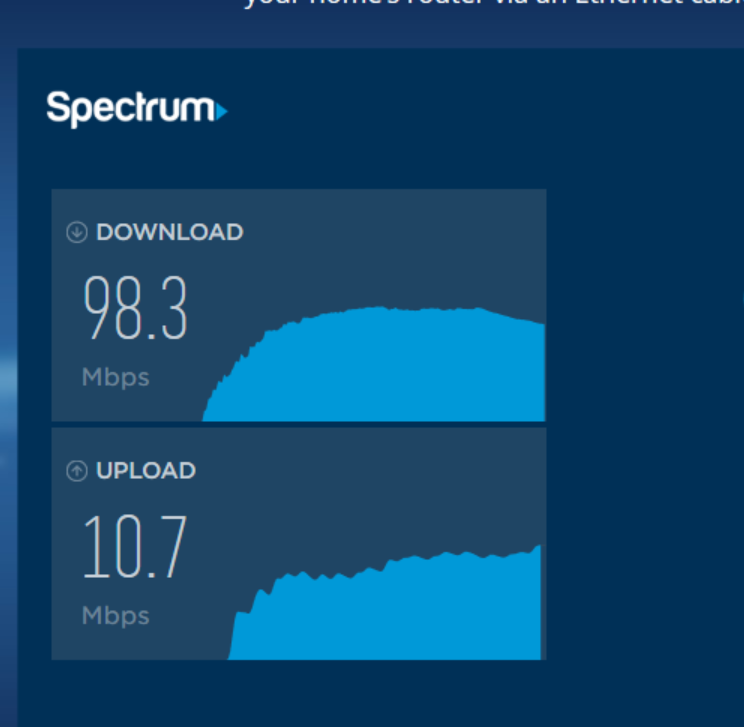
That's interesting as my router speed was terrible on the 2.4 Ghz side, at least after the firmware update. It wasn't that great before, though I didn't test it then. I switched to the 5 Ghz side and it's great: 98/10 (screenshot). The 2.4 connection typically hovered around 16/9, and my modem is putting out 100+. I'm with Spectrum and have the 100Ghz service. Others have suggested that the issue with the 2.4 might have been related to my drivers/software. I use a MS Surface with Win 10x64. I will add that some other issues with the new firmware were solved with a reset of my modem.
- mattperronAspirantSolution! I finally found he proper solution. After weeks of dealing with constant resets and flaky connections and speeds, I went and bought a Velop by Linksys. Works perfectly and am not dropping connections and seeing speeds of 150/15 over WiFi. Greatest decision of my life. I suggest you consider it since Netgear doesn’t seem to care about the crappy performance that everyone is complaining about on this thread.
- JimmyWLuminary
Glad you got it running, though it's a pricey solution for a problem that Netgear should've resolved a long time ago. I guess I'm lucky that I've had no issues after one hard reset. If I may ask, what is your modem (I assume it's cable) actully outputting with a direct ethernet connection/?