NETGEAR is aware of a growing number of phone and online scams. To learn how to stay safe click here.
Forum Discussion

antongibbs
Aug 21, 2011Aspirant
Netgear duo windows 7
Hi ,
I’m hoping someone would be able to assist me with a problem I have with a Netgrear nas duo it works totally ok on my 32 bit windows XP sp3 Machine, however I have an odd problem with raidar on my 64 bit windows 7 ultimate sp1 machine I can run raidar and go into setup but it will not allow me to browse files, I keep getting the error message Windows cannot access 192.168.1.64 , the diagnose button keeps returning “couldn’t identify the problem” I realise this is probably a windows issue but as I’m not that knowledgeable with windows 7 or the workings of networks in general, I was hoping that someone could point me in the right direction or suggest a solution to this problem
I’m hoping someone would be able to assist me with a problem I have with a Netgrear nas duo it works totally ok on my 32 bit windows XP sp3 Machine, however I have an odd problem with raidar on my 64 bit windows 7 ultimate sp1 machine I can run raidar and go into setup but it will not allow me to browse files, I keep getting the error message Windows cannot access 192.168.1.64 , the diagnose button keeps returning “couldn’t identify the problem” I realise this is probably a windows issue but as I’m not that knowledgeable with windows 7 or the workings of networks in general, I was hoping that someone could point me in the right direction or suggest a solution to this problem
18 Replies
Replies have been turned off for this discussion
 PapaBear1ApprenticeWhat I was wanting you to try was to connect the desktop to the router with ethernet cable to establish whether it is actually Windows or the wireless adapter.
Can you snip an image of the Network and Sharing Center and also the M-R section of the Allowed Programs window as above and post them? Snipping Tool makes this fairly easy. If you have not used it before, it is found under accessories (Start -> All Programs -> Accessories).- antongibbsAspirantI can capture the snip your after but cant work out how to post it to this forum thread (reply box) i still get the problem if i turn off my firewall by the way, so i dont think its a firewall problem
how do i post a captured/snipped image on to here.... ! doh....
it is possible that it is the wireless adapter the details of network adaptors in device manager are 802.11n Wireless Lan card, Microsoft Virtual WiFi Miniport Adapter and Realtek PCIe GBE Family controller, i guess that looks normal but i dont really know, because the screen raidar flash screen quickly flashes when i click on raidar i suspect that it is trying to connect twice and thats possibly why it refuses me to browse when i get entry to the setup, browse, rescan etc screen.
As i said before windows media player is seeing the files on the duo but i cant edit them so i think the adaptor is probably ok, i really do think its some sort of conflict. as i said i was using a wireless dongle before which worked ok but cause other problems with the operating system, do you think it might have left a network driver on the win 7 system somewhere ? if so where would I look for it ? the dongle was a TP-Link TL-Wn321G 54M with a realtek driver - PapaBear1ApprenticeOnce you have the image snipped and saved on your PC, you will need to upload the image to a third party image hosting service (I use photobucket, but there are others). On Photobucket, when you put your cursor on the image, four lines of codes show up below the image. Click on the fourth line (bottom) that starts with IMG and it will then say copied. Then click back on the forum tab, place your cursor where you want the image and right click and then click on paste. In the full edit window you can click on preview to see how the image posted.
I am not a techie, so when dealing with some of these wireless dongle aspects, I don't have a lot of experience. This is why I asked if you could connect with ethernet cable, even if only temporarily to see how that worked. This bypasses all the wireless security setup, since it is hardware and cannot be intercepted as wireless can be. Until we know for sure whether it is the wireless adapter of Win 7 settings, we will be spinning wheels.
If you have connection with another PC, open RAIDar and open Frontview. Then go into Network -> Interfaces in Frontview. In the middle where it says "IPv4 assignment" click on the down arrow and change to "Use values below" Note in the image, I have mine set to 203. My three NAS units all have static IP's set starting with 201. This gets it out of the dynamic range of most routers. (The router should skip one that is set manually, but why tempt fate).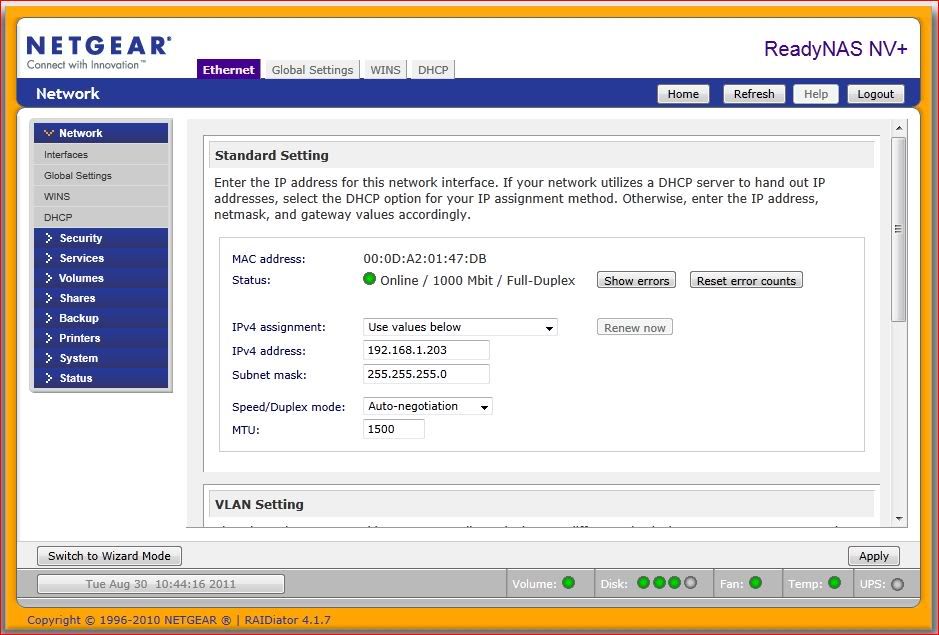
This will only solve the problem if there should happen to be a conflict somewhere in the network. At one point you indicated the DHCP was setting the fourth postiion to 64 and then possibly later to 66. (Do not exceed 255 on the fourth number. It shouldn't accept an address that high anyway). - antongibbsAspirantip4 addresses are the same on both machines 192.168.1.66, i have now selcted use values below but alas no difference still cant browse
- antongibbsAspirantwould you have thought it had anything to do with the port number or mtu ?
- PapaBear1ApprenticeSorry, I have been away. I am not sure about the port number or mtu. But one thing has me concerned. How many Duos do you have? You made a comment about both machines having 192.168.1.66.
- antongibbsAspiranthi PapaBear, I think im getting nearer to a solution, my xp machine is saying that i have IP address conflicts, when i look into the network folder on the xp machine i have loads of different connections to the nas unit, any idea how i can delete some of them !
- PapaBear1ApprenticeWhat brand and model of router do you have?
Is your modem separate from the router?
Are you on DSL or Cable internet?
Related Content
NETGEAR Academy

Boost your skills with the Netgear Academy - Get trained, certified and stay ahead with the latest Netgear technology!
Join Us!
