NETGEAR is aware of a growing number of phone and online scams. To learn how to stay safe click here.
Forum Discussion

Nottub
May 04, 2012Aspirant
I need a Screenshot of Backup Source
As much as I try I do not seem to be able to set up a back up. I cannot connect and don't know if it's the PC (Win XP) the Modem/ Router (Virgin Media Superhub) or my ReadyNas DUO V2.
If I knew I had set up the ReadyNAS properly I could move down the chain and look at other things. Problem is I'm lost as to what to put in the Backup Source options. There seems to be no definitive guidance on this and as much as I have looked at may threads on this board I am still stumped.
Screenshots would be really helpful as I am not a techie.
I failed setting up the e-mail notification as well, but that's another story.
Anyone out there set up a successful connection with an outfit similar to mine?
Cheers
Martyn
If I knew I had set up the ReadyNAS properly I could move down the chain and look at other things. Problem is I'm lost as to what to put in the Backup Source options. There seems to be no definitive guidance on this and as much as I have looked at may threads on this board I am still stumped.
Screenshots would be really helpful as I am not a techie.
I failed setting up the e-mail notification as well, but that's another story.
Anyone out there set up a successful connection with an outfit similar to mine?
Cheers
Martyn
26 Replies
Replies have been turned off for this discussion
 NottubAspirantSpent another four hours on this today and whilst I have the e-mail set up now I still failed to sort out the back up. I must be thick or something....
No help anywhere on the net and the supplied documentation is of no help whatsoever, is it really such a dark art?
Martyn- I think it is my friend, I too am as in the dark as you.
If I figure it out, I promise to post the answer!
Yet my own patience is wearing thin...
I have a very similar setup, (using XP) only my router is a SKY D-LINK one. - NottubAspirantHad another hour or two at this and still failing.
I am running XP are there any changes to XP required for access by the NAS to do the back ups?
Getting more and more frustrated. - NottubAspirantNow been in contact with NAS Support who advised the following for my specific request to set up a back up of 'My Documents' on my WIN XP Machine:-
"Configuring a backup job from a PC to the ReadyNAS can be done provided the folder on the PC is configured as a shared folder. This will enable the ReadyNAS to see the folder and transfer files over. Please make sure that the folder is shared before you proceed. For the backup job settings, please refer below:
ReadyNAS Backup Job Settings
HOST: IP address of the Windows XP Machine
PATH: My Documents
LOGIN: (leave this blank)
PASSWORD: (leave this blank)"
Unfortunately this did not work so I have responded to the suggestion accordingly. I'm currently awaiting a further update. Note that I have the Windows Firewall turned off all the time as I have Norton NIS installed which was also turned off (Firewall and Anti Virus) for the purpose of testing this suggestion.
I'll keep you posted of my progress.
Martyn. - Thanks for keeping us posted.
:) - NottubAspirantHad an IT friend look at my machine remotely and try different settings still cannot get the backup actions to connect. :( :(
Awaiting call from Netgear tomorrow. - NottubAspirantScreenshot for information, windows firewall OFF, Norton Internet Security Firewall and anti virus: OFF
Spent about a week on this with that many settings it's just becoming soooo frustrating......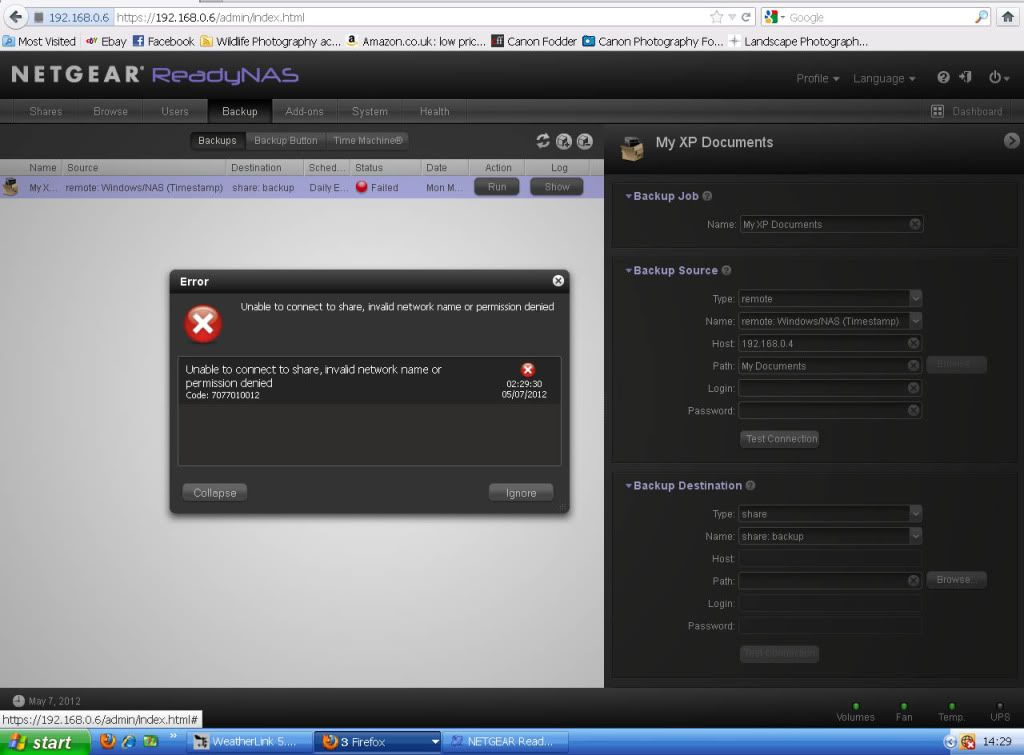
 Lee512AspirantI am having the very same problem. I had Netear Tech support guy on the line for 4 hours and they cant figure it out either.
If/when you get it fixed, Please pass on the info.- NottubAspirantSUCCESS - Well for me it worked.
After 1hr 17mins on the phone to a Netgear representative, who nearly gave up.
Here are the settings that eventually worked for me. However please read past the screenshots for some critical information.
This is based on setting up a back up on a folder within 'My Documents' called 'Martyn' which was set up as a shared folder. My XP IP address 192.168.0.4. This was to be save to a folder added to the NAS called 'Martyn'.
Settings 1 (Back up screen)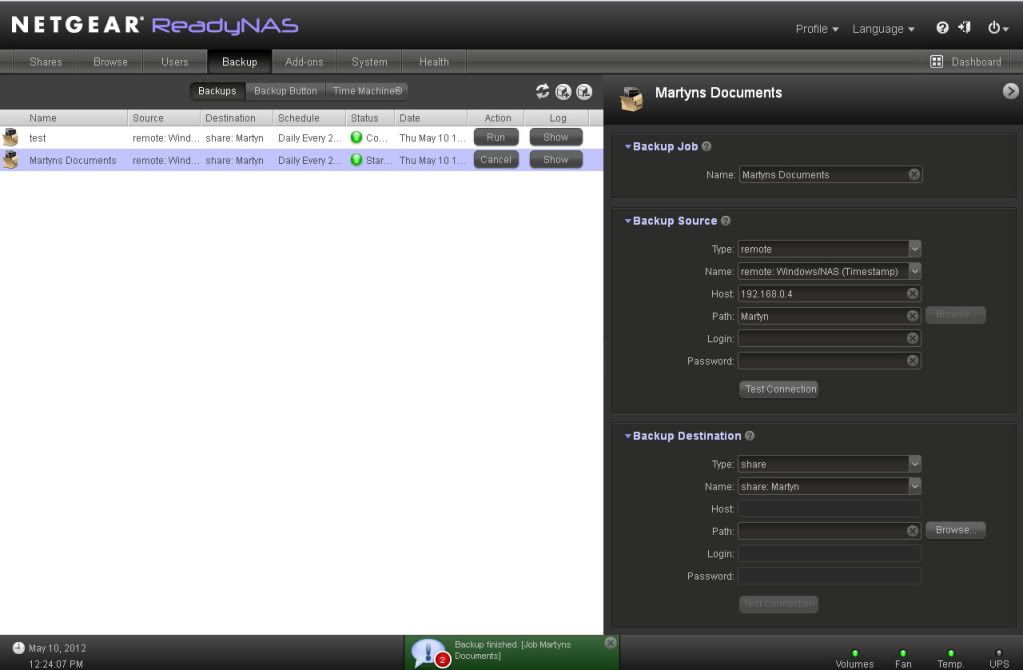
Scroll down this 'Back Up' Screen and notice the tick in the 'After back up ..... Something I had not done, and didn't know I had to do (ignore the every time option in the Full back up option as this was me playing around).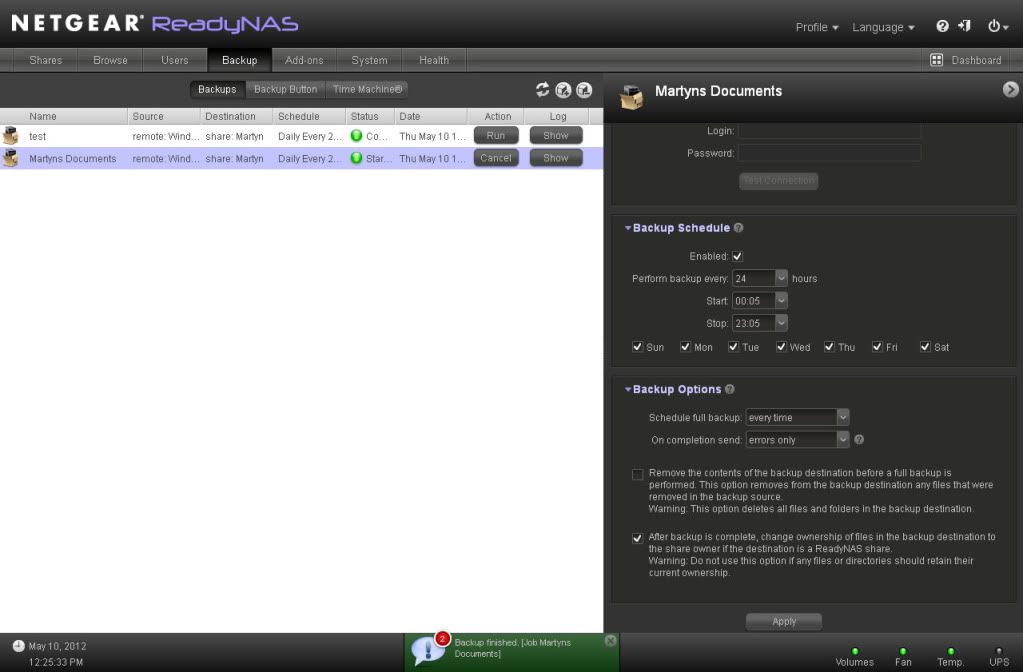
This didn't run to start with as I had an error which read 'Error encountered copying data from remote source path //192.168.0.4/Martyn ==> /Martyn/os_reinstall, due to permission denial on one or more files. [Job Martyns Documents]. Not sure what this was as it looked like all the documents had backed up correctly to the NAS Drive. However looking down the list there were a few files missing (in my case numerous .pdf files). I couldn't see any difference between the equivalent document that had copied to one that hadn't. A quick search on the net and I found someone who cut and pasted their affected folder to another location then copied it back. I tried again and it worked.
I hope the firmware can be updated to overcome this protected file problem and that the documentation can be improved to show these extra steps.
Let me know if this works for you.
Cheers
Martyn..... - thanks Martyn, I won't be able to try this until tomorrow. but will certainly let you know if it helps.
and thanks again! :D

Related Content
NETGEAR Academy

Boost your skills with the Netgear Academy - Get trained, certified and stay ahead with the latest Netgear technology!
Join Us!
