NETGEAR is aware of a growing number of phone and online scams. To learn how to stay safe click here.
Hardware
481 TopicsGS308EP sends management traffic outside configured Management VLAN
Hello, I would like to report a possible VLAN isolation issue with my GS308EP. Environment Device: NETGEAR GS308EP Firmware: V2.0.0.11 (latest as of writing) Configuration: The uplink port is configured as an IEEE 802.1Q trunk. Management VLAN is configured as VLAN 8. Management IP address is 192.168.8.18. The uplink is connected to a Linux router with multiple 802.1Q VLAN interfaces. The VLAN interfaces share the physical NIC's MAC address, which is the default behavior of Linux VLAN interfaces. The router also has arp_ignore=1 and arp_announce=2 configured to prevent ARP flux-related issues. Observed behavior Although the management VLAN is configured as VLAN 8, the GS308EP sends management-related traffic on VLANs other than VLAN 8. For example, packet captures show the switch sending ARP requests on multiple VLANs: VLAN 19: ARP Request: who-has 192.168.8.1 tell 192.168.8.18 Sender MAC: 28:94:01:XX:XX:XX The same ARP request appears to be sent on the VLANs configured on the GS308EP, in ascending VLAN ID order. In addition, management traffic generated by the switch, such as NTP, DNS, and UPnP/SSDP traffic, is observed on non-management VLANs. Expected behavior I would expect: - Management traffic generated by the GS308EP to be sent only through the configured Management VLAN. - ARP, NTP, DNS, UPnP/SSDP, and other management-plane traffic to use VLAN 8 only. - No traffic sourced from the management IP address (192.168.8.18) to appear on other VLANs. I can provide packet captures if needed. Thank you.323Views2likes12Comments
Network switch selection for VLAN design
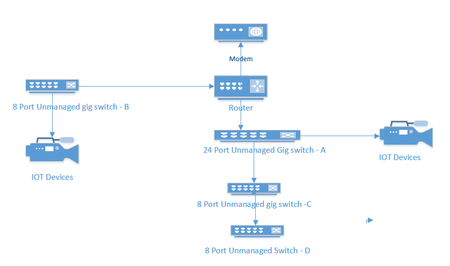
I currently have an unmanaged network consisting of a 24 port switch, 3 - 8 port switches, a Netgear RS series router and a cable company supplied modem. Several IOT devices reside on this network, and I would like to redesign to include managed switches to facilitate the use of VLANS to segment my IOT and streaming devices. A rough picture of the current design is below. My Questions. Should I consider replacing Switches A and B with new managed switches or can I get away with replacing the 8 port Port switch at B and put a new 4 port switch between the IOT devices and my main 24 port switch. ( and no, because of location and wiring constraints switch B must also connect to router. For the purpose of establishing simple VLANs for IOT, would the GS 3xxseries (GS 308E and GS305E) easy smart managed switches from Netgear work?589Views0likes26CommentsXS724EM in which all three fans spin at startup but only one remained active afterwards
For anyone else facing this issue, I wanted to write about my experience. I too had a XS724EM in which all three fans spin at startup but only one remained active afterwards. It turns out only one of the internal fan headers was functional. What I did was open up the switch and connect all the fans to the working fan header with a 3-pin fan splitter cable. Ideally, the cable should be a 3-pin splitter as shown in the attachment, not a 4-pin splitter. This XS724EM has now been operating without issue for almost 2 years in a commercial environment.M4300-52G-POE+ Bricked Recovery Method
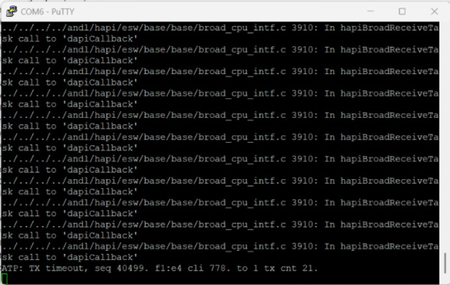
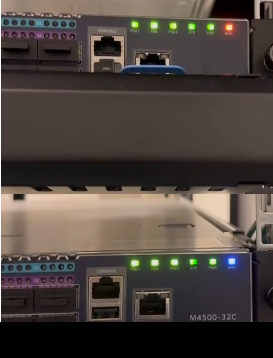
Anyone knows how to recover from a power outage that bricked my M4300 ? M4300-52G-POE+ We had an outage. Power came back on, then the unit boots but none of the 52-ports came back up. The OOB port lights up when plugged into, but nothing. Then I console it and got the readout. It didn't even get past port0 and stalled out. Here is the vid: https://www.youtube.com/shorts/7Q5zGWaNzxY About 8 seconds into it and the screen will show up170Views0likes1CommentSome GS308EP switches do not comply with IEEE 802.3 Ethernet specifications
IEEE 802.3 Ethernet specifications require that the switches provide galvanic isolation between all ports and chassis ground. this means that the POE supply is meant to be "floating" not connected to earth ground. I have found several of these switches in my installations that do not comply with this standard. I have also found those of the same model which do comply. It seems that the newer ones do not comply. Is there some rhyme or reason for this selective non-compliance? Can I select switches which do comply by the serial numbers? surely this is not a configuration, but correct me if I am wrong. Does Netgear offer any switches which do comply with IEEE poe requirements? test setup: plug switch into POE powered device, use a multimeter to check the volts to ground of the powered to device to the earth ground of the building. If you find that earth ground is mV from the powered device ground in voltage, this switch is compliant. if you find that ground is -54V from the ground on the powered device, then the PSE is non-compliant because it is providing a voltage source REFERENCED TO EARTH GROUND. Don't believe me about galvanic isolation being a requirment? ref: https://www.analog.com/en/resources/technical-articles/jumpstarting-ieee-802-3bts-poe.htmlSolvedGS110EMX: 10G ports throttle uploads to 250-300 Mbps
I've been going back and forth with Netgear support for over a week about this and I'm honestly at a loss. I'm hoping someone here can tell me if I'm crazy or if what they're telling me doesn't make sense, because it really doesn't add up to me. My Setup Switch: Netgear GS110EMX (firmware 1.0.2.8) Port 1: Internet uplink (1G, connected to router — standard fiber ISP) Port 9: Mac Pro via OWC Thunderbolt 4 to 10G Ethernet Adapter Port 10: Asustor AS6508T NAS (10G) Cables: Cat6A throughout This is exactly why I bought this switch — two 10G ports for my computer and NAS, with everything else on the 1G ports. Pretty standard home prosumer setup. The Problem Internet uploads are throttled to about 250-300 Mbps when my computer is on a 10G port. Downloads are fine at 830-880 Mbps. When I move the same computer to a 1G port with the exact same cable, uploads jump to 708 Mbps. That's more than double the speed on a port that's supposedly 10x slower. What I've Tested (at Netgear's request) I ran every test their L3 support team asked for. Here are the results: Internet Speed Tests (computer on 10G port 9): Flow Control Download Upload OFF 865 Mbps 306 Mbps ON (port 9 only) 879 Mbps 169 Mbps ON (both 9 & 10) 820 Mbps 137 Mbps Internet Speed Test — computer on 1G port (same cable, same everything): Download Upload 884 Mbps 708 Mbps iPerf3 between Mac and NAS (local, 10G ↔ 10G): Direction Speed Mac → NAS 3.73 Gbps NAS → Mac 9.40 Gbps Local 10G performance is excellent. The ports, cables, and NIC all work fine. What Netgear Says After all this testing, support came back and told me: This is "working as expected" and "within the design limitations of the switch" The 10G ports are "intended to be used as uplinks" — not for client devices A replacement would behave the same way My configuration is "not the intended use case" Why I'm Confused I don't understand how any of this is "expected behavior." Specifically: How does a 1G port give me faster uploads than a 10G port? If the 1G uplink is the bottleneck, moving to a slower port should give me equal or worse speeds. Not more than double. Nobody has explained this. Why are only uploads affected? Downloads through the 10G port hit 865 Mbps — nearly saturating the 1G uplink. The traffic crosses the same 10G/1G speed boundary in both directions. Why would only one direction have "buffer overflow" problems? Flow Control made things WORSE. They asked me to enable it. It dropped uploads from 306 Mbps to 137 Mbps. How is that a fix? The product page says "No Network Bottlenecks thanks to the 2 10-Gigabit/Multi-Gigabit Uplinks." Now support says those ports are only meant to be uplinks and my setup is unsupported. The user manual literally shows 10G client devices connected to ports 9 and 10 in its network diagrams. This switch used to work. I used the exact same setup with fiber in Chicago for years with no issues. I only noticed the problem after switching to fiber here in LA recently. Something changed. What I'm Asking Has anyone else seen this? Am I wrong to think a managed switch should be able to handle 10G devices sending traffic through a 1G uplink without losing 70% of the uplink's capacity? I've seen a couple other threads about similar issues with the GS110EMX and I'm starting to think this is a known design flaw that Netgear just doesn't want to acknowledge. At this point I just want to know if I should keep fighting for a replacement or just give up and buy a different switch. Any insight would be really appreciated. I've spent way too many hours on this already.