NETGEAR is aware of a growing number of phone and online scams. To learn how to stay safe click here.
RN104
36 Topics
User has been Auto deleted - all data lost
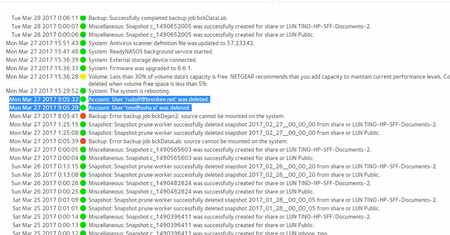
Netgear RN10400 , fw: 6.6.0, 2 x 1TB, RAID 1. User has been Auto deleted - all data lost. Can not acces local user home dir?!? Can someone check this? Or tell me, in which log can I check this. Which log file should I look to see from which IP was launched this operation? How to get data from lost home dir. You can send linux commands ... clipping from the readycloud.log … Mar 27 09:05:21 nas-soha rcbrokerd[2577]: ../common/unregister.h:62 DEBUG:../common/unregister.h:62 Unregister Mar 27 09:05:27 nas-soha rcbrokerd[12023]: ../common/unregister.h:62 DEBUG:../common/unregister.h:62 Unregister … system logs : image below (event is marked) One year it's working fine. Maybe the problem is that it has been previously created a local user with the same e-mail. Local user tino.sosteric exist until yesterday but is now gone with his home folder. Any help will be appreciated. Br, TomiSolved50KViews1like706Comments
rn104 updated to 6.4.0 and possible solution to random lock-ups
Hello everyone, I have updated my RN104 last week, and have been poised by the unit hanging up randomly since then. I have searched andread a lot of posts here, and after 5 hard reboot and re-syncing, I may have found a solution. At least, it's been 1 day the unit has not locked up, so I'm crossing my fingers. The culprit, I think, might by the snapshot creation. I had 3 share protected by snapshots. Documents, Caldav/Carddav hosting and my ebooks collection. All those share had a daily snapshooting policy. After reading the "FAQs on upgrading ReadyNAS firmware to 6.4.0" post linked in here, the last chapter caught my eye: btrfs-cleaner is commonly invoked after Smart Snapshot Management prunes older snapshots. ReadyNAS commonly prunes older snapshots based on its snapshot schedule. Now, my nas is almost 80% full, and the snapshots where taking around 4Gb of space (out of a 4 disks Raid5 array of 6To usable). As the unit completely locks up, no SSH-ing in to check how much CPU the btrfs-cleaner process takes, of course, and nothing in the syslog appart a bunch "@" at the time the hangs-up hapenned. Oct 13 21:48:05 nas kernel: [ 6591.520831] md: delaying resync of md126 until md127 has finished (they share one or more physical units) Oct 13 21:48:06 nas readydropd[4685]: DEBUG:readydropd.c:897 Shares.conf has been changed Oct 13 21:48:07 nas readydropd[4685]: DEBUG:readydropd.c:652 Reload Share configs Oct 13 21:48:08 nas kernel: [ 6593.661751] md: delaying resync of md126 until md127 has finished (they share one or more physical units) Oct 13 21:48:08 nas kernel: [ 6594.415415] md: delaying resync of md126 until md127 has finished (they share one or more physical units) Oct 13 21:48:09 nas kernel: [ 6594.927980] md: delaying resync of md126 until md127 has finished (they share one or more physical units) @@@@@@@@@@@@@@@@@@@@@@@@@@@@@@@@@@@@@@@@@@@@@@@@@@@@@@@@@@@@@@@@@@@@@@@@@@@@@@@@@@@@@@@@@@@@@@@@@@@@@@@@@@@@@@@@@@@@@@@@@@@@@@@@@@@@@@@@@@@@@@@@@@@@@@@@@@@@@@@@@@@@@@@@@@@@@@@@@@@@@@@@@@@@@@@@@@@@@@@@@@@@@@@@@@@@@@@@@@@@@@@@@@@@@@@@@@@@@ @@@@@@@@@@@@@@@@@@@@@@@@@@@@@@@@@@@@@@@@@@@@@@@@@@@@@@@@@@@@@@@@@@@@@@@@@@@@@@@@@@@@@@@@@@@@@@@@@@@@@@@@@@@@@@@@@@@@@@@@@@@@@@@@@@@@@@@@@@@@@@@@@@@@@@@@@@@@@@@@@@@@@@@@@@@@@@@@@@@@@@@@@@@@@@@@@@@@@@@@@@@@@@@@@@@@@@@@@@@@@@@@@@@@@@@@@@@@@ @@@@@@@@@@@@@@@@@@@@@@@@@@@@@@@@@@@@@@@@@@@@@@@@@@@@@@@@@@@@@@@@@@@@@@@@@@@@@@@@@@@@@@@@@@@@@@@@@@@@@@@@@@@@@@@@@@@@@@@@@@@@@@@@@@@@@@@@@@@@@@@@@@@@@@@@@@@@@@@@@@@@@@@@@@@@@@@@@@@@@@@@@@@@@@@@@@@@@@@@@@@@@@@@@@@Oct 13 21:53:01 nas kernel : imklog 5.8.11, log source = /proc/kmsg started. Oct 13 21:53:01 nas rsyslogd: [origin software="rsyslogd" swVersion="5.8.11" x-pid="2837" x-info="http://www.rsyslog.com"] start Oct 13 21:53:01 nas kernel: Booting Linux on physical CPU 0x0 Oct 13 21:53:01 nas kernel: Initializing cgroup subsys cpuset Oct 13 21:53:01 nas kernel: Initializing cgroup subsys cpu Oct 13 21:53:01 nas kernel: Initializing cgroup subsys cpuacct Reading the FAQ, I thought that I would try to remove the snapshots creation schedules of my shares, and remove all the existing snapshots. Since this moment, I had no more issues. By the way netgear, I'd really like to know another way than using the timeline to clean old snapshot. Removing 108 snapshots manually, one after the other was not fun... The "emergency" button in the shares/browse is nowhere to be found today in my web gui, so that only leaves the timeline afaik... It might not be relevant, but maybe the combination of low disk space, numerous snapshots and high CPU usage (because syncing back the array after the last hard reboot, my cpu load reported by "top" was around 12~15 at that time) might have been the issue. To be really torough, I even have deactivated DLNA, AFP and SMB services, leaving only the NFS, as I'm using linux boxes as client anyway. DLNA re-scanning the shares seems to be heavy, when resyncing the disks. Maybe it can help other people I've seen here having unresponsive units after bootup too. I'll come back comenting here if the unit locks-up again, but I am confident. Regards. Thierry.Solved16KViews0likes92Comments
ReadyCLOUD desktop client showing Offline on multple ReadyNAS 104 - it's been disabled?!
Hi. I have two RN104 models. One on my LAN in my office and one in a customer's office 22 miles away. The RN104 in my office is being used to store my media collection, a file server for my business and (in testing) a backup service to a small number of customers. The remote is a customer's main storage and file share which I maintain and am currently 'watching' due to problems with disk-based backups. Both devices suddenly appeared as Offline in the desktop client for me sometime yesterday. I then got a phone call from an irate customer complaining he couldn't access his backup to retrieve a file he needed (which I then accessed locally and emailed him). This problem would have also prevented me from monitoring the problematic backup on the remote device if I didn't have VNC access and was able to access the NAS via a PC in their office. Anyway, I left it for sometime hoping the service would return but alas no! Then I thought, just a moment ago, has the ReadyCLOUD function been somehow disabled? Sure enough, both devices have had their ReadyCLOUD function turned off. So my questions are . . . Why have both devices had their ReadyCLOUD function turned off? I didn't do it and I'm the only person with admin access to both devices and they both have different, complex passwords which change regularly. If this has occured due to a problem at NETGEAR, for example, a wide-ranging hack or someone 'accidentally pressing the wrong button' will you please let me know. I need to have confidence in this kit as I am installing and maintaining them for customers. Is it safe to turn the ReadyCLOUD function back on? I've seen recent reports of people complaining that their data has been lost or compromised. I need to use the ReadyCLOUD client on a daily basis to manage my devices. Thanks.Solved7.2KViews1like11Comments
ReadyNAS "Admin Page" is offline
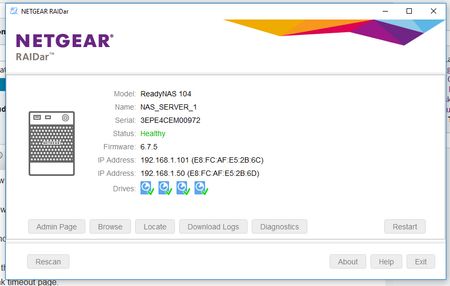
Upgraded to firmware 6.7.5 through the web interface and now the unit is not responing via the browser at all. SMB share is still working Tried Rebooting Tried Reset via reset pin on back and selecting OS Reinstall - same issue Raidar Diagnostic will not connect, but raidar says unit is healthy ! I cannot download the logs because login is not working, I know the password before someone suggests password recovery. Looking at USB recovery but cannot get the tool to recognise any firmware to make a usb for me. Format USB to Fat32 and put these in root Reboot machine and hold backup for 30 seconds. Machine says booting from usb, then after a few minutes, resets and does FW Upgrade. But the firmware is still 6.7.5 ?? How to do it? What am I doing wrong? I know the issue is network adapter related because "\\192.168.1.101\folder" is working fine, but "\\192.168.1.147\folder" comes up with network error do i want to diagnose? If I factory reset it with different disks in it, can I the set it to x-raid and put back the original disks without losing data? Will factory reset put the original firmware back in or will it use 6.7.5 ? I really want to get this working again :( Many thanks for any help7.1KViews0likes26CommentsRN214 or RN424 for RN104 user
Greetings. I am not a new user but it seems like this is the right place to post this question hopefully. I am a RN104 user that needs expansion and it looks like the RN104 does not support external expansion. I have read just about every post on the current model line so am somewhat up to speed. I have narrowed it down to the RN214 or RN424. Unless something new is coming out I missed? I use the NAS primarily for backup and for storing and playing HD and 4k self produced video files non-transcoded over gigabit Ethernet to a Minix device to a 4K TV. The RN104 works pretty well but does bog down at times copying large 4k video files from a memory card. I access the NAS shares via Windows explorer on a PC. Will the RN214 suffice or should I consider the RN424? I know about the X86 difference on the 424, but trying to figure out what the differences mean in my case. Would the RN214 be faster than my RN104? It looks like they both support up to 10TB drives? What are the preferred drives these days? I value the counsel of the forum and also the Netgear crew who I am pleased to still see posting here. The support from that group is the reason I am looking at another Readynas vs. another brand. Thanks, BJBSolved6.9KViews0likes19CommentsMy volume is gone.
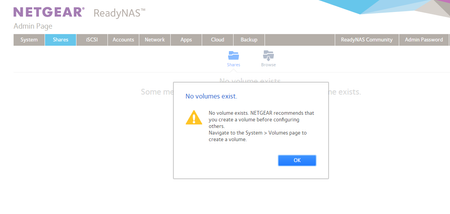
Hello there, I have an issue with my ReadyNAS104 Netgear. First I noticed that I couldn't access my data so I went to the admin page through Google Chrome. As soon as I open the tab I get a message saying this: "No volume exists. NETGEAR recommends that you create a volume before configuring others. Navigate to the System > Volumes page to create a volume". Of course I had my volume set long time ago since this is my data backup NAS. I navigate to System > Volume as the message ask me to do and I get a message there that says "Remove inactive volumes to use the disk. Disk #1,2,3,4." My volume data usage exceeded 80% of size, my NAS was alerting me that through email in case that is helpful to solve my issue. Please, can someone help me? There's tones of information in that device I need to keep safe. Thanks in advance.6.6KViews0likes15CommentsTwo RN104 units - can one be used to back up the other?
I now have 2 RN104 units. One is currently running with a RAID 5 configuration. The second one is about to go online soon. They will both be outfitted with four 1TB drives in each. What I would like to know is if one of the units can be used to provide an identical copy of the other in some simple fashion? (Besides just doing a manual file copy.) If so, what do you folks recommend? JimSolved6.3KViews0likes5Comments
15 Files Changed
Hi There, Just acquired a ReadyNas 104, and looking for a bit of advice on the ReadyCloud App, for which I can't find an answer to in any documentation or on this forum. System has been set up about 2 weeks now, and after a bit of head scratching it seems to be working how I expect. I have sync'd up my Windows 10 laptop to it, & also sync'd up my Daughters Mac book, and my Android smart phone, all to different folders. The issue (well it might not be an issue!) is that every time I fire up or wake up my Windows 10 laptop, after a few minutes the ReadyCloud App (It is set to start with Windows) gives a notification stating "15 Files Changed". Now as I said it is always states 15 files, no more, no less. Clicking on the notification usually brings up different sub-folders. From my Daughters Mac book it seems to advise a different number of files each time, & often greater than 15. All the folders for the Mac book are set to sync, on the Windows laptop I have 2 folders set to sync & 1 set as backup. The ReadyNas is 6.4.1 with 2 x 4 TB disks & the ReadyCloud app is 1.8.1223.376. So, is this normal behaviour, or have I missed or set something on the Folders on the ReadyNAS thats causing this 15 Files message? Thanks in anticipation of any pearls of wisdom. Paul.
RN104 Unable to access admin page - Firmware 6.7.3
Hi After install the firmware 6.7.3 I can't access to admin page with the name of the NAS. I can only access with the IP. Too, I've detected I can't access by FTP after install the firmware. Any suggestion? Any idea? ThanksSolved5.8KViews0likes14CommentsReadyNAS 104 no accessible after to upgrade 6.9.1 and update PLEX
Hi all, The first thing is to say thank you very much in advance for your help. I have a RN104 since Nov.2015 with 4x6TB in RAID 5 (almost full) with both LAN connected with 2 IP. I upgraded the software to 6.9.1 at the begining of December and it was working ok but at the end of Dec I upgraded the APP Plex and it causes a problem in my RN. It is not accesible from any computer (Windows/Windows Explorer or Mac/Finder) it is visible but no accesible to any folder and also other folders are new in the root (admin, data and home) Plex is not detecting the Ready NAS Media Server and it is not possible to see nothing in Plex. NAS is accesible in the Admin page and all disk are working ok and also accessible in RAIDar 6.3.0 Ping from Mac with positive feedback. No working in ReadyCloud - Message is NAS doesn't have connection. What I have tried is: -first to reinstall Plex before to be aware the NAS is not accesible (many times but not possible to install). - I decided to reinstall Firmware from Boot Menu - I reinstall 6.9.1 from admin page - I dowgraded to 6.9.0 from admin page - I upgraded to 6.9.1 from admin page ... but nothing worked I really appreciate your help on this because a lot of info in my NAS I would like to preserve ... I am sending also the logs to the email. PS. Sorry about my English (I am from Spain)...5.6KViews0likes22Comments