NETGEAR is aware of a growing number of phone and online scams. To learn how to stay safe click here.
Solutions
402 Topics
Is the EN104 a hub in the sense of repeating incoming packets to all other ports?
I'm looking to pick up a few ethernet hubs, for network troubleshooting use -- stick a hub between two devices, tap in a computer running WireShark, and analyze the traffic. It's starting to become difficult to find a classic "dumb hub", that repeats what it gets on each port to all other ports. I'm trying to figure out whether the EN104 is like that; if so, will probably pick up a few.Solved2KViews0likes3CommentsNetwork switch selection for VLAN design
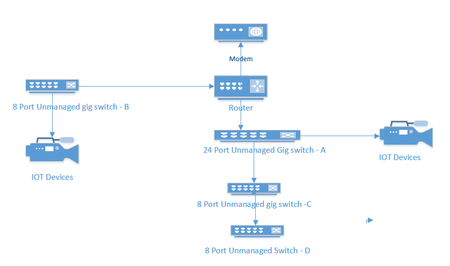
I currently have an unmanaged network consisting of a 24 port switch, 3 - 8 port switches, a Netgear RS series router and a cable company supplied modem. Several IOT devices reside on this network, and I would like to redesign to include managed switches to facilitate the use of VLANS to segment my IOT and streaming devices. A rough picture of the current design is below. My Questions. Should I consider replacing Switches A and B with new managed switches or can I get away with replacing the 8 port Port switch at B and put a new 4 port switch between the IOT devices and my main 24 port switch. ( and no, because of location and wiring constraints switch B must also connect to router. For the purpose of establishing simple VLANs for IOT, would the GS 3xxseries (GS 308E and GS305E) easy smart managed switches from Netgear work?599Views0likes26CommentsGS305E Setup VLAN's from behind the switch
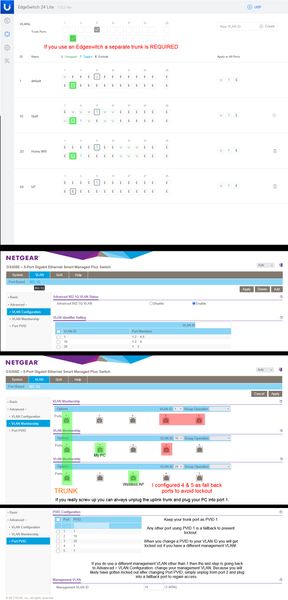
The PC used to configure the switch permanently resides downstream of the switch, on a VLAN, and MGMT VLAN that is not 1. It becomes a chicken & egg problem where you will be constantly locked out and forced to reset the switch as you try all the different combinations. I tried googling for solutions and the closest was the topic GS305E Trunking tagged and untagged VLAN's. It was very helpful. However my issue is slightly different and I wanted to share what worked. It was... a process. Step 1: Configure your upstream switch with a trunked port for all the VLAN's you intend to have traffic through the GS305E switch. In the case of a Ubiquiti EdgeSwitch 24 for example, it absolutely 100% requires a new trunked port... even though you already likely have a main trunk tagged and setup for VLAN's. Step 2: Manually configure your PC's IP address to be in the 192.168.0.x subnet. Plug your PC into any port on the switch. Which port you choose to plug into does not matter for initial configuration, they are all configured identically. Use a browser and go to 192.168.0.139 and login with the password: password. There is no username so this switch is not appropriate for a multi-admin environment. Step 3: Change your password. This is mandatory and you will be presented with a screen to do so immediately upon first successful login. Step 4: You will immediately see the main system settings page (home). Disable DHCP mode and provide the device with a static IP within the subnet range where it will permanently reside. Also provide the subnet gateway IP (Subnet DHCP server). Apply the changes, no reboot necessary, the browser will timeout because the switch will now be found at that new static IP. You will likely want to change your PC's IP again to be within the new subnet range. Step 5: Go to VLAN > 801.q > Advanced: and enable the advanced option. Step 6: Advanced > VLAN Configuration: add your VLANs. You cannot remove VLAN 1 it is hardcoded and also used as the management VLAN by default. DO NOT attempt to change the management VLAN yet if your management VLAN is not 1. You will do that at the very end almost as the last step. This is why a lot of people (meeeee) have locked up their GS305E during initial configuration by changing that too soon, don't do that, don't touch it, live with management VLAN as 1 until you have everything working. Step 7: Advanced > VLAN Membership: this is where you setup your trunked port and tags. Now is when you decide which port you want to be the trunk port. I use port 1 but port 5 is also a logical choice. Whatever port you decide to make the trunk the default VLAN 1 should be untagged and the rest of your VLAN's under it tagged. Step 8: Advanced > Port PVID: the trunk port should always remain as PVID 1. Change the PVID's to your VLAN ID's. A note of caution if you have a different management VLAN than 1. This will lock you out and force you to plug into a fall back port. If your management VLAN is 1 then you should be finished. Step 9: Advanced > VLAN Configuration: If you need to change your management VLAN now is the time, the last final step. If you would have attempted to change your management VLAN at any time during the prior processes you would have been locked out and likely forced to hardware reset the switch to defaults. This is what worked for me. I spent about a day trying to get it all to work and honestly I believe the one thing that prevented me from succeeding most of the time was not setting up that port as a trunk port on the Edgeswitch. It shouldn't be needed like that but it definitely does not work if that trunk checkbox isn't checked. All feedback, corrections, comments, will be gladly accepted. Just please try to keep them constructive.GS724TPv3 The switch loses IP connection about 1 time in 5 days.
Hi, I have Netgear switch GS724TPv3, newest firmware installed The switch loses IP connection about 1 x every 5 days. I don't know why? While power supply of IP cameras powered via POE is maintained. IP connectivity from router and connected devices to switch is lost. After hard power off and on of switch everything works. The restart pin on the front of switch does not restore connectivity, it requires complete power off. The switch has a static IP address to avoid problems with address reservation from DHCP router. Looking for a solution to the problem of setting up a reboot script for switch GS724TPv3 from my NAS Synology via ssh or telnet. Can someone with experience help me with writing a script. Thank you Zbynek1.2KViews0likes10Comments
VLAN Routing for Newbies
Howdy All, I've recently decided to install a GS752 switch in our offices to segregate traffic to help with security. I've run into a problem that I'm hoping someone can help me with (to keep things simple I'll just go over what VLAN 1 and VLAN 10 look like): VLAN1 - is fine. Systems attached get IP addresses from DHCP server, and can reach the internet. All ports are Untagged "U" in the port membership image. (Port 1-10) VLAN10 - doesn't work. No DHCP traffic through and no access to the internet even when using a static IP address in range. All ports are Untagged "U" in the port membership image. (Port 1, 11-20) My setup is: Broadband Router -> Firewall -> GS752 -> VLANS as follow: VLAN 1 - NAS, DNS Server, DHCP Server, Wifi APs VLAN 10 - PCs How do I allow DHCP and DNS to service VLAN1 and VLAN 10, as well others?1.7KViews0likes12CommentsERROR: can't get kernel image!
Hi, Overnight switch malfunction. I managed to connect to the switch with miniUSB console port using HyperTerminal port 23. I switched off/on couple of times. This is the error logs i get. :( Please help. I am attaching the pictures of switch too. " U-Boot 2012.10-00205-gef56c5f (Jan 01 2016 - 14:02:15)VerNo=1.0.0.7 UBIFS error (pid 0): ubifs_get_sb: cannot open "ubi:fs", error -19 UBIFS error (pid 0): ubifs_mount: Error reading superblock on volume 'ubi:fs' er rno=-19! ubifsmount - mount UBIFS volume Usage: ubifsmount <volume-name> - mount 'volume-name' volume UBIFS not mounted, use ubifs mount to mount volume first! ubifsload - load file from an UBIFS filesystem Usage: ubifsload <addr> <filename> [bytes] - load file 'filename' to address 'addr' Wrong Image Format for bootm command ERROR: can't get kernel image! ERROR: can't get kernel image! done UBIFS not mounted, use ubifs mount to mount volume first! ubifsload - load file from an UBIFS filesystem Usage: ubifsload <addr> <filename> [bytes] - load file 'filename' to address 'addr' Wrong Image Format for bootm command ERROR: can't get kernel image! Saving Environment to SPI Flash... done UBIFS not mounted, use ubifs mount to mount volume first! ubifsload - load file from an UBIFS filesystem Usage: ubifsload <addr> <filename> [bytes] - load file 'filename' to address 'addr' Wrong Image Format for bootm command ERROR: can't get kernel image! ERROR: Ethernet external port not connected at bcmiproc_eth.c:125/bcmiproc_eth_open() Wrong Image Format for bootm command ERROR: can't get kernel image!" Thank you MM4.4KViews0likes4CommentsMS510TXM - Private VLAN Promiscuous Port Issue
Hello, I am following the directions on how to properly setup a promiscuous port on a private vlan that allows communication between the two associated community ports. I am unable to add more than one secondary vlan in the interface and the manual clearly says it's possible so I must be missing some nuance. VLAN Type Configuration 20 - Primary 21 - Community 22 - Community Private VLAN Association Primary 20 --- Secondary 21-22 --- Community 21-22 Port Mode Configuration I8 - Promiscuous (LAG) Private VLAN Promiscuous Interface Configuration Here is page 180 of the manual under: Private VLAN promiscuous interface: Assign the interface to primary and secondary VLANs ... ... 9. In the Promiscuous Primary VLAN field, specify a primary VLAN ID. You can select a VLAN for which you configured the type as Primary (see Assign a private VLAN type to a VLANonpage171). 10. In the Promiscuous Secondary VLAN field, specify one or more secondary VLAN IDs. You can specify VLANs for which you configured the type as Isolated or Community, both of which are secondary VLAN types within a private VLAN. You can specify a single VLAN ID, a range of VLAN IDs, or a combination of both in sequence separated by a comma (,): You can specify an individual VLAN ID, such as 10. You can specify the VLAN range values separated by a hyphen, for example, 10-13. • You can specify a combination of both separated by commas, for example: 12,15,40–43,1000–1005, 2000. ERROR Error: Value (0) is out of range for 'Promiscuous Secondary VLAN'. The valid range is 2 to 4095. I have tried to add 2 secondary vlans with the comma approach 21,22 and with the hyphen approach and both give the same error. The Secondary VLAN field only accepts 1 vlan so how do you configure a promiscuous port in a private vlan?