NETGEAR is aware of a growing number of phone and online scams. To learn how to stay safe click here.
iOS
57 Topics
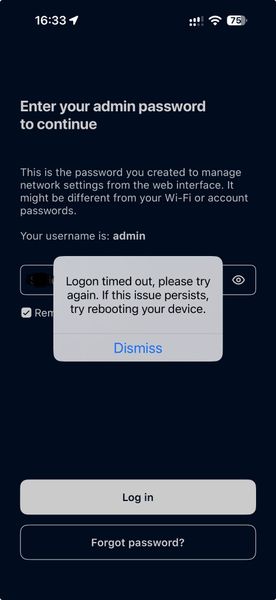
Orbi app 2.54.1 – RBR50v2 “Logon timed out”; same credentials work with app 2.45.2 and web interface
Hi, I am experiencing what appears to be an Orbi iOS app compatibility/regression issue with my RBR50v2 and would be interested to know whether other RBR50/RBR50v2 users are seeing the same problem. My setup: RBR50v2 in AP mode 2 × RBS50 satellites Router and satellites firmware: V2.7.5.6 iPhone 18 Pro Max: iOS 27.0 / Orbi app 2.54.1 iPhone 15 Pro: iOS 26.6.1 / Orbi app 2.45.2 On my new iPhone 18 Pro Max, the Orbi app successfully signs into my NETGEAR account, including email OTP verification, and detects my Orbi system. However, when I select Go to Dashboard, the app asks for the local router credentials (admin + admin password). After entering the correct credentials, the app returns: “Logon timed out, please try again. If this issue persists, try rebooting your device.” I have been able to establish that the admin credentials themselves are not the problem: The same credentials work through orbilogin.com on my Mac. They also work through orbilogin.com in Safari on the affected iPhone 18 Pro Max itself. The same credentials work normally in the Orbi app 2.45.2 on my iPhone 15 Pro. I reset the admin password twice; each new password worked immediately via the web interface and Orbi 2.45.2, but Orbi 2.54.1 continued to return “Logon timed out.” On the affected iPhone I have also: confirmed Local Network access is enabled for Orbi; disabled VPN; temporarily disabled Private Wi-Fi Address; disabled Limit IP Address Tracking; deleted and reinstalled Orbi 2.54.1; rebooted the iPhone. None of these changed the behaviour. I also tried enabling Anywhere Access from the working Orbi app on the iPhone 15 Pro, but received “Some error occurred while enabling/disabling Anywhere Access.” The setting remains OFF. The comparison therefore seems particularly relevant: iPhone 15 Pro + iOS 26.6.1 + Orbi 2.45.2 → works iPhone 18 Pro Max + iOS 27.0 + Orbi 2.54.1 → “Logon timed out” Same iPhone 18 Pro Max + iOS 27.0 + Safari/orbilogin.com → works I realise that two variables have changed between the phones (iOS version and Orbi app version), so I cannot determine whether the issue is caused by Orbi 2.54.1, iOS 27, or an interaction between the two. However, the successful local web login from the affected iPhone seems to rule out the password and basic local-network connectivity. I have found previous Community reports of very similar “Logon timed out” problems affecting RBR50/RBR50v2 systems after iOS/Orbi app updates. Interestingly, my working app version 2.45.2 was itself released with a fix for “admin login timeout on certain router models.” Has anyone with an RBR50/RBR50v2 tested Orbi app 2.54.1 on iOS 27 and encountered the same issue? I have already submitted a bug report with logs through the Orbi app's “shake → Report a bug” function. Thanks in advance for any feedback.52Views0likes2CommentsI have an RBR50 router with two RB250 satellites, all running firmware version 2.7.5.6
I've been seeing this same problem ever since I installed iOS 27. I have an RBR50 router with two RB250 satellites, all running firmware version 2.7.5.6. I've tried rebooting the router and removing/reinstalling the iOS app (version 2.54.1 on an iPhone 16 Pro). I have no problem logging into the router's orbilogin.com web interface using the same credentials.15Views0likes1CommentCan’t access Router config
I moved by Orbi RBK 850 from one home to the next, 3 times. Currently located in a home with Fiber. I have 2 satellites, one using back haul and the second connected via Ethernet. I cannot get my Orbi app to work nor can I use my browser on a laptop connected directly to the router to get access to the setup. The app sees my router but says it’s offline and I never get to the apps menu system. When I attempt via browser it fails128Views0likes4CommentsDevice List Failed To Load
Using the device manager in the Orbi App, I get the message ‘device list failed to load’ Why is that? How to fix? Also under Security it does not show any devices scanned All looks OK when I check it on the web, but the App has issues Any suggestions?212Views0likes6CommentsNew iPhone, no more Orbi access
I bought a new iPhone 17 pro, and can now no longer access the Orbi app capabilities. I’m connected to the WiFi, but when I access the app it states: “WiFi not detected, go to orbi app setting and ensure that “connect to local WiFi” is selected””. Screen grab attached, can anyone help please?227Views0likes3CommentsSenior needs help with Netgear Orbi APP
Hello! We've got a some used, but working, Netgear Orbi RBS 750 Mesh router and 3 satellites. I'm pretty old & not too proficient with technology so my son set everything up on the app on his phone. I wanted to log into the app on my own phone so I downloaded the app. My son gave me the password but even though I entered it, and then he entered it, it would not open up and show me our system (like it shows on his phone/app). Is only 1 person allowed to have access to the app? How do we get it to work on my phone? On a related question, we have 2 more RBS750 Satellites, and in doing some research on the internet, it says you can add them to the WIFI mesh system, but you have to turn off one of the 3 satellites we already have on, and then provision the new satellite (#4). And then do it again for the remaining satellite ($5). Is this correct? Or am I wrong. I ask because I am disabled and fall a lot. They have WIFI call buttons, where I can pish a button & it alerts my family that I need help. I'd like to walk around outside my house, but I need a little more reach to hit the outside. That's why we got the additional satellites. Thanks in advance for helping an old man!207Views0likes8CommentsOrbi iOS App- Wi-Fi signal strength not correctly showing for iPhone 17 Pro Max
More of a nuisance issue, but thought I'd post a question on this... In the iOS-based Orbi app (most current Orbi app release level running on an iPhone 17 Pro Max (also has the most current iOS version level), all other connected devices seem to show the correct and expected wi-fi signal strength given their relative location to an RBS or RBR ... except for my iPhone 17 Pro Max. The Orbi app shows the iPhone online with a green dot but the wi-fi strength is not reporting properly. Doesn't matter what RBS or RBR it is connected to, the displayed signal status is the same, no bars. Also doesn't matter if viewing the Device Manager or Network Map screens in the Orbi app. More than 9 times out of 10 it will show the icon basically all grey/no-bars even though it is wi-fi'd to my network and just fine and very fast per SpeedTest. On the iPhone I have had Private Wi-Fi Address set to FIXED and typically Wi-Fi 6E Mode set to OFF. I just tried setting that iPhone Wi-Fi 6E Mode setting to AUTOMATIC and restarted the iPhone and now I have full bars but I'm connecting to an 770 RBS 40' or so away and the 771 RBR is about 2' from the iPhone. Flipped it back to OFF, restarted iPhone and now back to no wi-fi bars but connected to the RBR. Set it back to AUTOMATIC, restarted iPhone and no bars for wi-fi strength and connected back to the RBS... so no real consistency there in the testing. I still intend to play around with RBS positioning for my 773, maybe even dropping one RBS so I get more consistent results with what device connects to what RBS/RBR. Also worth noting that I have intermittent wi-fi connectivity issues only on initial iPhone power-up/startup. Have to toggle wifi OFF/ON most times to get clean wifi. This occurred with my 852 as well as the newer 773 (has current firmware levels for RBS's/RBR). Is this a known problem with iPhone 17's and the wi-fi signal strength indicator in the Orbi app? Thanks in advance!277Views0likes7CommentsOrbi app - Network Map changes?
Feels like a really dumb question, but I can't find another thread exactly discussing this. Everything works just fine either way the iOS Orbi app displays, this is just a curiosity question: I set up a new 773 mesh a couple weeks back. Router/Sat's are all running on firmware v10.5.20.10. Due to cabling restrictions, the 771 router is on the far right of the house on the 2nd floor in the office, 2nd floor sat sits in the middle of the house and the 1st floor sat is in the far left on the main 1st floor. Each are about 50' apart. The sats are not Ethernet connected, just wi-fi'ing back to the router. Connection status for the two sats is always showing 'Good'. For the first few days the iOS-based Orbi app's Network Map visually showed the two 770 sats separately connecting to the 771 router. After about five days the Network Map on the Orbi app (v2.52.0.42) on an iPhone 17 Pro Max changed to show the 1st floor sat connecting to the 2nd floor sat which then connected to the router (also on the 2nd floor). It has since reverted to showing both sats connecting separately to the 771 router. Is this the 773 auto-sensing over time that it's changed to a daisy-chain sat-to-sat-to-router config given their relative distances and signal strength to the router? ... or is this just an expected change in how the iOS app may periodically display the Orbi network topology and I'm not intermittently daisy-chaining (which I understand I can't manually configure)? I haven't changed a thing, location/distance of sats/router, no power resets, etc. when the Network Map changes its visual routing orientation in the app. Thanks in advance!189Views0likes4CommentsWhy does my WiFi slow down when multiple devices are connected?
Hi everyone, I’ve been noticing something strange with my home WiFi setup. Whenever only 1–2 devices are connected, everything works perfectly fine. But as soon as more devices join (like phones, laptop, and smart TV), the internet speed drops a lot. For example, in my house, when my brothers and sister all start using their devices at the same time, streaming or browsing becomes very slow. I’m not sure if this is due to bandwidth limits, router settings, or something else. Has anyone experienced something similar? Would really appreciate any suggestions or tips to improve performance.172Views0likes1Comment