NETGEAR is aware of a growing number of phone and online scams. To learn how to stay safe click here.
switch
24 Topics
How to recover an "enable" password
Good Day all! We have a M4300 Netgear switch and I am looking for a way to recover the "enable" password for when using SSH. I can connect via HTTPS and have admin rights, is there a way to reset it in the GUI? Thanks in advance... AlfredSolved229Views0likes3CommentsNetgear GS105Ev2 mismatch
Hello, Since the past couple of days, I encountered a problem where a number of applications and websites are not working properly. Sometimes they do, sometimes they don't. For example, on twitch.tv the stream loads, but after 30 seconds the stream buffers and/or the chat randomly disconnects. On League of Legends I can sometimes connect to the lobby, but get dropped the moment the game starts. Or I disconnect from champ select. Sometimes YouTube loads, but takes a while and drops connection halfway through the video. When checking the router and calling the ISP, everything seems okay. Now I've checked the Netgear GS105Ev2 switch and the cable tester shows a Mismatch error on the cable router through to my PC. The other cables don't give errors. I've updated the firmware and rebooted the switch. I've updated Windows and rebooted the router. I've tried 3 different cables, where each one shows a Mismatch at the end of the cable. Routing is as follows: Port 1: ISP Router -> Switch (1000M) Port 2: My PC (Mismatch) (1000M) Port 3: GF's PC (100M) (This should be 1000M so there's also something going wrong here) Port 4: Solar Panels (100M) Port 5: Not used. Port Port Description Port Status Speed Linked Speed Flow Control Max MTU 1 IN Up Auto 1000M Disable 16349 2 My-PC Up Auto 1000M Disable 16349 3 GF-PC Up Auto 100M Disable 16349 4 Solar Panels Up Auto 100M Disable 16349 5 Down Auto No Speed Disable 16349 Cable Tester Port Test Results Cable Fault Distance (meters) 1 OK 2 Mismatch 2 3 OK 4 OK 5 No Cable Does anybody know what to do here? I'm kinda running out of options. Thanks in advance.
slow transfer speed 10GB
I have 2 nas devices, one synology and the other is a qnap, both have 10GB nic's. They are both connected to gs110mx switch. From my pc to nas is get 110/MB on both nas devices but if i transfer from one nas to other i get 60/MB/s. Both nas devices are 8 drive raid-6 with ssd cache on both,ts-873(32gb ram) with qm2-2p10g1t 10gb nic and DS1821+(36GB ram) with E10G18-T1 10GB nicSolvedBroken GS308EPP web gui after reverse proxy
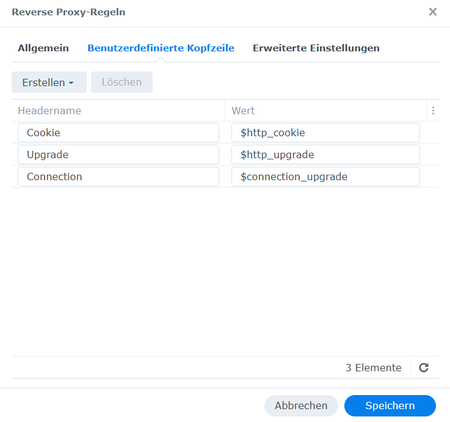
Hello community, I put my switch GS308EPP behind a reverse proxy HTTP -> HTTPS on my Synology DS923+ which works well. Unfortunately, the errors come after the login. The first error which I solved was that I could not log me in, because the credential mask infinitely loops. This I could manage when setting a proxy header "Cookie $http_cookie" in my reverse proxy settings on my Synology. The second error which I struggle with is, that when logging me in, the whole web UI looks broken. Starting the F12 developer mode in Google Chrome, it says that some .js functions and .svg vectors get 502 - Bad Gateway. Here I got stuck. To make it even a little bit easier, I published some screenshots showing my problem in detail. Than Thank you! Kind regards, ViktorManagment-IP & Trunk on the same Port - GS108T
Hey, I'm new to switching with netgear! As stated in the title: is it possible to make the switch accessible via the trunk port while also being in a managment vlan? The setup so far: Default-VLan 1, Client-VLan 40, Printer 50 and MGMT 10. The switch can be managed with the IP it gets from the default VLAN over the trunk port. But i want it to be in vlan 10. When i change the managment vlan id to 10 the switch isn`t pingable anymore. The switch is set to dhcp and has a reserved ip address in both vlans (1 and 10). I use the GS108T mainly for testing, will need an solution for the M4300-52G ProSAFE 48-port without needing to connect an laptop! I hope my question is understandable, english is not my first language. Thanks in advance! PhilippGSM7224v2 is switching console dead
I hope i got the right board. Hi, sorry for my bad english. I bought a used switch "GSM7224v2". It's working but i can't access the website. My Router shows me the IP of the switch. I try with Hyperterminal to get access on the console. It looks dead. No prompt or any letters. Nothing. The reset button is doing something. But it doesent reset to factory defaults. Even on the Hyperterminal there is nothing while hit the reset button. I tried a connection with SSH. Nothing. If i try with FTP on Port 21 I get asked for a username. I don't have any Login data. Is there any way to reset the switch? Can it be jtaged or something? what about the usb port? IP from Router with DCHP 192.168.168.82 No connection possible. No Login data. Thank you for your help in advance2.6KViews0likes6CommentsMehrere R6400 als WLAN-Access Point mit gleicher SSID
Hallo Community, ich habe folgendes vor und möchte mich informieren ob mein Vorhaben überhaupt machbar ist. DSL via Glasfaser 100MBit/s V Fritz!Box 7590 als LAN-Router und Telefonrouter V Switch 8-Port/Patchfeld V R6400 als WLAN-AP und Switch im Wohnzimmer EG V R6400 als WLAN-AP und Switch im Wohnzimmer OG Telefon wird über die zweite LAN-Leitung verteilt (oder DECT) und kommt direkt von der Fritz. Desweiteren werden am Switch nach der Fritzbox 2xNAS und 1xDrucker betrieben. Plan ist es beide Etagen einwandfrei mit WLAN zu versorgen und diverse Geräte wie TV, Playstation und KODI (Smart-TV) per Kabel am R6400 in den Wohnbereichen anzuschließen. Das WLAN soll auf beiden Routern mit der gleichen SSID und dem gleichen SSID-.WPA2-Passwort angeboten werden sodass per WLAN-Roaming die Endgeräte selbst entscheiden welches Signal besser ist. Das sollte beim R6400 kein Problem sein, da ich festgestellt habe, dass die WLAN Übertragung vom EG ins OG ohnehin schlecht ist. Jetzt meine Frage, ist das ohne Einschränkungen machbar, sodass sich die beiden R6400 nicht in die Quere kommen? Können im AP-Modus noch alle 4 LAN-Ports des R6400 als Switch genutzt werden? Gibt es andere, bessere Möglichkeiten um mein Vorhaben zu ermöglichen? Orbi fällt raus! (sehr unzufrieden). Vielen Dank schonmal für die HilfeSolved2.8KViews0likes2CommentsM5300 stack firmware upgrade
Hello, My firm currently utilizes Netgear M5300-28G_POE+ switches in a stacked group of 10 devices. We are currently at firmware level 10.0.0.44, and I've been tasked to: a) Update to latest firmware {11.0.0.31} b) Add the company certificate (to avoid the initial https error message) (Is it better to use the company wildcard certificate or the switches selfsigned certificate?) c) Switch access from http, to https Couple questions I have regarding the firmware upgrade are: 1) Is the best way to do this to upgrade one switch at a time? If I reboot the initial switch (management switch) will I reboot the entire stack? 2) Should I add the firmware to all switches before rebooting any switches, then reboot all switches at the same time? This way all the switches will come up simultaneously. 3) Please share your thoughts and let me know if there is a document that details out how best to do this. Thank youSolved5.4KViews0likes6CommentsReadyNas 104 network connectivity issues
Hi, I am using a readynas 104 on firmware 6.8.0. The NAS was working fine and every time I went into the dashboard I was getting automatic notifications about firmware updates. The other day I plugged the NAS into a d-link 5 port gigabit switch and while I can still; access the internet on my network (including other devices running out of the same switch as the NAS) and access file shares on my NAS from the entire network, it has stopped backing up on the cloud (readyvault) and gives me the below error message. " Operation timeout. communication error. check your internet connection, DNS settings or proxy settings. " Seems to me the NAS has suddenly stopped seeing the internet... does anyone have any ideas on what could be the cause?1.3KViews0likes3Comments