NETGEAR is aware of a growing number of phone and online scams. To learn how to stay safe click here.
xr1000
24 Topics
Nighthawk XR1000 mit Telekom Anschluss.
Hallo ! Habeich einen Nighthawak XR1000 pro gaming router gekauft. Mein Internetanschluss kommt von der Telekom 250Mbit/s. Das Problem ist dass ich keine Verbindung zum Internet mit dem XR1000 bekomme. Habe meinen alten Speedport Router in die DSL modem versetzt und mit meinem XR1000 verbunden. Leider findet der XR1000 keine Internetverbindung. In den Interneteinstellungen habe ich die Zugangsdaten wie folgt eingegeben: Internet Service Provider: PPOE Login: [email protected] Auch : AAAAAAAAAAAZZZZZZZZZZZZZZZZ#[email protected] A Steht für die 12 stellige Anschlusskennung Z steht für die zugangsnummer M steht für die vierstellige Mitbenutzerzahl Passwort-> Das persönliche Kennwort Service Name-> leer Connection Mode ->Always on Kann mir jemand sagen was ich falsch mache?Solved5.8KViews0likes12CommentsNetGear Router | WAN / LAN IP Conflict issue
I recently had an issue on my XR1000 where I was not able to apply IP address reservation in the LAN setup page, due to the router reporting back that the LAN IP range is in conflict with the WAN IP. I have seen several posts in relation to this issue, one of which is: The IP address conflicts with the WAN IP subnet. Please enter a different IP address. | NETGEAR Communities If anyone else is experiencing this issue, check for this as a solution: In the "internet setup" page in settings, check for any LAN IP's entered as your DNS servers, i.e. do you have primary / secondary DNS set as your LAN IP of the router or any other internal devices like a DNS server on your LAN? Try changing the DNS servers to something external like 1.1.1.1 and 8.8.8.8, THEN try applying your LAN settings config, you might find that the error message no longer exists. This problem should not exist, but I guess it could be a bug / oversight in the coding.800Views0likes20CommentsMultiple games matchmaking "messes up"?
I have noticed this issue in two separate games that I've played and while it could be just the games themselves the fact that both games have effectively the same problem happens makes me question if something is wrong that maybe I'm not aware of. In Street Fighter 6 and Guilty Gear Strive that are technically P2P fighting games I run into this issue where I will play against multiple people just fine and then after maybe 4-5 people BOTH GAMES will suddenly go into what I would describe as "matchmaking loops". Both games will basically show that I am "Connecting" or "Checking Opponents Connection" indefinitely as if it can no longer match with another person. Either I have to outright restart the games or it would take an excessive amount of time to find another match. Both these games are relatively popular for what they are so it shouldn't be a lack of opponents to play against. Secondly if I monitor to my personal connection, like say pinging google DNS I can see that it is stable and never going above like 45ms, so there isn't any fluctuations on my "raw connection". My speeds are 500/100 so I don't think it is a bandwidth issue either. I have UPnP ON on the router so there shouldn't be any problems connecting to other people if I understand how that is SUPPOSED to work. But I did try to setup port forwarding as stated within whatever game support or Playstation said to do anyway. So I also have a static IP for my PS5 setup to do that. So my question is what could be causing this type of problem and is there a solution? Cause it is one thing if it was happening just in a specific game but the fact that same pattern happens in both is a little suspicious. System: PS5 Connection: Wired Router: XR1000v2 (xr1000v2 1.1.0.22_2.1.34) Modem: CM2000700Views0likes14CommentsUnable to view/access XR1000 USB Storage in Windows Pro 11 File Explorer
Setting up a new Windows Pro 11 laptop. I want to use Windows File Explorer to view and access all folders/files within my WD External HD (connected to XR1000 through USB). Environment Details: * Lenovo ThinkPad running Windows Pro 11 version 25H2 (OS Build 26200.7922) * Netgear Nighthawk XR1000 running version 1.0.0.74_1.0.63 * Western Digital Ext HDD 1021 connected via USB to XR1000 I'm trying to map a network drive in File Explorer to the XR1000 USB Storage - \\readyshare\USB_Storage. 1) Open File Explorer 2) Right Click 'Network', click 'Map Network Drive' 3) Choose Drive letter, and in 'Folder' type \\readyshare\USB_Storage and click Finish 4) A Windows Security page opens asking to Enter network credentials - User name and Password. It also states - You can't access this shared folder because your organization's security policies block unauthenticated guest access. These policies help protect your PC from unsafe or malicious devices on the network. - I've tried entering various Windows and Netgear user names and pwds without success Notes: In File Explorer under 'This PC', there is a folder XR1000. However when I expand XR1000 /Browse Folders/14TB Copy/My Documents/... it is only showing .jpg files. No text, pdf, or other file extensions, and missing some folders. In File Explorer Under 'Network', there is an XR1000 Media Device listed. When I click on that icon it opens the XR1000 admin page. In my previous laptop running Windows Home 11, I was able to access all the folders within \\readyshare without any issue. How can I view and access, in File Explorer, all of the contents on the WD HDD 1021 which is connected to XR1000? Thank you.Solved600Views0likes20CommentsXR1000 What/Where is the Latest Firmware?
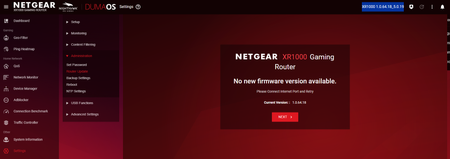
I have a XR1000 and my current firmware seems to be 1.0.64.18_5.0.19. On the support page for the XR1000 under 'Firmware and Software Downloads' it says "Firmware Version 1.0.2.86" with "Latest" next to it. https://www.netgear.com/support/product/xr1000#download Furthermore, I downloaded the XR1000-V1.0.2.86.zip, and when I extracted it, these are the files: -XR1000-V1.0.2.86_2.1.40.chk -XR1000-V1.0.2.86_Release_Notes.htm According to 'Nighthawk Pro Gaming Router Model XR1000' user manual on page 151 it says "Note: The correct firmware file uses an .img extension." .chk files are usually recovery fragment files What is the correct Firmware version and where can it be downloaded?Solved600Views0likes3CommentsXR1000 dropping out every couple of hours
Im getting the same issue and i dont know what to do to fix it. I have reserved all my devices from .2 to .49 and set the DHCP range from .50 to .99 and yet im still experiencing a dropout which disconnects me from momentarily, cutting my stream to twitch. Every time it drops out, I get these errors when it happens. "Jan 30 20:22:43 XR1000 user.emerg httpd: ****handle_get(411) 66 Jan 30 20:22:43 XR1000 user.emerg httpd: ****handle_get(675) 66 Jan 30 20:22:43 XR1000 user.emerg httpd: ****handle_get(411) 66 Jan 30 20:22:43 XR1000 user.emerg httpd: ****handle_get(699) 66" any idea what is causing this?499Views0likes12CommentsXR1000 Admin Password Reset loop
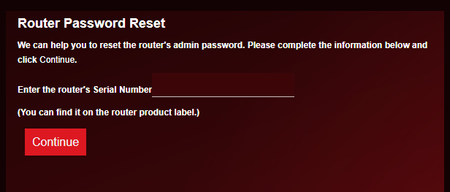
Just happened today Repro steps: Went to the Admin home ( 192.168.1.1 ) Got shown this screen Entered S/N Got asked 2x Security Questions, answered correctly Got shown this screen now Entered & confirmed new password Answered the 2x Security Questions (again!) Got shown the success screen Both "Exit" and "Login" button directed me to Step 2 again 😣 I'm at my wits' end and I'm not sure what to do. The router is still working fine and internet has no noticable problems. Suggestions? If possible, I'd like not to have to factory reset the damn thing since importing settings doesn't seem to work ( tried it once 2 years back, ended up having to figure & set everything from scratch again ) Thank you in advance!400Views0likes8CommentsCannot connect to most EU community servers in Valve Games
Having issues with connecting to most if not all EU community servers in CS2 and even other games. I am using a XR1000v2 and its firmware is upto date, and strict mode on geo filter is already disabled. I dont have this issue with my other networks, and i cannot find out how to disable this blocking of connections. The response the server feeds back, is App ID is not specified. The latency check also fails.Solved399Views0likes22Comments