NETGEAR is aware of a growing number of phone and online scams. To learn how to stay safe click here.
xr1000
23 Topics
XR1000 v1 "DumaOS is not running!"
After updating my XR1000 v1 to Version 1.0.2.86, http://192.168.1.1 redirects to https://192.168.1.1/dumaweb/ which only shows DumaOS is not running! The router does still provide connection to the internet, and https://192.168.1.1/adv_index.htm is accessible. How do I get DumaOS back up and running?35Views0likes3Commentsxr1000v2 - network spikes higher shown than real usage?
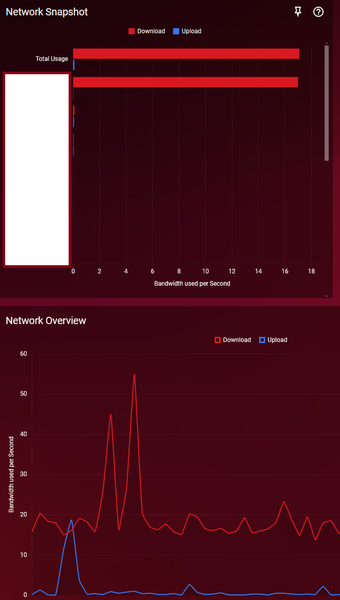
xr1000v2 1.1.0.22_2.1.34 While I'm monitoring my network to see what is causing lag spikes, I've seen that the "Network Overview" is showing spikes much higher than what ANY DEVICE is showing in the "Network Snapshot" between Total Usage OR any given device. In this screenshot you can see one device is using up some download bandwidth because it is my brother using his Smart TV for streaming. But as I'm monitoring it it is never going above basically 25 per second in usage. Yet you can see in the Network Overview it is hitting spikes well above 40 and 50 and yet even the TOTAL USAGE is not hitting those limits in any given moment as I'm watching it. What is causing this discrepancy? To be clear I am watching it as it is happening so I know what is shown at the top Snapshot is not the same as the instance of the Network Overview in those previous moments. I'm saying in those previous moments nothing was hitting that high in the bandwidth and yet it is showing it like that.Solved57Views0likes4CommentsXR1000 will not turn on?
My XR1000 will not turn on. I thought it was the surge protector but when I plug it in direct it won’t turn on. I’ve tried on and off button, hard reset with the paperclip nothing seems to be working. We’ve had some thunder storms in the area that knocks out the power and the internet sometimes. But I did not think this would cook my router. Is it done and time for a new one or is there anything I can do to try to make it work?46Views0likes2CommentsNetgear XR1000v2 constant DNS issues
Hey all, As the title suggests i am having constant networking issues where i am unable to connect to any websites for several minutes that occur multiple times a day. I also have a forum going on Netduma forum and so far with have. Manually changed my DNS to google. Changed my DHCP settings to create after .50 and have given all my devices a static address between .2 and .49. I am still getting these issues with these changes, unsure what else i can do. Has anyone else had this issue and managed to fix it?259Views1like4Comments
Firmware xr1000 V.1
Need help windows 11 when I download the firmware I’m on .74 was going to 82 before stepping up to the latest but I was able to extract the file I think but not sure which to use. I’m disabled and have no one smart enough to assist. I work from home. This is my fav router I’m hoping to get help. Please anything anyone?70Views0likes4CommentsUnable to view/access XR1000 USB Storage in Windows Pro 11 File Explorer
Setting up a new Windows Pro 11 laptop. I want to use Windows File Explorer to view and access all folders/files within my WD External HD (connected to XR1000 through USB). Environment Details: * Lenovo ThinkPad running Windows Pro 11 version 25H2 (OS Build 26200.7922) * Netgear Nighthawk XR1000 running version 1.0.0.74_1.0.63 * Western Digital Ext HDD 1021 connected via USB to XR1000 I'm trying to map a network drive in File Explorer to the XR1000 USB Storage - \\readyshare\USB_Storage. 1) Open File Explorer 2) Right Click 'Network', click 'Map Network Drive' 3) Choose Drive letter, and in 'Folder' type \\readyshare\USB_Storage and click Finish 4) A Windows Security page opens asking to Enter network credentials - User name and Password. It also states - You can't access this shared folder because your organization's security policies block unauthenticated guest access. These policies help protect your PC from unsafe or malicious devices on the network. - I've tried entering various Windows and Netgear user names and pwds without success Notes: In File Explorer under 'This PC', there is a folder XR1000. However when I expand XR1000 /Browse Folders/14TB Copy/My Documents/... it is only showing .jpg files. No text, pdf, or other file extensions, and missing some folders. In File Explorer Under 'Network', there is an XR1000 Media Device listed. When I click on that icon it opens the XR1000 admin page. In my previous laptop running Windows Home 11, I was able to access all the folders within \\readyshare without any issue. How can I view and access, in File Explorer, all of the contents on the WD HDD 1021 which is connected to XR1000? Thank you.Solved614Views0likes20CommentsXR1000 dropping out every couple of hours
Im getting the same issue and i dont know what to do to fix it. I have reserved all my devices from .2 to .49 and set the DHCP range from .50 to .99 and yet im still experiencing a dropout which disconnects me from momentarily, cutting my stream to twitch. Every time it drops out, I get these errors when it happens. "Jan 30 20:22:43 XR1000 user.emerg httpd: ****handle_get(411) 66 Jan 30 20:22:43 XR1000 user.emerg httpd: ****handle_get(675) 66 Jan 30 20:22:43 XR1000 user.emerg httpd: ****handle_get(411) 66 Jan 30 20:22:43 XR1000 user.emerg httpd: ****handle_get(699) 66" any idea what is causing this?590Views0likes12CommentsXR1000 What/Where is the Latest Firmware?
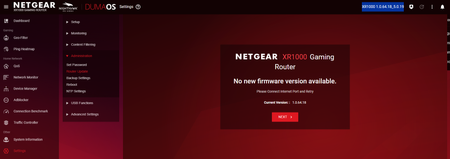
I have a XR1000 and my current firmware seems to be 1.0.64.18_5.0.19. On the support page for the XR1000 under 'Firmware and Software Downloads' it says "Firmware Version 1.0.2.86" with "Latest" next to it. https://www.netgear.com/support/product/xr1000#download Furthermore, I downloaded the XR1000-V1.0.2.86.zip, and when I extracted it, these are the files: -XR1000-V1.0.2.86_2.1.40.chk -XR1000-V1.0.2.86_Release_Notes.htm According to 'Nighthawk Pro Gaming Router Model XR1000' user manual on page 151 it says "Note: The correct firmware file uses an .img extension." .chk files are usually recovery fragment files What is the correct Firmware version and where can it be downloaded?Solved610Views0likes3Comments