NETGEAR is aware of a growing number of phone and online scams. To learn how to stay safe click here.
Forum Discussion

iposner
Jul 02, 2012Aspirant
RAIDIATOR 4.1.9 Upgrade - Access Denied to some CIFS Shares!
If you have run into this issue please upgrade to 4.1.10: http://www.readynas.com/RAIDiator_4_1_10_Notes
You can then use the Advanced Options tab (go to Shares > Share Listing > Sharename then click on e.g. CIFS and you'll see the tab) to reset the ownership to what you want. You can use the Set ownership and permission for existing... option. Don't forget to click Apply to make your changes
Upgraded my NV+ from 4.1.8 to 4.1.9.
Three of the shares now have "Access Denied" errors when attempting a directory listing from a workstation.
I've done a full filesystem check - hours later it reports that problems were corrected, but still access is denied.
I've tried changing the permissions on the CIFS shares affected, including setting the default share as everybody.
I also notice that I can't set the owner or group of the share on the advanced tab. It's set to nobody/nogroup and whenever I try and change it, it resets to nobody/nogroup.
How do I downgrade to 4.1.8?
You can then use the Advanced Options tab (go to Shares > Share Listing > Sharename then click on e.g. CIFS and you'll see the tab) to reset the ownership to what you want. You can use the Set ownership and permission for existing... option. Don't forget to click Apply to make your changes
Upgraded my NV+ from 4.1.8 to 4.1.9.
Three of the shares now have "Access Denied" errors when attempting a directory listing from a workstation.
I've done a full filesystem check - hours later it reports that problems were corrected, but still access is denied.
I've tried changing the permissions on the CIFS shares affected, including setting the default share as everybody.
I also notice that I can't set the owner or group of the share on the advanced tab. It's set to nobody/nogroup and whenever I try and change it, it resets to nobody/nogroup.
How do I downgrade to 4.1.8?
23 Replies
Replies have been turned off for this discussion
 pugilaresAspirantHere you can download 4.1.8
http://www.downloads.netgear.com/files/ ... ator-4.1.8
Personally I didn't try to downgrade yet, even if I have similar problems after upgrading to 4.1.9
EDIT:
So I just tried to downgrade from 4.1.9 to 4.1.8 locally, but I do not have success with this. I get something like "local image sending failed" error message.
EDIT2: Problem with downgrade solved. It was probably timeout of firmware image upload to the ReadyNAS due to stiff set ethernet connection to 100 Mbit full duplex. Now changed to auto. melvseeAspirantI have the same problem. Setting "share access everyone" to "read/write" as a workaround.
Also, cannot change share folder owner or share folder group
Help! iposnerAspirant
melvsee wrote: I have the same problem. Setting "share access everyone" to "read/write" as a workaround.
Doesn't work for me. Setting default read/write and allow guest still produces "Access is denied".
What I need to know from someone at ReadyNas is whether you can downgrade 4.1.9 to 4.1.8 with no ill-effects. ChippyAspirantMElvsee - See my new post today about 4.1.9 killing ReadyNAS Remote Add-on and Support advice to go back to 4.1.8
If you upgraded from 4.1.8 in the first place I can't see why reverting should be a problem- melvseeAspirantdowngraded to 4.1.8
cif options, share folder owner and share folder group were set to "nobody" and "nogroup"
managed to change the share folder owners and groups and users regained access!
this is my first ever bad _release_ firmware upgrade. now scarred for life - iposnerAspirantDowngraded to 4.1.8. Able to change the share owner and group from nobody/nogroup to admin/admins. Phew!
Netgear - you have to pull the 4.1.9 image immediately. - pugilaresAspirantSuccessfully downgraded back to 4.1.8.
Disabled automatic upgrade in Frontview. Never upgrade again without being sure that for some days after release people don't have problems. - iposnerAspirantNow I've gone through all my shares, I can see that the 4.1.9 upgrade has set all the shares' owners and groups to nobody/nogroup.
- PapaBear1ApprenticeDoes it actually say nobody/nogroup or are the fields blank?
I no longer have an NV+ available to me, but here is my setup on my NVX. Note that the setting up the groups restricts the access to only those groups. The restriction is set by the check mark. Also check the default access field to ensure it has not reverted to "disabled".
Here is the page on my NVX: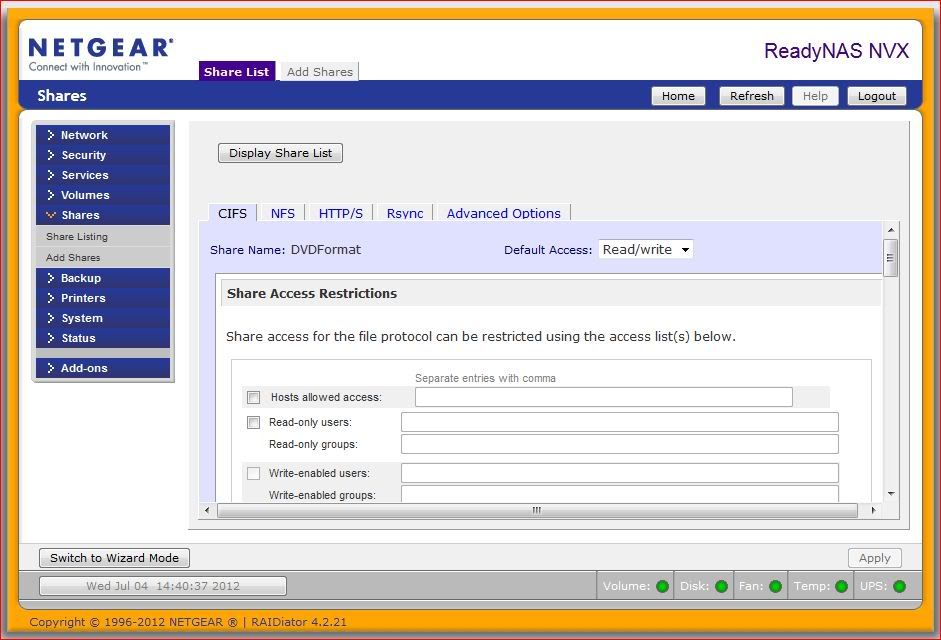
- iposnerAspirantIt's on the "Advanced Options" tab that the owner and group are set to nobody/nogroup. The values on the CIFS tab remain the same.
Related Content
NETGEAR Academy

Boost your skills with the Netgear Academy - Get trained, certified and stay ahead with the latest Netgear technology!
Join Us!
