NETGEAR is aware of a growing number of phone and online scams. To learn how to stay safe click here.
Forum Discussion

derekcannady
Dec 23, 2021Guide
RAX120 V2 Constant Random Reboots
The router reboots frequently sometimes every 30 minutes. I have noticed that the router reboots under heavy system load of +50% on the processor. The only way I have been able to drastically lesse...
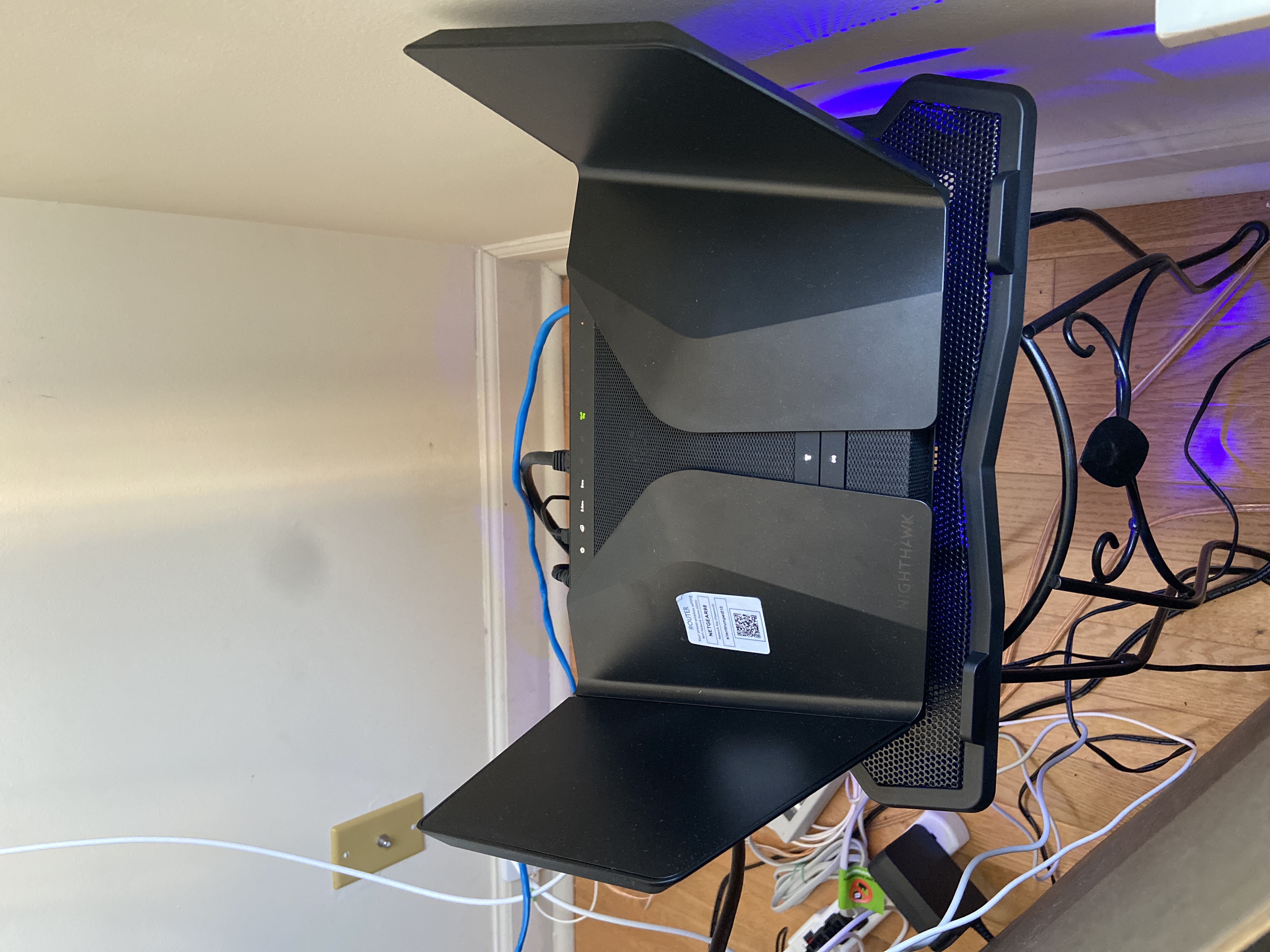
- Jun 11, 2022Installed beta firmware 1.2.3.33 on it and then turn fan on in debug.htm. Just check mark it , don’t click on apply.
And bought a cool pad from amazon $10 . 4 days in a row no restart and router works perfect.
Laptop Cooling Pad,ESGAMING Laptop Cooling Stand Laptop Cooler 10-15.6 Inch 2 USB Ports 2 Fans with Blue LEDs https://a.co/d/dXVVnxw
doctorcito
Mar 24, 2022Star
Disabling 2.4GHZ WMM seems to be doing the trick. I am at 21+ hours of uptime for the first time in a while. Will look into getting the UPS if I continue to get the issue. Requiring a UPS on a router would be a first for me as all other routers in the past have been plugged in directly into the wall socket.
doctorcito
Mar 24, 2022Star
Does anyone with more technical knowledge understand why disabling WMM is making it more stable? I am currently at 1+ days of stable uptime. Albeit with a very very slow 2.4ghz band.
- Zoza83Dec 06, 2021Initiate
This thing continues to reboot at random throughout the day. I prevously owned an Orbi and I'm quickly regretting spending the cash on this indadequate device. Considering the amount of $$ I hadto shell out for this, there's zero reason as to why I should have any issues with this device. What an absolute waste.
- plemansDec 06, 2021Guru - Experienced User
Did you just buy this?
Have you tried going through support?
To get a hold of support. Click on "MyNetgear" at the top.
Register an account (or login) and then the device.
From there you can start the support process. Keep in mind that its only free for the first 90 days. - derekcannadyJan 03, 2022Guide
Disable WMM on 2.4 gHZ solves reboot issues.
- FURRYe38Mar 24, 2022Guru - Experienced User
What Firmware version is currently loaded?
What is the Mfr and model# of the Internet Service Providers modem/ONT the NG router is connected too?What channels are you using?
Any Wifi Neighbors near by? If so, how many?Most of the time WMM should be enabled as this allows for best wifi performances on 2.4Ghz to be seen. Depending on what you have connected, your environment and conditions and possible bad FW code, could be anything leading up to this odd problem.
Also has a factory reset and setup from scratch been performed since last update?
doctorcito wrote:
Does anyone with more technical knowledge understand why disabling WMM is making it more stable? I am currently at 1+ days of stable uptime. Albeit with a very very slow 2.4ghz band.
- doctorcitoMar 24, 2022StarHi, I am currently running a beta firmware provided by Netgear (V1.2.3.33-0315). The router is connected to a Verizon FIOS Alcatel-Lucent I-211M-L modem.
Channels
2.4ghz: Channel
Auto ( 4(P) + 8(S) )
5ghz: 36(P)+40+44+48
There are various other networks around me así live in an apartment. Finally, I did perform a factory reset when I upgraded the firmware. - doctorcitoMar 24, 2022StarAttachment of 5ghz network channel scan
- doctorcitoMar 24, 2022StarDisabling WMM is the one thing that has seemingly made stable. I'm currently at 1 day and 5 hours of uptime
- FURRYe38Mar 24, 2022Guru - Experienced User
doctorcito wrote:
Hi, I am currently running a beta firmware provided by Netgear (V1.2.3.33-0315). <You might downgrade to v.28 and see if this changes anything. I don't see v.33 being listed as of yet on NGs site. https://www.netgear.com/support/product/RAX120#download
The router is connected to a Verizon FIOS Alcatel-Lucent I-211M-L modem.
Channels
2.4ghz: Channel
Auto ( 4(P) + 8(S) )< channels you should be using are 1, 6 or 11. If you have wifi neighbors around, try turning down the power output from 100% to 50 or 25 % with SC, MIMO and WMM enabled to see if this helps.
5ghz: 36(P)+40+44+48
There are various other networks around me así live in an apartment. Finally, I did perform a factory reset when I upgraded the firmware. - beachmilesMar 24, 2022Apprentice
I've done all the tricks with no luck (factory reset, disable wifi smart mode, etc). The only thing that worked to stop the random reboots using the firmware settings was disabling the 2.4Ghz WMM.
But when someone said something about dirty power being the problem for him I found out my UPS wasn't a pure sine wave UPS like I thought. I replaced it with a pure sine wave UPS and I re-enabled the 2.4GHZ WMM and I have been running for 18 days straight. So the root problem appears to be dirty power and somehow disabling 2.4Ghz lets the router handle the dirty power better.
- doctorcitoMar 25, 2022StarThanks for the response! Netgear really dropped the ball on this one. This is the first I hear of dirty power causing issues on a router in all my years of having routers. The UPS is another $180. I'm might as well switch to another product. At this point I just want my $350 back. Sadly, I doubt that will happen. This router belongs in the trash.🗑️
- doctorcitoMar 25, 2022StarSupport is also trash, I have been going back and forth with them for MONTHS! At this point I feel that I work for Netgear. Do you guys know if the RAX200 is having the same issues? It's been more than 10+ years of great Netgear products for me.
- doctorcitoMar 25, 2022Star
I think I pissed someone off on the Netgear support team. They are not responding to my support ticket anymore. I have resorted to threatening the router as a last resort. I told the router: "If you restart one more time, I am throwing you in the trash". Will update with my results later today.
- FURRYe38Mar 25, 2022Guru - Experienced User
So did you try the suggestions I mentioned?
- doctorcitoMar 25, 2022StarHi Furry,
I did a downgrade back down to v1.2.3.28. Haven't messed around with the channel settings yet. Disabling WMM was not the solution as the router still restarted after 1 day and 6 hours. Currently at 15 hours of uptime after the downgrade and factory reset. Will keep you posted! - FURRYe38Mar 25, 2022Guru - Experienced User
Ok, what channels are currently being used?
What is the transmit power set for currently? I presume 100%?
Is WMM enabled currently?
doctorcito wrote:
Hi Furry,
I did a downgrade back down to v1.2.3.28. Haven't messed around with the channel settings yet. Disabling WMM was not the solution as the router still restarted after 1 day and 6 hours. Currently at 15 hours of uptime after the downgrade and factory reset. Will keep you posted!  DarrenMMar 31, 2022Sr. NETGEAR Moderator
I reached out the engineering about this issue and we do have a beta firmware that may have a fix for the issue if you would like to try this firmware please send me a Pm
Thanks
DarrenM
- BriarchildApr 02, 2022TutorHi I would like to try this beta firmware for the Rax120 reboots issue.
Could you send me an email: 75646772@qq.com - SlgreenApr 03, 2022Aspirant
Hello, can I get the RAX120 V2 beta firmware for the reboot issue? Thanks
- DarrenMApr 04, 2022Sr. NETGEAR Moderator
I have PM you the firmware.
- JayFiveAliveApr 09, 2022GuidePm sent!
- SkippyNLApr 09, 2022GuideHi moderator,
Could you please send me the beta firmware link?
Thank you in advance!
Best regards,
Skipp - doctorcitoApr 09, 2022StarBeta firmware did not do it for me. Against my own judgement, I've decided to upgrade to the RAX200 and it has been up and running for 2 days. 🤞
- SkippyNLApr 09, 2022GuideI understand your purchase decision, but you shouldnt have to buy a new (different) router ofcourse, i mean the AX 120 v2 is still pretty new and should do its job.
Having said that, i do hope you wont experience any issues! I've, in general, very good experience with nighthawk routers, so im still hoping for that definitive fix. Good luck OP - pkaytesApr 11, 2022Guide
Hi,
Can anyone tell me if the beta fw solves the inability to enable the VPN service as seen with fw 1.2.3.28?
Pete