NETGEAR is aware of a growing number of phone and online scams. To learn how to stay safe click here.
Forum Discussion

martyr444
May 04, 2021Apprentice
RAXE500 cannot get speeds over 1G even though I have 1.2G Internet
My Xfinity speeds just went up from 1G to 1.2GB. If I test my speeds hooked up to the RAXE500 Router it still only gives me the 1G. If I go straight to my Netgear CM2000 Modem I get the 1.2G. Plus my...

Razor512
May 04, 2021Prodigy
The CM1200 will work if you enable LACP on both the modem, and on the RAXE500, go to Advanced > Setup > Internet setup, and then set the mode to Multi-Gig Internet (1 Gbps + 1 Gbps)
Then you will connect the first 2 Ethernet ports fromm the CM1200, to the yellow WAN port, and the first Ethernet port of the RAXE500.
That should then establish a 2Gbps connection to the modem, and then the laptop will have a 2.5GbE connectionn to the router via the 2.5GbE port.
Just be sure that LACP is enabled on both the CM1200 and the RAXE500.
martyr444
May 04, 2021Apprentice
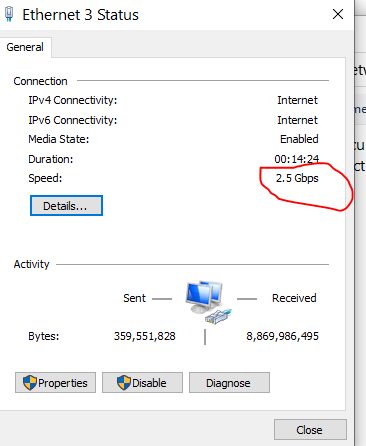
I enabled LACP on both the CM1200 and the RAXE500. Both of them say active when I check the LACP. The Nic still shows only 1G unless I plug the Laptop Nic to the 2.5G Port on the RAXE500. When I do that, the speeds drop to almost half on downloads. When I connect the Laptop Nic to one of the other RAXE500 ports I get my 1G speed. Any thng I'm missing?
- plemansMay 05, 2021Guru - Experienced User
I went back and read this a couple times.
do you have the CM2000 or the CM1200?
the CM1200 has 4x ethernet ports and supports LACP.
The CM2000 only has a 2.5g port and doesn't support LACP.
If you have the CM2000, you'd connect the RAXE500 to it through the 2.5g port and set it up in your internet settings to use that port. That'd give the ROUTER the full 1.2g speeds. But like Razor512 says, unless you have a computer that supports LACP to use the RAXE's LACP support, you won't get >1gig out of a single port. Not saying you can't use the full 1.2gig just not through to one device/connection. I've managed it with 2x devices connected. (940mbs on one and 200mbps on the other during concurrent usage).
I've got the same CM2000 + RAXE500
- plemansMay 05, 2021Guru - Experienced User
Also, the cm1200-s support from comcast for LACP is sketchy at best. I wouldn't use it.
- martyr444May 05, 2021Apprentice
I have both the CM1200 and the CM2000. I tried the CM2000 first by setting up the internet inferface 2.5G port on the RAXE500. I plugged the CM2000 Modem into the RAXE500 2.5G port. The Killer E3100 USB-C 3.1 to RJ-45 2.5Gbps Ethernet Adapter properties still showed a 1G connection. Speed test only gave it the 1G capped speeds. I then switched to the CM1200 Modem to test LACP. It was all set up correctly and both the CM1200 and the RAXE500 both said LACP was active. Both the onboard Lan and the Killer E3100 USB-C 3.1 to RJ-45 2.5Gbps Ethernet Adapter still only showed 1G, not a 1+1 for 2G. I know the Killer E3100 USB-C 3.1 to RJ-45 2.5Gbps Ethernet Adapter can reach over 1.2G if I hook it up directly to the CM2000 Modem with no Router. I also have a XR700 Router but I haven't tried it yet using the LACP.
- plemansMay 05, 2021Guru - Experienced User
martyr444 wrote:Both the onboard Lan and the Killer E3100 USB-C 3.1 to RJ-45 2.5Gbps Ethernet Adapter still only showed 1G, not a 1+1 for 2G.
Using those both on 1 device isn't going to give you a 1+1.
You'd need a dual NIC card.
What onboard lan do you have? Is it a >1gig port?
What driver are you using the the killer e3100? There was some driver issues when it was first released?
When you were using the RAXE500 with the 2.5g port directly connected to the killer card, did it show a 2.5g connection?
