NETGEAR is aware of a growing number of phone and online scams. To learn how to stay safe click here.
Installation
7513 Topics
GS724TV6 - Refuses to get DHCP address non 192.168.0.x address
I have two GS724TV6 that I want to configure and set up on my network. The network is a Verizon FIOS router that serves as DHCP to a Netgear GS724TV4. I also have a few 8 port Netgear switches on the network (GS108EV4) and a GS316EPP. All of these get DHCP addresses perfectly fine. - Neither get DHCP addresses - They take the default address of 192.168.0.239 - I was able to configure a PC as 192.168.0.1 and connect to them - I assured that they were both configured as DHCP - When I configured one to 192.168.1.30 with a gateway of 192.168.1.1 (the Verizon Router) it would be seen when I plugged it into the network. - I set up it's MAC address in the router to assign it 192.168.1.30, the router never assigned the address - I upgraded the firmware to 7.0.0.14 from 7.0.0.12, no change - The Network Discovery Tool doesn't see the device on either the 192.168.0.x or 192.168.1.x configurations How to I get it do get a DHCP address from my regular network like all of the other 40 devices seem to be able to do?Netgear Engage won't start
Hi. I'm having some trouble with my Netgear Engage installation on my local Windows 10 Pro laptop. Everything has been working fine up to recently. Now when starting engage I get error : "Cannot open Engage: resource busy" and it hangs at 42%." I have tried uninstalling, although I cannot find a purpose uninstaller in my Apps panel or start menu, so I deleted the Netgear folder under Program Files and re-installed a fresh download from the Netgear website. I get the same issue. It does not appear to make a difference if any network interfaces are connected or not, the application will not start. Hoping someone might have some insight please?95Views0likes3CommentsOptimizing Wi-Fi Coverage Across a Multi-Bay Dealership Lot (John Autos Feedback)
Hi everyone, I'm currently updating the network setup for our local dealership site. John autos, and wanted to share some feedback while asking for community advice on hardware placement. We run a used car dealer business locally, and our setup requires seamless Wi-Fi coverage spanning from the main office sales desk out across our vehicle inventory lot. both our staff and customers browsing for a used car in Leighton Buzzard rely heavily on a stable connections to check online vehicle histories, inspect stock details, and complete digital paperwork right on the lot. Currently, we are using NETGEAR mesh system or outdoor directional antennas specifically for large outdoor commercial lots or auto dealership ? Any recommendations on ideal height placement or weatherproofing tips to maintain fast speed for visiting customers would be greatly appreciated! Thanks for any insights! 🔗johnautos160Views0likes7CommentsFritzbox+GS305E+WAX210 Vlan
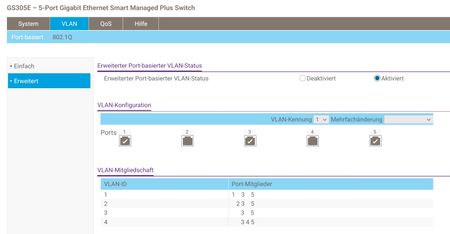
Checked serveral similar posts, but could not find my case. It seems to me, that my case is less complex than those I found. I ordered a GS308E and a WAX210 in order to be able to create a segmented Network at home. We have a photovoltaik-system installed. The different devices since weeks have grave issues communicating with each others. Some of them use multicast. From customer support I got the advice, to buy a managed switch and create a Vlan exclusive for their devices. As I have to get used to this, for me, new functionallity I searched for hardware which can be configured without the need of any cloud-service. I choosed to order a GS305E and a WAX210. In addition to the request from the PV-Support, I want to create more Segments using Vlans. My Idea: Fritzbox main Lan: lan+wlan PCs, tablets, printer, scanner, NAS Fritzbox guest-wlan: (no guests) wlan cameras Vlan3: wlan smarthome devices like shelly sensors and actors Vlan 4: lan + wlan IOT-devices like Hue, TV etc. WAX210-Guests: guests GS305E: Port1: VLan1: actually free Port2: VLan2: unmanaged switch connecting all PV-devices Port3: all: WAX210 Port4: VLan4: wired IOT-devices Port5: all: Uplink to Fritzbox Lan1 WAX210: SSID1 : Vlan Id 3 SSID2: Guests SSID3: Vlan Id 4 setting GS305E Setting WAX210 From Posts I read in the community, I understood, that I shall use 802.1Q. My Intension: all devices may be able to connect to the internet no device of any vlan may connect/disturb any device on another vlan, nor Fritzbox Question: will this setup prevent devices in Vlans prevent to access devices in the Fritzbox Lan?SolvedWAX610-100JPS VLAN設定(Untagged/Tagged)について / VLAN Untagged/Tagged setting on wired port
Japanese --- お世話になっております。 弊社にてNETGEAR WAX610-100JPSの導入を検討しており、ユーザーズマニュアル記載の仕様について1点確認させてください。 構成イメージは以下の通りです。 ・WAX610をブリッジモード(NATモード無効、初期設定のまま)で使用 ・SSID1にVLAN ID 1(初期値)を割り当て ・SSID2に別のVLAN ID(例:VLAN 20)を割り当て ・上位のルーターに1本のLANケーブルで接続し、上位ルーター側でVLANごとにセグメントを分離する構成を想定 質問は以下の通りです。 ユーザーズマニュアル151~152ページに記載の「Untagged VLAN」チェックボックスについて、これは有線(イーサネット)インターフェース全体に対する単一の設定と理解しています。この設定を「Untagged VLAN」(デフォルト、VLAN ID 1)のままにした場合、以下のいずれの動作になりますでしょうか。 (A) ネイティブVLAN(この場合VLAN 1)に属するSSIDのフレームはタグなしで送信され、それ以外のVLAN ID(例:VLAN 20)を割り当てたSSIDのフレームは自動的にタグ付きで同一の有線ポートから同時に送出される(いわゆる802.1Qトランクポートと同様の動作)。 (B) 有線ポートは「タグなしのみ」または「タグ付きのみ」のいずれか一方でしか動作せず、異なるVLAN IDを持つ複数のSSIDのトラフィックを同一の物理ポートで同時に区別して送出することはできない。 (A)の動作であることを確認できれば、1本のLANケーブルでSSID1(VLAN1)とSSID2(VLAN20)の両方のトラフィックを上位ルーターに渡し、上位ルーター側でVLANごとにアクセス制御を行う構成が可能と考えております。マニュアル中にこの点を明記した記載が見当たらなかったため、確認をお願いいたします。 対象製品:WAX610-100JPS 参照箇所:ユーザーズマニュアル 73ページ、85ページ(SSIDごとのVLAN ID設定)、151~152ページ(802.1Q VLANと管理VLANの設定) 以上、よろしくお願いいたします。 English --- Hello, We are considering deploying a NETGEAR WAX610-100JPS, and I would like to confirm one point regarding the specifications described in the User Manual. The intended configuration is as follows: WAX610 used in Bridge mode (NAT mode disabled, default settings) - SSID1 assigned VLAN ID 1 (default) - SSID2 assigned a different VLAN ID (e.g., VLAN 20) - Connected to an upstream router via a single LAN cable, with the upstream router separating segments per VLAN My question is as follows. Regarding the "Untagged VLAN" checkbox described on pages 151-152 of the User Manual, I understand this to be a single setting that applies to the entire wired (Ethernet) interface. If this setting is left as "Untagged VLAN" (default, VLAN ID 1), which of the following behaviors occurs? (A) Frames belonging to the SSID on the native VLAN (VLAN 1 in this case) are sent untagged, while frames from SSIDs assigned other VLAN IDs (e.g., VLAN 20) are automatically tagged and sent out simultaneously from the same wired port (i.e., behavior similar to an 802.1Q trunk port). (B) The wired port operates in only one mode at a time - either "untagged only" or "tagged only" - and cannot simultaneously distinguish and send traffic from multiple SSIDs with different VLAN IDs out of the same physical port. If behavior (A) is confirmed, we believe it would be possible to pass traffic from both SSID1 (VLAN1) and SSID2 (VLAN20) to the upstream router over a single LAN cable, with access control per VLAN handled on the upstream router side. Since we could not find a clear statement on this point in the manual, we would appreciate your confirmation. Target product: WAX610-100JPS Reference: User Manual pages 73 and 85 (VLAN ID setting per SSID), pages 151-152 (802.1Q VLAN and management VLAN settings) Thank you in advance.Solved170Views0likes2CommentsGS305E Setup VLAN's from behind the switch
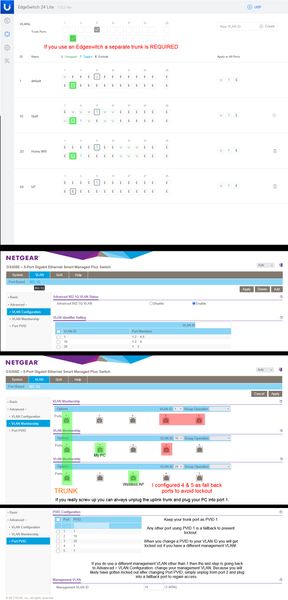
The PC used to configure the switch permanently resides downstream of the switch, on a VLAN, and MGMT VLAN that is not 1. It becomes a chicken & egg problem where you will be constantly locked out and forced to reset the switch as you try all the different combinations. I tried googling for solutions and the closest was the topic GS305E Trunking tagged and untagged VLAN's. It was very helpful. However my issue is slightly different and I wanted to share what worked. It was... a process. Step 1: Configure your upstream switch with a trunked port for all the VLAN's you intend to have traffic through the GS305E switch. In the case of a Ubiquiti EdgeSwitch 24 for example, it absolutely 100% requires a new trunked port... even though you already likely have a main trunk tagged and setup for VLAN's. Step 2: Manually configure your PC's IP address to be in the 192.168.0.x subnet. Plug your PC into any port on the switch. Which port you choose to plug into does not matter for initial configuration, they are all configured identically. Use a browser and go to 192.168.0.139 and login with the password: password. There is no username so this switch is not appropriate for a multi-admin environment. Step 3: Change your password. This is mandatory and you will be presented with a screen to do so immediately upon first successful login. Step 4: You will immediately see the main system settings page (home). Disable DHCP mode and provide the device with a static IP within the subnet range where it will permanently reside. Also provide the subnet gateway IP (Subnet DHCP server). Apply the changes, no reboot necessary, the browser will timeout because the switch will now be found at that new static IP. You will likely want to change your PC's IP again to be within the new subnet range. Step 5: Go to VLAN > 801.q > Advanced: and enable the advanced option. Step 6: Advanced > VLAN Configuration: add your VLANs. You cannot remove VLAN 1 it is hardcoded and also used as the management VLAN by default. DO NOT attempt to change the management VLAN yet if your management VLAN is not 1. You will do that at the very end almost as the last step. This is why a lot of people (meeeee) have locked up their GS305E during initial configuration by changing that too soon, don't do that, don't touch it, live with management VLAN as 1 until you have everything working. Step 7: Advanced > VLAN Membership: this is where you setup your trunked port and tags. Now is when you decide which port you want to be the trunk port. I use port 1 but port 5 is also a logical choice. Whatever port you decide to make the trunk the default VLAN 1 should be untagged and the rest of your VLAN's under it tagged. Step 8: Advanced > Port PVID: the trunk port should always remain as PVID 1. Change the PVID's to your VLAN ID's. A note of caution if you have a different management VLAN than 1. This will lock you out and force you to plug into a fall back port. If your management VLAN is 1 then you should be finished. Step 9: Advanced > VLAN Configuration: If you need to change your management VLAN now is the time, the last final step. If you would have attempted to change your management VLAN at any time during the prior processes you would have been locked out and likely forced to hardware reset the switch to defaults. This is what worked for me. I spent about a day trying to get it all to work and honestly I believe the one thing that prevented me from succeeding most of the time was not setting up that port as a trunk port on the Edgeswitch. It shouldn't be needed like that but it definitely does not work if that trunk checkbox isn't checked. All feedback, corrections, comments, will be gladly accepted. Just please try to keep them constructive.
System name
Hallo GS728TXPv3 with firmware: 6.2.2.40 This is a new switch and i just did the basic setup wenn i hung it in a DC. Besecly the old switch was still in use. Now that one is gone and i want to continue. But i can not change the name or system contact. The way i did: login -management. On a other netgear switch is a purple button but not on this one. I know normaly this is easy to do but... On some Cisco switches it is a brouwser thingy then it log in with a Microsoft brouser and you see the compleet interface. But never saw this on a Netgear. Anbody know of this???SolvedCréer des VLAN sur switch Netgear GS728TPv3
Bonjour, Nouveau sur la communauté Netgear, j'ai une problématique professionnelle. J'ai un nouveau switch Netgear GS728TPv3 et je veux créer un VLAN supplémentaire, le 20, pour la VoIP. Comme mon parc réseau, je veux que le téléphonie IP fasse transiter aussi le réseau des PC (le téléphone pouvant accueillir un RJ45 Internet et une RJ45 PC) Le switch Netgear est relié à un routeur Cisco qui dessert la téléphonie IP et donc les 2 vlan (1 data + 20 VoIP). Habituellement, avec les switches Cisco, je me débrouille mais là, le langage des commandes diffère. Ce que j'ai fait déjà : Le port 24 est relié sur une prise RJ45 murale sur lequel le POE fonctionne, le téléphone s'allume mais aucune connexion ip. J'ai paramétré le protocole SSH pour y accéder via Putty, ça, ça fonctionne bien. Ce que je voudrais : Tous les ports 1 à 24 POE me permettent de faire transiter le vlan 1 des PC et le vlan 20 VoIP. J'ai interrogé l'IA mais il est plutôt à côté de la plaque... Merci de votre aide. Cdlt.56Views0likes0CommentsRegistering WAX610 to NETGEAR will be charged the fee?
I am wondering if I should register a WAX610 because I have no idea if registering will be required a fee. Please let me know if registering WAX610 to NETGER would be charged the fee or not. If I need to pay its fee , please tell me its cost too.Solved147Views0likes4Comments