NETGEAR is aware of a growing number of phone and online scams. To learn how to stay safe click here.
Solutions
58 Topics
WAX210 Firmware 1.1.0.34 Bug – SSID Password Complexity Incorrectly Enforced
Hi everyone — I’m seeing what looks like a firmware regression on the WAX210 after updating to v1.1.0.34, and I want to report it in case others are affected. After updating, the AP now refuses to save any configuration changes (even unrelated ones like just renaming the Access Point). The UI throws this error: SSID1: SSID passphrase length must be between 8 and 63 characters, and contain at least one uppercase letter, one lowercase letter, one number, and one special symbol. This happens even when the SSID password is not edited at all. The AP loads the existing (valid) WPA2/WPA3 passphrase and flags it as invalid due to a complexity requirement that didn’t exist before. This appears to be the AP Login Password complexity policy being mistakenly applied to SSID passphrases, which contradicts the official manual. SSID passwords for WPA2/WPA3 should only require 8–63 characters. Reproduction Steps Update WAX210 to firmware 1.1.0.34 Log into the web interface Make any change (example: AP Name only) Click Apply The SSID password complexity error appears, even though SSID settings were untouched Impact. The AP cannot accept any configuration changes unless the SSID password is replaced with a much more complex passphrase. This forces a complete re-key of all connected devices. Expected Behavior Per the WAX210 User Manual, SSID passphrases should be valid with: 8 to 63 characters No requirements for uppercase/lowercase/digits/symbols Those rules worked correctly in previous firmware versions. Current Workaround Rolling back to firmware 1.1.0.25 or 1.1.0.20 fully resolves the issue. Request Can Netgear please confirm whether this is a regression in 1.1.0.34 and escalate to the firmware engineering team? This issue effectively prevents configuration of the device. I can provide: Screenshots of the error dialog A configuration backup A short video showing the issue Exact hardware revision and serial if needed Thanks in advance.1.3KViews4likes21CommentsWAX610 cannot be added to Insight - ownership release required
Hello, I have a NETGEAR WAX610 that I cannot add to Insight. Error message: "This device was previously added to a different account." I have already factory reset the device multiple times. Serial number: 6KE10C280023E I understand this device was previously used at another location and I do not have access to the original account. Could you please assist with ownership release so I can use the device with Insight? Thank you.709Views1like8CommentsHow to Retain Static IP Address on Netgear WBE710 After Reboot or Firmware Update
I am using the Netgear WBE710. Currently, I have enabled the DHCP server on the router and assigned an IP address to the AP by setting a reserved IP for its MAC address. Ideally, I would like to set a fixed IP address directly on the AP, but even if I configure a static IP, the IP setting reverts to automatic (DHCP) after a firmware update or reboot. Is there any way or setting that allows the AP to retain the static IP address configuration even after a reboot?352Views0likes3CommentsWAC720 bricked
We have a few WAC720 AP's controlled by a WC7500 Wireless controller. So far I have: Performed a hard reset to the AP (holding button down for 10/15seconds) I can only use Putty to conect to the AP via the console port. The state of the AP LED's: power - solid green activity - no light network/lan: no light Thoughts, has anyone found a work arround for this AP? Thanks :)141Views0likes0CommentsHome Account should be Business
Does anybody know how to contact Netgear when you have an admin problem (not tech support). For several years I have emailed different people (sales, support etc) asking why my account is setup as a Home account when it should be a Business Account. I never get a reply. That means that every invoice that I get from Netgear Ireland has VAT on it which I cannot reclaim because it is an Irish VAT number. It should be dealt with under the reverse charge procedure and have no VAT added. So far I cannot find and point of contact to deal with mundane issues such as this but it is costing me money every time I have to renew a support contract and it stops me buying anything direct from Netgear. I am about to spend a few thousand pounds on new Wireless Access Points and I'm seriously thinking of using a different product. Thanks for any help.378Views0likes2CommentsWAX615 Mehrere APs als quasi Mesh nutzen
Hallo Zusammen, ich habe zwei WAX615 APs und möchte dies noch um einen dritten evtl. sogar vierten erweitern um bspw. die verschiedenen Ebenen/Bereiche einer Immobilie abzudecken: AP1 = Paterre AP2 = Garage AP3 = Garten AP4 = 1. Stock Genutzt werden drei verschiedene SSIDs und Einstellungen: SSID mit nur 5GHz Sendekanal für AP1 40/5,2 GHz Sendekanal für AP2 48/5,24GHz PMF 802.11w optional Band Steering / 802.11 k/v aktiviert SSID mit nur 2,4GHz (Auto Kanal einstellung) PMF 802.11w optional Band Steering / 802.11 k/v aktiviert Gast-SSID mit beiden Frequenzen PMF 802.11w optional Band Steering / 802.11 k/v deaktiviert Allgemein Einstellungen: QoS ist für alle Frequenzen mit WMM und WMM Powersave aktiviert Spannung Tree Protocol aktiviert Network Integrity Check aktiviert IGMP Snooping deaktiviert Ethernet LLDP aktiviert UPnP aktiviert Powersetting 802.3at Load Balancing aktiviert Force Sticky Client ti disassociate deaktiviert Leider war die Anleitung da für mich nicht sehr hilfreich, daher wäre meine Frage: Was wäre die optimalen Einstellungen um die selben SSIDs auf allen APs quasi wie ein Mesh zu benutzen ohne die Insight App zu nutzen und Lokal zu konfigurieren? Viele Grüße und ein schönes verlängertes Wochenende634Views0likes6Comments
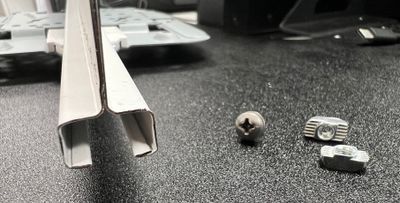
WBE7XX Universal Mounting Solutions: 9/16" Bolt Slot T-Bar Grid
#9/16BOLTSOLT #T-BAR_MOUNT #WBE750 #WBE758 #WBE710 #WBE718 #ACCESS_POINT #UNIVERSAL_MOUNT 9/16" T-Bar Grid Cross Section 9/16" Side View 6000N209 – McMaster-Carr Drop-in Hammer Nut M4 90317A573 – McMaster-Carr M4 X 8 mm Machine Screw/Washer Universal Mount attached to 9/16" T-Bar Grid Please see the attachment for more information.906Views1like1CommentPerformance Degradation:
We are experiencing significant performance degradation with our Netgear wireless network. The speed tests are consistently lower than expected, and large file transfers are painfully slow. Are there any recommended configurations or firmware updates to improve performance?"1.1KViews0likes1CommentWireless Access Point comparison between the WAX Range (WAX218, WAX220, WAX610, WAX620 & WAX630)
Greeting Netgear Community, I would like to seek your advice and knowledge regarding setting up my home WIFI connection. I am based in Melbourne and recently moved into a two-story house. Previously I've been using the Telstra Router with WIFI function for about 7-10 years and thought it was about time for an upgrade (my partner keeps complaining that the WIFI is slow where it can take up to 16 hours to perform updates on the PlayStation console). NOTE: The game requires an update every month I am looking to mount these WAPs on the ceiling where they are out of sight but provide high-level WIFI coverage. I've read some reviews and the following WAPs were recommended however I'm struggling to determine the differences between these WAPs: - WAX218 - WAX220 - WAX610 - WAX620 - WAX630 I'm aware that the WAX600 range offers Insight Manage Subscription however given that this is primarily home use, I don't think I will need this subscription package. I am looking WAP that meets the following requirements: - Currently, I have between 30 to 50 devices connected - High transfer speeds for NAS Streaming and file copying - Good coverage around the house - Single SSID WIFI and password (devices only connect to one SSID around the house) - WAP that offers future proofing (something that will last for another 7 to 10 years) without much maintenance I plan to get the house hard-wired up, where all the network cables will terminate in my study room. NOTE: My study room has a Server rack where I plan to purchase a 24x Port switch and an 8x Port POE switch (any recommendations on the model would be appreciated) Thank you in Advance Regards San4.7KViews0likes2Comments