Surveillance
194 Topics
No video, but good audio, in Live Viewer, readynas surveillance Toolkit.
hello I still use readynas surveillance with my 524x and 4x4tb disks. I have 11 cameras and the toolkit has been working fine on my windows10 rig. I still think it is a very good program. I recently bought a better pc. intel i9, rtx 3080, M.2 samsung 980. etc. It runs with windows 11. I have been wanting to upgrade to w11 for some time. Now, of course, the surveillance toolkit dont work. Therefore i have installed a virtualbox with windows 7. I have installed the plugin for IE. i have isntalled C++ and Java. In Live viewer i get good audio but no video? anyone now why? And the Playback system starts but i get a red square that says fault and it wont work. Has anyone managed to run readynas Surveillance Toolkit on a Windows 11 rig? Best regards to you all. Magnus from SwedenSolved2 Wohnparteien mit geteiltem Internet und Kameras
Hallo! Ich habe einen Netgear GS752TPv3 sowie eine Fritz!Box. Wir sind zwei Wohnparteien, die sich einen Internetanschluss teilen wollen, aber ansonsten getrennte (V)LANs haben wollen. Allerdings gibt es Überwachungskameras, auf die von beiden LANs sowie dem Internet zugegriffen werden soll. Ich habe heute einen Tag lang probiert, dies einzurichten, aber ohne Erfolg. Mein erster Ansatz war ein Primary VLAN, an das die Fritz!Box mit Internet sowie die Kameras angeschlossen sind, sowie zwei Community VLANs für die Familien. Leider finde ich keine Anleitung, die zu der Benutzeroberfläche meines Switches passt, und durch selber "rumfummeln" hat es nicht funktioniert, die Community VLANs haben keinen Internetzugriff. Ich blicke einfach nicht durch, was alles einzustellen ist, damit die Ports des Primary VLANs als "Promiscuous Port" funktionieren (Port-Zuordnungen und VLAN-Typen habe ich mMn. korrekt gesetzt). Lieber wäre mir sowieso eine Variante, bei der es zwei gleichberechtigte VLANs gibt, wobei das zweite VLAN an den Gastzugang der Fritz!Box angeschlossen ist. Die Kameras wären dann in einem dritten VLAN, und irgendwie über Routings würden diese von den beiden anderen VLANs zugreifbar sein. Die Kameras würden auch über ein Routing das Internet des Gastzugangs nutzen. Der Vorteil für mich wäre hierbei, dass das WLAN der Fritzbox zu dem einen Familien-VLAN gehört, und nicht zu dem Primary VLAN wie oben. Geht so etwas überhaupt? Irgendwie bin ich überrascht, wie schwierig das ganze ist, selbst mit einem Switch, der so teuer ist. Kann mir jemand ein paar Hinweise geben? Vielen Dank! Johannes
Where to from ReadyNAS Suirvellance?
So I've been running an RN104 with ReadyNAS Suirveillance for quite a few years, and it's been hit and miss over time. I bought extra licenses, had issues unlocking the licenses when the NAS software update failed.... and the software isn't compatible with modern browser versions half the time - some features aren't accessible anymore. So... where to from here? Is there better (any?) suirveillance software to run on a ReadyNAS? Or should I just relegate my ReadyNAS to being a backup device and move to another 'eco system'. Suggestions?ReadyNAS Surveillance and Milestone Apps End of Service
ReadyNAS Surveillance ReadyNAS Surveillance has not been available for purchase a number of years now. We have provided a replacement for this application known as Milestone Arcus Surveillance on September 26th, 2017. We removed this app from the ReadyNAS App Store, and is no longer available for download. Milestone Arcus Surveillance NETGEAR licensed a VMS product from Milestone which later became Arcus. During the time of the collaboration, there were several key technical and commercial benchmarks that were not met. NETGEAR and Arcus reached an amicable agreement to end that licensing relationship, as of July 1st, 2018 and the last date to purchase a camera license was December 31st, 2018.RN42400 + ReadyNAS 6.9.5 and Surveillance
I am exploring the video surveillance aspect of my ReadyNAS 424 + 6.9.5 and hitting loads of brick walls. I intalled the ReadyNAS Surveillance app, but only get a login screen that doesn’t accept any password I use with Netgear. Then I went to the Netgear website to try and learn more, but was disappointed. There is a nice video about switches though. Then I used the page Chat feature to talk with a nice NETGEAR Business team member who happily sent me on to the mySupport page which promptly sent me here to beg for answers. Also, before coming here I tried the Milestone Arcus Surveillance app which runs but keeps saying that I need to be licensed. There is even a link it provides for me to buy one. Went to their website and, surprise, was exactly as informative and helpful as the Netgear site. Okay, so is it really possible to use my ReadyNAS server with IP cameras and HOW DOES THAT WORK? Can anyone please point me in a direction more production than the road that leads me here?
ReadyNAS Surveillance and Insteon Cameras
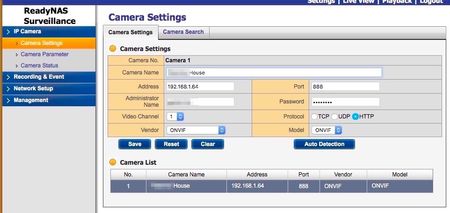
Has anyone had any success getting the ReadyNAS Surveillane software to connect and display vidoe from the an Insteon IP camera, I do believe the camera is made by Foscam. I have version 56 of the camera, there were previous version but this is their latest HD camera. I was able to get the surveillance software auto detect camera on my network by enable the Onvif protocol on the camera and enabling its port. I am trying to see if this works before buying any additional license or cameras. I use Insteon home controls and would like to have it all work together and not have to pay for cloud storage when I have my own home NAS. When I do live view all I get is a black screen. I have the latest version of Java install and I also enable Jave to work when connected to the NAS IP address. At this point I am stuck and can not figure out what to do and whether I have something not configured properly. Any help would be appreciated. Here are some screen shots of my set up.
Trouble activating Milestone Arcus on RN314
Hi folks -- I just bought a 4-camera license for Milestone Arcus from CDW, but when It try to activate it via the portal at milestone.netgear.com, it keeps saying "Please enter a valid key". Any ideas? I tried entering it with and without hyphens, tried both Firefox and Chrome, verified my serial # is correct but it refuses to accept it. Did I get a bad key?? My server: ReadyNAS RN-314 Product: Milestore Surveillance SKU: RNVMSMA4-10000S (For Milestone 4 channel)Solved3.1KViews0likes4CommentsError message while trying to activate Arcus Milestone License
I am having a problem registering my pari of Arcus RNVMSMA8-10000S licenses on a ReadyNAS RR4312X0. I get the follolwing error: "Salesforce API sfOneCloudContractMaptoPrdRe is not working please check No JSON object could be decoded error" I have attempted with mulitple browsers - please advise.