NETGEAR is aware of a growing number of phone and online scams. To learn how to stay safe click here.
Troubleshooting
1224 Topics
M4300 stack-port RX discarded packets, high mgmt latency
Hello, I have 4 M4300-28G-PoE+ (IP 192.168.101.4, fw version 12.0.19.23) in a stack ring, and one M4350-48G4XF (IP 192.168.101.5, fw 14.0.6.9), which is connected to the stack via 4 port LAG, each cord connected to one switch from the stack. The asic switching seems fine, I have <1ms latency on every device in the network, except for the stack management IP. Counters show RX discards on all but one stack cord (which is logically disconnected to prevent loop). The discards bleed steadily and more heavily if there are more devices in the network, though the data rate shows around 90Mb/s on each stack interface, which is nothing, when the stack interfaces show 10Gbit links. There are no errors, just RX discards (show stack-port counters all) as if the CPU buffer can't handle it. The stack management IP also has higher ping, 1-2ms with up to 80ms peaks. Those peaks are probably correlated with CPU usage spikes, normally sitting around 15 % on the Mgmt Sw, going well over 50% and even up to 80% (with agentMain, tRpcsrv.01000 and syncdb eating up the most at those peaks). There is VuWall AV system populating most of the switch ports. I have igmp-plus set up and igmpsnooping, with querier being the switch 192.168.101.4 (snoopTask eats almost nothing). The secondary switch 101.5 has set igmp mrouter 101 on the LAG and querier set to 101.4. Therefore IGMP should be correctly configured. I tried: Set all recommended settings for Netgear by VuWall. Upgraded FW from 12.0.19.21 to 12.0.19.23. Different presets in switch GUI. Disconnecting 3 out of 4 LAG ports. port-channel load-balance 3 and 6 and I have port-channel local-preference on that LAG, on both stack and M4350 I guess discarding rx packets on stack interfaces isn't a feature. Only the stack interface is having this high latency and sometimes our video streams freeze (this can be totally unrelated to the switch issue though) Disconnecting almost all devices, problems weren't as severe but persisted, which seems to me more like a broadcast storm/topology problem, rather than low bandwith problem. Any ideas of what could have been wrong?57Views0likes0CommentsGS308EP sends management traffic outside configured Management VLAN
Hello, I would like to report a possible VLAN isolation issue with my GS308EP. Environment Device: NETGEAR GS308EP Firmware: V2.0.0.11 (latest as of writing) Configuration: The uplink port is configured as an IEEE 802.1Q trunk. Management VLAN is configured as VLAN 8. Management IP address is 192.168.8.18. The uplink is connected to a Linux router with multiple 802.1Q VLAN interfaces. The VLAN interfaces share the physical NIC's MAC address, which is the default behavior of Linux VLAN interfaces. The router also has arp_ignore=1 and arp_announce=2 configured to prevent ARP flux-related issues. Observed behavior Although the management VLAN is configured as VLAN 8, the GS308EP sends management-related traffic on VLANs other than VLAN 8. For example, packet captures show the switch sending ARP requests on multiple VLANs: VLAN 19: ARP Request: who-has 192.168.8.1 tell 192.168.8.18 Sender MAC: 28:94:01:XX:XX:XX The same ARP request appears to be sent on the VLANs configured on the GS308EP, in ascending VLAN ID order. In addition, management traffic generated by the switch, such as NTP, DNS, and UPnP/SSDP traffic, is observed on non-management VLANs. Expected behavior I would expect: - Management traffic generated by the GS308EP to be sent only through the configured Management VLAN. - ARP, NTP, DNS, UPnP/SSDP, and other management-plane traffic to use VLAN 8 only. - No traffic sourced from the management IP address (192.168.8.18) to appear on other VLANs. I can provide packet captures if needed. Thank you.306Views2likes12CommentsGS116EP and Cisco Switch Trunk Issue
I need to pass multiple VLANS between a Cisco C9300 switch and a GS116EP. I've tried two brand new GS116EP switches, so it has to be an issue with the config. C9300 interface config: switchport trunk allowed vlan 1,10,20,30,40,50 switchport mode trunk switchport nonegotiate GS116EP config: port 1 is connected to the C9300 vlan 1 is untagged (C9300 native vlan ID) vlans 10,20,30,40,50 are tagged PVID is set to 1 The latest firmware version (2.0.0.5) has been installed. If I set corresponding C9300 interface to access mode, there's no issues. Trunking is the issue. What am I missing? Thank you for the help on this!Netgear Switch G5316v3
I setup a new home network and it worked for 3 mins then it stopped. Nighthawk MS80 system Modem connected to Mesh Router which is connected to Netgear G5316V3 16 port unmanaged switch which i then connected to CAble Matters 24 port Shielded RJ45 Patch Panel. Currently only have 7 confimed working ethernet lines to 2 TV's, Xbox, 2 PC's. 1 not used. When i set it all up and powered up, it all worked. Ethernet lines lasted about 5 mins then stopped. The error msg being shown is there is no internet signal. The wifi still works.However my ethernet cables no longer have internet signal. The Switch lights are all blinking and power is on. When i power cycle the switch the internet does not come back, however all the ports are blinking like its sending data. Is this Switch toast?96Views0likes2CommentsGS308e Admin page unreachable
I am having an issue where I can't access the Admin page for GS308e switch. I have ATT Fiber modem/router. I have the modem/router connected to the switch and multiple LAN connections off the switch. In my office, I have a Netgear nighthawk operating as a WAP. I cannot access through the Insight App nor the Switch Discovery Tool. I've tried resetting to default and I am still having same issues. I need help. Thanks,GS305E Setup VLAN's from behind the switch
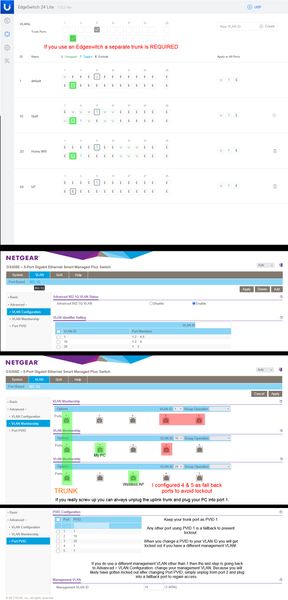
The PC used to configure the switch permanently resides downstream of the switch, on a VLAN, and MGMT VLAN that is not 1. It becomes a chicken & egg problem where you will be constantly locked out and forced to reset the switch as you try all the different combinations. I tried googling for solutions and the closest was the topic GS305E Trunking tagged and untagged VLAN's. It was very helpful. However my issue is slightly different and I wanted to share what worked. It was... a process. Step 1: Configure your upstream switch with a trunked port for all the VLAN's you intend to have traffic through the GS305E switch. In the case of a Ubiquiti EdgeSwitch 24 for example, it absolutely 100% requires a new trunked port... even though you already likely have a main trunk tagged and setup for VLAN's. Step 2: Manually configure your PC's IP address to be in the 192.168.0.x subnet. Plug your PC into any port on the switch. Which port you choose to plug into does not matter for initial configuration, they are all configured identically. Use a browser and go to 192.168.0.139 and login with the password: password. There is no username so this switch is not appropriate for a multi-admin environment. Step 3: Change your password. This is mandatory and you will be presented with a screen to do so immediately upon first successful login. Step 4: You will immediately see the main system settings page (home). Disable DHCP mode and provide the device with a static IP within the subnet range where it will permanently reside. Also provide the subnet gateway IP (Subnet DHCP server). Apply the changes, no reboot necessary, the browser will timeout because the switch will now be found at that new static IP. You will likely want to change your PC's IP again to be within the new subnet range. Step 5: Go to VLAN > 801.q > Advanced: and enable the advanced option. Step 6: Advanced > VLAN Configuration: add your VLANs. You cannot remove VLAN 1 it is hardcoded and also used as the management VLAN by default. DO NOT attempt to change the management VLAN yet if your management VLAN is not 1. You will do that at the very end almost as the last step. This is why a lot of people (meeeee) have locked up their GS305E during initial configuration by changing that too soon, don't do that, don't touch it, live with management VLAN as 1 until you have everything working. Step 7: Advanced > VLAN Membership: this is where you setup your trunked port and tags. Now is when you decide which port you want to be the trunk port. I use port 1 but port 5 is also a logical choice. Whatever port you decide to make the trunk the default VLAN 1 should be untagged and the rest of your VLAN's under it tagged. Step 8: Advanced > Port PVID: the trunk port should always remain as PVID 1. Change the PVID's to your VLAN ID's. A note of caution if you have a different management VLAN than 1. This will lock you out and force you to plug into a fall back port. If your management VLAN is 1 then you should be finished. Step 9: Advanced > VLAN Configuration: If you need to change your management VLAN now is the time, the last final step. If you would have attempted to change your management VLAN at any time during the prior processes you would have been locked out and likely forced to hardware reset the switch to defaults. This is what worked for me. I spent about a day trying to get it all to work and honestly I believe the one thing that prevented me from succeeding most of the time was not setting up that port as a trunk port on the Edgeswitch. It shouldn't be needed like that but it definitely does not work if that trunk checkbox isn't checked. All feedback, corrections, comments, will be gladly accepted. Just please try to keep them constructive.M4300-52G-POE+ Bricked Recovery Method
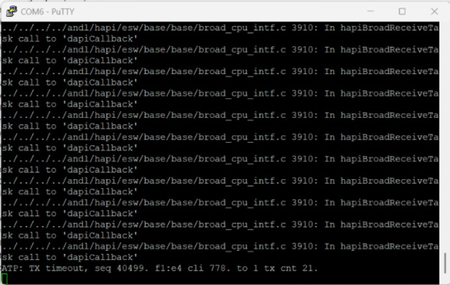
Anyone knows how to recover from a power outage that bricked my M4300 ? M4300-52G-POE+ We had an outage. Power came back on, then the unit boots but none of the 52-ports came back up. The OOB port lights up when plugged into, but nothing. Then I console it and got the readout. It didn't even get past port0 and stalled out. Here is the vid: https://www.youtube.com/shorts/7Q5zGWaNzxY About 8 seconds into it and the screen will show up170Views0likes1Comment