NETGEAR is aware of a growing number of phone and online scams. To learn how to stay safe click here.
mr6500
56 Topics
M3 (MH3150) with USB-C to Ethernet adapter (USB2ETH) does not charge and has no Ethernet connection.
Hello, I purchased the M3 along with the original Netgear USB-C Ethernet adapter, but unfortunately, this combination doesn't seem to work—even though the adapter is supposed to be compatible with the M3. I have configured the M3 settings for charging and tethering, and the adapter's green and orange LEDs light up as soon as a LAN cable is connected; however, no data transfer actually takes place. I cannot access the internet or the router itself through this connection. The adapter is supposed to work via plug-and-play, but it doesn't. The M3 appears to be running the latest firmware. At first, I tried using it without a power supply; later, I connected a USB-C charger to the adapter hoping that would solve the issue, but it didn't work. I also noticed that the router doesn't charge at all when connected via the adapter; it only charges when I plug the charging cable directly into the router, bypassing the adapter. Is there a trick to this? Is the adapter defective, or is the information on the product page—stating that it is compatible with the M3—incorrect? Regards,M6 Pro Error Type #3 Reason #1067
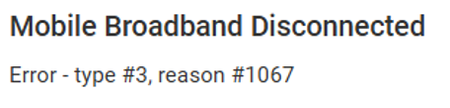
Hi Netgear, My M6 Pro has just started closing down this week twice per day and again overnight disconnecting broadband. Disconnecting Power or reboot resolves but will happen again through the day and evening. It showed Mobile Broadband Disconnected Error - type #3, reason #1067. My M6 Pro has battery removed and powered via Netgear supplied socket and usb cable. Unit temperature always around 30* to 40*C from external cooling fan so not a temperature issue. I believe this might suggest a firmware patch is now required from Netgear looking at previous similar issues? JohnPeng - Would you look at if a firmware patch is now required for me and the community using M6 Pro units and do you need me to send you my unit model.json file? Firmware - NTGX65_12.01.74.00 PRI Version - 03.00 Firmware Build Date - 14/11/2025 Many ThanksSolvedMR7400 Bugs
MR7400 Bug: WiFi standby issue with apostrophe in SSID + Cellular tab only shows info in Cellular-only mode I’m using a Netgear Nighthawk MR7400 (M7 Pro) and have run into two reproducible issues: WiFi Standby with Apostrophe in SSID If I set my SSID to include an apostrophe (e.g. Hoff's Nighthawk), the WiFi goes into standby mode and will not turn back on. WiFi is enabled, standby is set to Never, and broadcast SSID is on. The only workaround is to remove the apostrophe from the SSID (e.g. HoffsNighthawk). Cellular Tab Info Missing in Mixed Mode In the web interface, the Cellular tab stays blank (no signal, SIM details, or network status) if WiFi + Cellular is enabled in Internet Options. If I switch to Cellular-only mode, the tab populates correctly with all the details. This suggests a UI/firmware bug when using mixed WiFi + Cellular mode. Environment: Device: MR7400 (M7 Pro) Software: MR7400_1NA1NAS_04.00 Firmware: NTGX75_10.04.10.00 Carrier: AT&TNighthawk M7 Pro - eSIM support
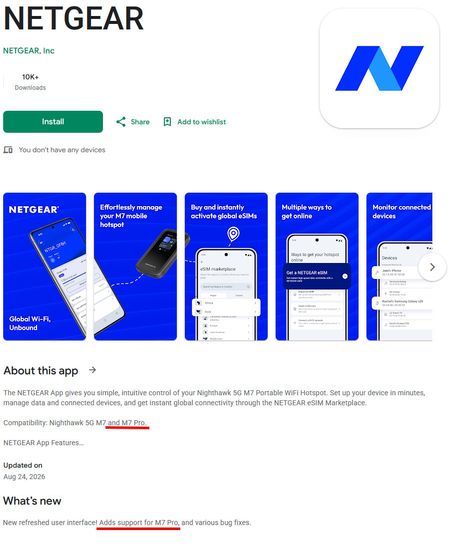
At CES 2026, Netgear unveiled the M7 router. At the time, the company stated that it was Netgear’s first 5G mobile hotspot with built-in eSIM support. The company had developed a special “Netgear” app (this time the one with the blue “N” icon), which used the Marketplace to purchase local and global data plans. The app supported only one M7 router (MH7150). Netgear promised at the time that eSIM functionality and the Marketplace would also be extended to the M7 PRO router (MR7450), which was already on the market. After many months, on August 24, 2026, the latest version (1.3.1.1072) appeared on the Google Play Store. The app’s description included the following entry: “Compatibility: Nighthawk 5G M7 and M7 Pro.” The “What’s New” section states: “(..) Adds support for M7 Pro (..)” Delighted, I called the Netgear hotline to confirm that they had already introduced eSIM support for the M7 Pro through their marketplace. The hotline representative told me that the app only supports the M7 models, not the M7 Pro. When I asked why the description then stated that it supports both the M7 and the M7 Pro... (https://play.google.com/store/apps/details?id=com.netgear.ntgr) the representative was very surprised. He put me on hold and spent quite some time contacting engineers to clarify the situation. He came back with the information that, yes, the description does say it supports both, but it actually doesn’t! :/ In light of the above, I have a question—is there anyone here who owns a Nighthawk M7 Pro router and can check if the latest app "Netgear" supports it? --- By the way, I apologize for the incorrect tag (below), but there's no option to select a tag for devices from the “MR7xxx” family, and it's required.MH7150-100EUS (M7) – Has anyone successfully activated a carrier eSIM? (Plus Poland / Europe)
Hello everyone, I am trying to activate a Plus Poland (Plus na Kartę) eSIM on my NETGEAR Nighthawk M7 (MH7150-100EUS). Router information Model: MH7150-100EUS Software Version: 2.12 Purchased in Poland What happens The QR code is recognized correctly. The eSIM profile starts downloading. The installation reaches the final step ("Finishing"). The router then displays Error Code: 1 and the eSIM is not installed. The eSIM profile is brand new and has never been activated on any other device. I have already: restarted the router, confirmed that the router has Internet access, checked for firmware updates (none available). I have also opened a support case with NETGEAR. My questions: Has anyone successfully activated a carrier-issued eSIM (not a NETGEAR marketplace eSIM) on the MH7150? If yes: Which mobile operator? Which country? Which firmware version? Has anyone successfully used Plus Poland, Orange Poland, Play or T-Mobile Poland eSIM on this router? Does anyone know what Error Code 1 at the "Finishing" stage actually means? I have found a few discussions where users experienced similar eSIM activation issues, but I have not yet found any confirmed successful activation with a Polish carrier. Any information would be greatly appreciated. Thank you!M6 and IP-passthrough with routable static IP
I have an M6 Pro (MR6550) and a T-Mobile business internet account, and I'm unable to use the M6 in passthrough mode. The M6 (the hotspot) does some pretty inexplicable things. Like ARP my firewall from 192.168.3.1. As I said, my firewall has a public routable (non RFC-1918) address, so 192.168.3.1 is not going to be adjacent on the subnet, and therefore my firewall will drop the ARP request at a minimum, and potentially trigger the IDS as there being misconfiguration of a peer on the network or even someone doing malicious probes. It also sends SSDP packets to my network segment as multicasts. Why? Only hackers use SSDP on a WAN interface: to figure out (1) if you're misconfigured and (2) to know what sort of machines are on your network so they can tailor attacks after fingerprinting the hosts and looking up their attack surfaces and vulnerabilities. But more to the point, it's a modem/bridge. It should be operating at layer 2 on the Ethernet side, and layer 3 on the 4G/5G side. The correct behavior is trivial: (1) When the APN provisioning is received from the 5G carrier, PROXY ARP the default gateway's IP address with your own (M6's) MAC address (or GARP it, that works too if the firewall has been sysctl'd to accept GARP's on a public interface... which is sometimes used for man-in-the-middle attacks on public networks). (2) Then ARP REQUEST the firewall's IP address so you know where to forward the packets. That 2nd step is likely unnecessary, since most IP neighbor implementations cache the address of an ARP requestor in anticipation of their being return traffic (i.e. some sort of answer). You don't need SSDP. Or mDNS. Or to be trying to figure out anything about what's attached to the firewall. That's just suspicious behavior. Also, don't IPv6 SSDP me if I'm not provisioned for IPv6! That just fills my logs with noise. If I do a ping -c 1000 8.8.8.8 then I see spans of 8 or 9 packets being passed, then 20 or so dropped, then 8 or 9 passed, then 20 or so dropped... until the test completes. How did this not turn up during homologation testing? I'm getting 62-70% packet loss!!!MR7400 (AT&T): USB tethering remains active after being disabled in both device and web UI
MR7400 (AT&T): USB tethering remains active after being disabled in both device and web UI M7 Pro (MR7400, AT&T) Software: MR7400-1A1NAS_04.17 Firmware: NTGX75_10.04.43.00 GUI: M7_ATT_v07.01.80.00 Hardware: 1.0 Client: MacBook Pro (M4), macOS 26.6.2 USB tethering remains fully functional after being disabled. I have set the touchscreen control at Settings > More > USB Tethering to OFF, and the web UI at Mobile Router Setup > Use USB port for to Charge only. Both settings save and persist across device restarts. Despite that, the hotspot continues presenting a USB network function to the connected Mac. Verified in ioreg while both settings were in place: "USB Vendor Name" = "Netgear" "USB Product Name" = "MR7X00" "USB Serial Number" = "c5ff0a77" The Mac receives 192.168.1.4 by DHCP from the hotspot, which the user manual identifies as the address assigned to a USB tethered client. Traffic bound explicitly to that interface reaches the internet and returns: ping -b en19 -c 3 8.8.8.8 3 packets transmitted, 3 packets received, 0.0% packet loss I restarted the Mac with both settings in place and the interface came back up unchanged, so this is not stale state on the client side. Impact: I use the 2.5G Ethernet port as my data path to the same Mac. Because the tethering interface comes up anyway, the Mac ends up with two interfaces on 192.168.1.0/24, both gatewayed at 192.168.1.1 with the same DNS and IPv6 prefix. I have had to disable the network service on the Mac to work around it, and that does not survive a hotspot restart. Separately, tethering often fails to come up at all when I connect the cable to an already-running hotspot, and does not appear until I unplug and reconnect. The manual's tethering procedure has you power the hotspot off first and connect the cable before booting, which suggests the USB network function is not presented until some point during startup. Possibly related: https://community.netgear.com/discussions/aircard/mr7400-m7-pro-att/2473181. Same AT&T build, different symptom, but also a settings-layer control not behaving as shown. Screenshots of both settings attached.Using M6 Pro, EAX17 & EAX12 As Home Network
Hi All, I thought I would share my Home Network configuration using my M6 Pro Router and 2xEAX17s, EAX12 WiFi Routers for extended WiFi Coverage. I utilise the ethernet option also from these devices to get the very best WiFi coverage within home & back garden area. All working great with excellent coverage for my needs eliminating previous black spots. Any thoughts abouts this configuration?Netgear App (for M7) - Translation Issues [PL]
Hi, I've noticed some issue with translated text inside app - Netgear (for M7 Mobile Router), for Polish language. Screenshots from app attached. Correct text would be: First one: Przeglądaj nasze marketplace, aby kupic eSIM do swojego hotspota. Second one: Ustawianie %eSIM name% jako aktywnej karty eSIM na hotspocie I suggest to remove word "moim" also.MR6450-100EUS in boot loop
My MR6450 is stuck in a boot loop It shows the Netgear logo, then the 5G logo, then reboots. I have tried multiple attempts to factiory reset, but no use. Using FDT.exe I have been able to communicate to the model from my computer. I need the full recovery firmware package for MR6450-100EUS and should be able to get this running again.