NETGEAR is aware of a growing number of phone and online scams. To learn how to stay safe click here.
not listed
17 Topics
USB HD attach to R6900v2
I believe I read (likely in the user manual) that there's a USB port to which I can connect an external HD. What wasn't clear was maximum size for the HD. Also, I was surprised to see the drive formatting included Linux ext2 / ext3 / ext4 (I think). I guess I could go with a 5Tb drive, formatted prior to the router to ext4. That would satisfy my plan. Sound OK? Thx.141Views0likes6CommentsI was having some issues with the 2.4GHz not showing properly
I was having some issues with the 2.4GHz not showing properly, but mine was initiated by having a Spectrum router connected after they talked me into it. Their router only displays the network name of whatever has been defined by them or requested by yourself, and it decides if it will use 2.4 or 5 GHz. The Spectrum router seemed to have limited range compared to my Nighthawk, and it seemed to keep randomly dropping out, so I elected to which it back to the Nighthawk. The one thing I forgot to do when I switched the internet cable from the Spectrum router to the nighthawk was I forgot to power down the Spectrum router, which was still broadcasting the same network name as my Nighthawk. I could not figure out why 5GHz was displaying under properties of the network, when the router was clearly set for 2.4GHz. It was also taking a long time to connect. Then it occurred to me that the Spectrum router was still sending out the same network name as the Nighthawk, and I was connecting to or the other routers with hit or miss internet connection . Once I powered down the Spectrum router all was working as before.39Views0likes1CommentBurnt smd, need help to identify Netgear R6900v2
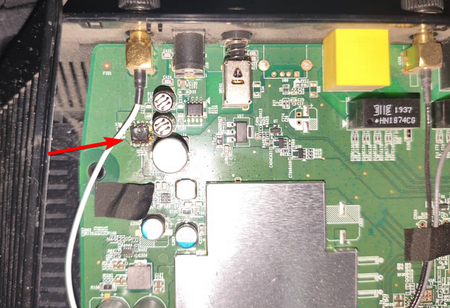
By mistake in emergency I inverted the polarity of the DC adapter voltage and burnt an smd and the router doesnt turn on now, there is a low frequency sound but thats it, I need to identify this smd to replace it. Thank you anyone!364Views0likes5CommentsVPN client on R6700v3 router - internal network
I have a R6700v3 router with the VPN service set up. I have a Windows 10 laptop with the latest OpenVPN client on it. I had to set it to Unsecured since the TLS was reporting as too low. The client does connect and gets a 192.168.254.2 address from the router. I verified the router has the laptop listed as a connected device. However, I can not ping or connect to any of my internal 172.16.200.xxx network devices. I have the VPN service set for 'Home network and Internet' in its setup. I found mention of 'VPN Passthrough' in other forums, but I don't see that setting on the R6700v3. Any suggestions? Thank you!Website blocked on RAX-50
Beginning on 10-17-25 I began receiving this message when attempting to access https://www.riil.org/: This IP Address has been blocked. Please contact support if you believe you have received this message in error. 68.230.132.151 I receive the message on multiple devices connected to my Netgear Nighthawk RAX-50. I am able to access it on my work laptop while on their network. I have the Nighthawk app on my phone but when I pull it up I don't see any settings to manage blocked web sites. There is a section called "Security & Support" but when I tap it I am prompted to purchase Armor Plus. I am not looking to purchase firewall support but unblock this site. Any suggestions?Solved268Views0likes10CommentsI have one router and 4 satellites
Did you end up buying a new one? Mine is two years old and disconnects often and depressing part is I have to reset and reboot several times before I can establish a connection. I have one router and 4 satellites. It is a pain to bring the router back and a nightmare to bring the satellites back. Extremely inefficient system I guess126Views0likes3CommentsI have broken my connection to our AC2100 R7200 router
Yesterday while I was trying to manage devices in our nighthawk, I accidentally removed my iphone which is also the admin. When I tried to reconnect, I am having issues. It will not connect. This appears to be because I have reset to the factory name for the router and the security But in the world of the chicken and the egg, I cannot access the APP in order to fix any of it???? I am so lost161Views0likes2CommentsI can't get past the "Updating DST Adapter Information ..." spinning wheel
Have you found a solution? The same thing is happening to me after a factory reset... I can't get past the "Updating DST Adapter Information ..." spinning wheel. It was working well before the reset. Thanks!160Views0likes5CommentsI have this error "TFTP block rollover. Upload might fail!"
I have this error. "TFTP block rollover. Upload might fail!" By default, file transfers using TFTP are limited to 65535 * 512 bytes (almost 32 MiB). Uploading files exceeding this limit might fail, depending on the device. If it does fail, your only option is flashing an older image, which is smaller than 32 MiB. The first firmware 1.0.1.4 is 36.4 MB in size. How can I solve this?197Views0likes3Comments