NETGEAR is aware of a growing number of phone and online scams. To learn how to stay safe click here.
rbk850
87 Topics
Orbi app not showing satellites connected
My issue is simple: I have 1 Orbi as the router and 5 satellites. Everything is working, but I can't see any of the satellites in the Orbi app. I have tried finding them again, but they're not off the network, so it just reconnects. The router is on firmware v7.2.8.8. Obviously, I can't see the satellite firmware versions at this point. Any ideas what to do?RBR850 – massive IPv4-TCP-einbrüche bei FTTH/VLAN 31 – Verdacht auf WAN/NAT/Firmware-Problem
Sehr geehrtes NETGEAR Support-Team, ich betreibe ein NETGEAR Orbi RBK850 System (RBR850 + RBS850) an einem österreichischen spusu-FTTH-Anschluss. Ich möchte den Orbi als Router direkt hinter dem ONT betreiben und nicht dauerhaft die vom Provider gelieferte FRITZ!Box verwenden. Im Router-Modus treten jedoch sporadisch massive TCP-Performanceprobleme auf. Ich habe das Verhalten mit mehreren reproduzierbaren Tests eingegrenzt. Hardware und Firmware NETGEAR Orbi RBR850; Satellite RBS850 Firmware: V7.2.8.8_5.1.24 LAN: 192.168.1.0/24; Router-IP 192.168.1.1 Komplett neue Einrichtung; keine alte RBR50-Konfiguration importiert FTTH-Anschluss / Provider Provider: spusu Österreich – Glasfaser/FTTH. Das ONT arbeitet laut Provider im Bridge-Modus. VLAN ID 31 IP automatisch über DHCP ONT im Normalbetrieb als Bridge Verwendung eines eigenen Routers ausdrücklich erlaubt WAN-Konfiguration des RBR850 Dynamic IP / DHCP; kein PPPoE VLAN ID 31, Priorität 0 MTU 1500 DNS automatisch NAT Filter: Offen SIP ALG: deaktiviert WAN-Port: 2.5 Gbit/s WAN Aggregation: deaktiviert IGMP Proxy: deaktiviert Keine DHCP Options MAC-Adresse: Standard WAN-IP / CGNAT Direkt am ONT erhält der RBR850 per DHCP beispielsweise die WAN-IPv4-Adresse 100.66.86.229. Diese liegt im Bereich 100.64.0.0/10 und damit hinter Carrier Grade NAT (CGNAT). Traceroute zeigt entsprechende Provider-interne 100.x-/10.x-Adressen. Die Latenz ist grundsätzlich sehr niedrig. Fehlerbild Das Problem ist nicht dauerhaft. Bei identischem Setup gibt es normale Läufe mit ca. 180–225 Mbit/s und Fehlerläufe mit nur ca. 2–3 Mbit/s. Bei den langsamen Läufen wird die TCP-Verbindung teilweise vom Server zurückgesetzt. Reproduzierbarer IPv4-TCP-Test Der Test erfolgt von einem per Ethernet angeschlossenen Windows-PC: curl -4 -L -o NUL -w "IPv4: %{speed_download} Bytes/s | %{http_code} | %{size_download} Bytes\n" "https://proof.ovh.net/files/100Mb.dat" Fehlerläufe: 360.838 Bytes/s | HTTP 200 | 22.377.966 Bytes; danach: curl: (56) Recv failure: Connection was reset (≈ 2,9 Mbit/s) 320.466 Bytes/s; Abbruch nach ca. 18,68 MB mit Connection Reset (≈ 2,6 Mbit/s) 406.639 Bytes/s; Abbruch nach ca. 23,57 MB mit Connection Reset (≈ 3,25 Mbit/s) Normale Läufe mit demselben RBR850: 28.184.465 Bytes/s; 104.857.600 Bytes vollständig übertragen (≈ 225 Mbit/s) 22.872.204 Bytes/s; HTTP 200; 104.857.600 Bytes vollständig übertragen (≈ 183 Mbit/s) IPv4-/IPv6-Vergleich Mit derselben Datei, demselben PC und demselben Orbi: IPv4 – problematischer Lauf 360.838 Bytes/s | HTTP 200 | 22.377.966 Bytes – anschließend TCP Connection Reset IPv6 – gleichzeitig funktionierend 17.926.662 Bytes/s | HTTP 200 | 104.857.600 Bytes vollständig übertragen Das entspricht im problematischen Lauf ungefähr 2,9 Mbit/s über IPv4 gegenüber ca. 143 Mbit/s über IPv6. Später waren auch IPv4-Läufe wieder mit ca. 183 Mbit/s möglich. Das Verhalten ist daher intermittierend und nicht durch eine konstante Bandbreitenbegrenzung erklärbar. IPv6 und Ping Aktueller IPv6-Test: ping -6 google.com → 4/4 Antworten, 0 % Verlust, 35–36 ms Während langsamer IPv4-Downloads wurde parallel ping 1.1.1.1 -t ausgeführt. Die Antworten blieben grundsätzlich niedrig (typisch 2–6 ms, einzelne Werte etwa 20–36 ms), ohne sichtbare Timeouts oder massiven Paketverlust. Der TCP-Durchsatz kann somit stark einbrechen, obwohl ICMP weiterhin funktioniert. MTU-Test ping 1.1.1.1 -f -l 1472 → 0 % Verlust ping 1.1.1.1 -f -l 1464 → 0 % Verlust ping 1.1.1.1 -f -l 1400 → 0 % Verlust MTU 1500 funktioniert nachweislich; ein klassisches MTU-/Fragmentierungsproblem erscheint unwahrscheinlich. LAN und Routing Ping zum RBR850 (192.168.1.1) liegt bei ca. 1–2 ms. Die entscheidenden Durchsatztests erfolgen per Ethernet. IPv4-Traceroutes zu 1.1.1.1 und Google sind niedrig-latenz und unauffällig. Gegenprobe mit der Provider-FRITZ!Box Zur Eingrenzung habe ich die von spusu gelieferte FRITZ!Box vor den RBR850 gesetzt und den RBR850 in den AP-Modus versetzt: spusu FTTH → ONT → FRITZ!Box → RBR850 (AP-Modus) → PC/LAN/WLAN Damit übernimmt die FRITZ!Box WAN, DHCP, NAT, IPv4 und IPv6; der RBR850 übernimmt nur AP-/LAN-/WLAN-Funktionen. Dieser A/B-Test soll zeigen, ob die zuvor beobachteten TCP-Einbrüche verschwinden, sobald der WAN-/NAT-Stack des RBR850 nicht mehr verwendet wird. Weitere bereits geprüfte Punkte Traffic Meter deaktiviert; kein Monatslimit und keine automatische Trennung Keine klassische QoS-/Dynamic-QoS-Funktion in der aktuellen Firmware-Oberfläche vorhanden RTS/CTS testweise angepasst (2,4 GHz 1000 / 5 GHz 2347); Problem tritt bei Ethernet-Tests auf und ist daher kein reines WLAN-Problem SIP ALG deaktiviert MTU 1500 VLAN 31 / DHCP entspricht exakt den Angaben von spusu Konfigurationsbackup Ich habe eine RBR850-Konfigurationssicherung namens NETGEAR_RBR850.cfg und kann diese bei Bedarf zur Analyse bereitstellen. Bitte an NETGEAR Ich bitte Sie insbesondere um Prüfung folgender Punkte: Bekannte Probleme des RBR850 mit FTTH + DHCP + VLAN Tagging + CGNAT, speziell IPv4-TCP/HTTPS Bekannte Probleme der Firmware V7.2.8.8_5.1.24 mit WAN-TCP, NAT, IPv4, CGNAT, VLAN-tagged DHCP WAN oder TCP Connection Resets Mögliche Unterschiede in der IPv4-/IPv6-TCP-Verarbeitung des RBR850 Mögliche Probleme beim NAT-State-Handling hinter Provider-CGNAT Bekannte Probleme der VLAN-Tag-Group-Funktion bei VLAN 31 und DHCP-WAN an FTTH-ONTs Empfohlene Firmware für einen kontrollierten A/B-Test bzw. möglichen Firmware-Rollback Welche Debug-, System- oder WAN-Logs Sie für eine technische Analyse benötigen Gewünschtes Zielsetup Mein gewünschtes Setup ist: spusu FTTH → ONT → VLAN 31/DHCP → RBR850 im Router-Modus → RBS850 + LAN/WLAN. Die FRITZ!Box möchte ich nach Möglichkeit nicht dauerhaft verwenden. Der Provider hat die Nutzung eines eigenen Routers ausdrücklich bestätigt. Zusammenfassung Die bisherigen Tests sprechen gegen ein allgemeines Problem der Glasfaserleitung, des LANs, der MTU oder der grundsätzlichen Internet-Erreichbarkeit. Der RBR850 kann über denselben Anschluss zeitweise mehr als 180–225 Mbit/s über IPv4 übertragen und über 100 Mbit/s über IPv6. Das Problem ist jedoch intermittierend: IPv4-TCP kann ohne erkennbaren ICMP-Ausfall auf ca. 2–3 Mbit/s einbrechen und anschließend mit einem TCP Connection Reset abbrechen. Der Gegenversuch mit der Provider-FRITZ!Box als Router und dem RBR850 im AP-Modus soll nun klären, ob das Problem verschwindet, sobald der WAN-/NAT-Stack des RBR850 nicht mehr verwendet wird. Ich wäre für eine technische Analyse durch NETGEAR sehr dankbar, insbesondere im Hinblick auf Firmware, WAN-/NAT-Implementierung, IPv4-TCP und die Kombination aus FTTH, VLAN 31, DHCP und CGNAT. Mit freundlichen GrüßenRouter Hardware-type Fault
Hello NETGEAR Support, My Orbi RBR850 router (serial, purchased 2020-11-07) is past its warranty, but it has developed a hardware-type fault, and I'd like to ask whether you can offer a goodwill replacement or a discount on a replacement. The problem: several times an hour, the router loses its internet connection for 1 to 3 seconds. The LED turns magenta, and the router log shows "Internet disconnected" then "Internet connected" immediately after. Both of my satellites then re-request addresses, so the whole house drops, and live streaming buffers constantly. For example, on Oct 2, 2026 it happened at about 7:24, 7:26, 7:34, 7:37, 7:46, 7:48 and 7:51 AM. I've already ruled out the cable (brand new), the gateway port (tried a different one), the ISP line (my public IP never changes through the drops), and firmware (already the latest, V7.2.8.8). I've power-cycled everything multiple times. I've been a Netgear customer for about 6 years and run a three-unit Orbi system (RBR850 plus two RBS850s). I'd much rather stay with Orbi than replace the whole system with another brand. Is there any replacement or discount you can offer for this router? Thank you, Michael Baublit [email protected]RBR850 background Speedtest running?
Hi all, Been seeing some odd network behaviour relating to my RBK853 that I recently updated to V7.2.8.8_5.1.24 that I'm pretty sure I've tracked back to a background Speedtest that is running every two hours. I'm running it in AP mode sitting behind a UniFi Cloud Gateway which gives me loads of data about my network. I've been seeing spikes in traffic every couple of hours showing consistently 2.6GB of activity over a period of less than 5 minutes. This activity is directly attributed to the Orbi router but when I dig further, none of the devices connecting to it or the satellites are using anywhere near that amount of data. This usage is occurring every 2 hours and has been doing so for a number of days - I recently updated the FW to V7.2.8.8_5.1.24 (on 28th Sept). Based on the pattern, these occur at 50-55mins past the hour, I ran a debug trace on the RBR and looking at the speedtest_result.log I can see a Speedtest running at the time of the debug that I didn't request. [2026-10-01 16:53:58.854] [info] HTTP request (effective url: https://config.speedtest.net/v1/embed/......... Looking at the Speedtest results in the web interface a couple of hours later, I can see a more recent speedtest result, which again, I didn't request and the log file in a more recent debug has that later test result. Blocking Speedtest.net at the network level stops it occurring, but, obvs, stops other devices running speed tests. Am I alone in this? I'm guessing it's perhaps quite niche to be able to see the traffic on the network. TLDR.. appear to have an automated background Speedtest running every 2 hours. Am I alone? RBK853 UniFi Cloud Gateway Fiber ISP modem : Sagemcom device rebranded for my ISP
IPv6
Since replies have been turned off on all previous discussions regarding the IPv6 trouble introduced with version 7.2.7.15 and newer, I needed to create a new thread. Checking in on this once again, last mentions stated they were aware, were working on it, etc. I realize the 850 is old hardware but a properly working current firmware would be nice. Perhaps someone can share some insight on the delay? Thank you.Kein Connect zu RBR850 trotz voller Funktion
Hallo zusammen, ich lese mich seit Tagen durch die Netgear Foren, Reddit und Google Suchvorschläge, komme aber nur einem Nervenzusammenbruch näher. Folgendes Setup: Ich nutze seit Jahren eine Fritbox (WLAN deaktiviert) und habe dahinter einen Orbi RBR850 und zwei Satelliten. Alles läuft seit Jahren stabil. Neulich wollte ich mich nach langer Zeit mal wieder connecten, aber ich erhalte mit allen Browsern und der App die Fehlermeldung, dass eine Verbindung nicht möglich ist. Skurril ist, dass ich mir in der App trotz Fehlermeldung die Details wie den Gerätemanager anschauen kann. Ich habe schon alle Tipps probiert - vom Strom getrennt, erst Fritzbox und dann Router wieder angeschlossen, Browser Cache geleert, über IPs versucht den Router zu erreichen etc. Hat noch jemand eine andere Idee außer einen Rest? Bin für jeden Hinweis dankbar! Danke, AlexOrbi 850 running V7.2.8.5_5.1.21 dhcp issues
Hi I recently switched my Orbi 850 back to router mode from AP mode as I have a new ISP. What i've found within a day is that the dhcp function on the Orbi 850 (+1 satellite) running V7.2.8.5_5.1.21 is incredibly flaky. We have about 80 devices at home, the majority of which are nanoleaf light bulbs (~40 or so), sonos devices and various other "smart" appliances. I've rebooted it multiple times to try and get things working, and it works for some but then other devices cannot get connected. Symptoms I've seen are: Windows PCs getting the default microsoft IP address of 169.254, which means it could not get an IP address. Devices that were connected before the reboot won't connect after. Devices showing incorrect device "names" against the respective mac address in the device list. Overall it seems to be incredibly unreliable. Anyone else experienced this?RBR850 Won’t connect to Orbi App
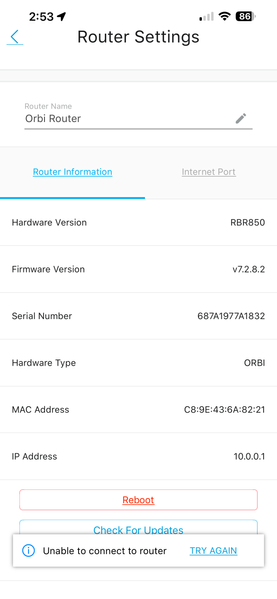
I opened the Orbi App (2.54.1.2) on my iPhone (iOS 26.6.1) to monitor some devices on my network and get the message "We can’t find your Orbi". My iPhone is connected to the WiFi SSID noted in my RBR850 Router. I am not having any internet connectivity problems on the 30 some items connected to the same SSID WiFi network. If I look in Network Map, My ATT Router and RBR850 Show as not connected, but my 1 RBS850 shows as connected. I note that my Router Settings show Firmware v7.2.8.2 but the latest version is v7.2.8.5. I tried to manually upload the newer firmware but I can’t seem to connect to my Router login page (10.0.0.1). Where do I go from here? I’ve had this system for 3 years and it has worked flawlessly, what could be wrong? Thanks in Advance!