NETGEAR is aware of a growing number of phone and online scams. To learn how to stay safe click here.
Forum Discussion

sndlt
Jul 30, 2015Aspirant
LLDP on ProSafe GSM7248
Has anyone have much luck enabling LLDP on ProSafe GSM 7248 class managed switches?
Below are my attempts
(GSM7248) (Config)#ll?
(GSM7248) (Config)#
(GSM7248) >ena
Password:
(GSM7248) #?
cablestatus Test the cable attached to an interface.
clear Reset configuration to factory defaults.
configure Enter into global config mode.
delete Deletes file.
copy Uploads or Downloads file.
disconnect Close active remote session(s).
dot1x Configure dot1x privileged exec parameters.
exit To exit from the mode.
Ezconfig Run the easy configuration.
help Display help for various special keys.
ip Configure IP parameters.
logout Exit this session. Any unsaved changes are lost.
network Configuration for inband connectivity.
ping Send ICMP echo packets to a specified IP address.
reload Reset the switch.
save Save the running configuration to NVRAM.
script Apply/Delete/List/Show/Validate Configuration Scripts.
set Set Router Parameters.
show Show configured data.
sshcon Configure SSH connection parameters.
telnet Telnet to a remote host.
telnetcon Configure telnet connection parameters.
--More-- or (q)uit
terminal Set terminal line parameters.
traceroute Trace route to destination.
vlan Type 'vlan database' to enter into VLAN mode.
Thanks.
9 Replies
- JohnRoNETGEAR Employee Retired
Hello sndlt,
Welcome to the community!
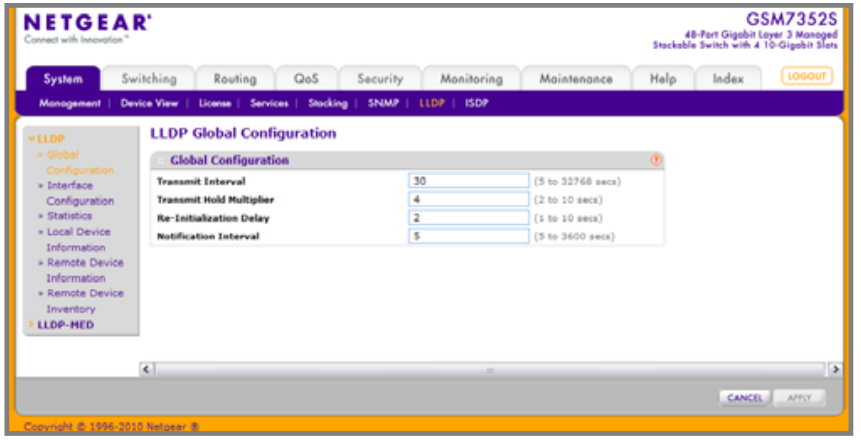
I would like to know if you have tried to configure LLDP using the web interface of the swicth. Please refer to the image below for reference:
For configuring LLDP uisng the web ui, please click this link. You should be able to find LLDP global configuration of pages 104 up to 166 for LLDP-MED.
I hope using the web UI will help you with the configuration. I'll be looking forward to your response.
Thanks,
 sndltAspirant
Thank you. I'll try that tomorrow when I get to office.
So this means I have to give interface(mgmt) an ip to access?
- JohnRoNETGEAR Employee Retired
Hello sndlt,
Yes, you'll have to give it an IP address for web access. You can follow this old version of the install guide found on our product support page, the document is a bit old but still applies.
I'll look forward to your response.
Thanks,

Related Content
NETGEAR Academy

Boost your skills with the Netgear Academy - Get trained, certified and stay ahead with the latest Netgear technology!
Join Us!
