NETGEAR is aware of a growing number of phone and online scams. To learn how to stay safe click here.
Forum Discussion

Gear-Head
May 15, 2017Aspirant
Setting up Port Authentication w/ RADIUS on a S3300, seeing timeout erros
On the same network that I am attempting to get 802.1x working I have it working threw a GS752TP-poe and a Unifi AP to a Win VM running RADIUS. With the S3300 conneced to a computer on a secured ...
- Jul 12, 2017
Daniel_Z,
So, I broke down and bought a S3300 just for testing this issue. First thing I did was upgrade the firmware from the Netgear site as I always do on new out of the box products. Set the switch up to work on the same network and implemented 802.1x w/ RADUIS and what do you know it works. But what! Why? After comparing the production S3300's to the sandbox S3300 I found the firmware versions are not the same.
Throughout this thread I had been using v6.6.1.4 which I has stated in a previous thread and I'm not sure when but your team has since than released v6.6.1.7. I have confirmed If I down grade and rebuild 802.1x w/ RADIUS on firmware v6.6.1.4 that 802.1x port authentication breaks. Still no mention of 802.1x w/ RADIUS port authentication being fixed in v6.6.1.7. Maybe this should be added to the release notes for v.6.6.1.4 and v6.6.1.7 as it would be nice to know there was an issue and has been fixed.
Broken 802.1x Port Authentication /w Radius - https://kb.netgear.com/31220/S3300-Firmware-Version-6-6-1-4
Fixed 802.1x Port Authentication /w Radius - https://kb.netgear.com/000038558/S3300-Firmware-Version-6-6-1-7

DanielZhang
May 22, 2017NETGEAR Expert
Hi Gear-Head
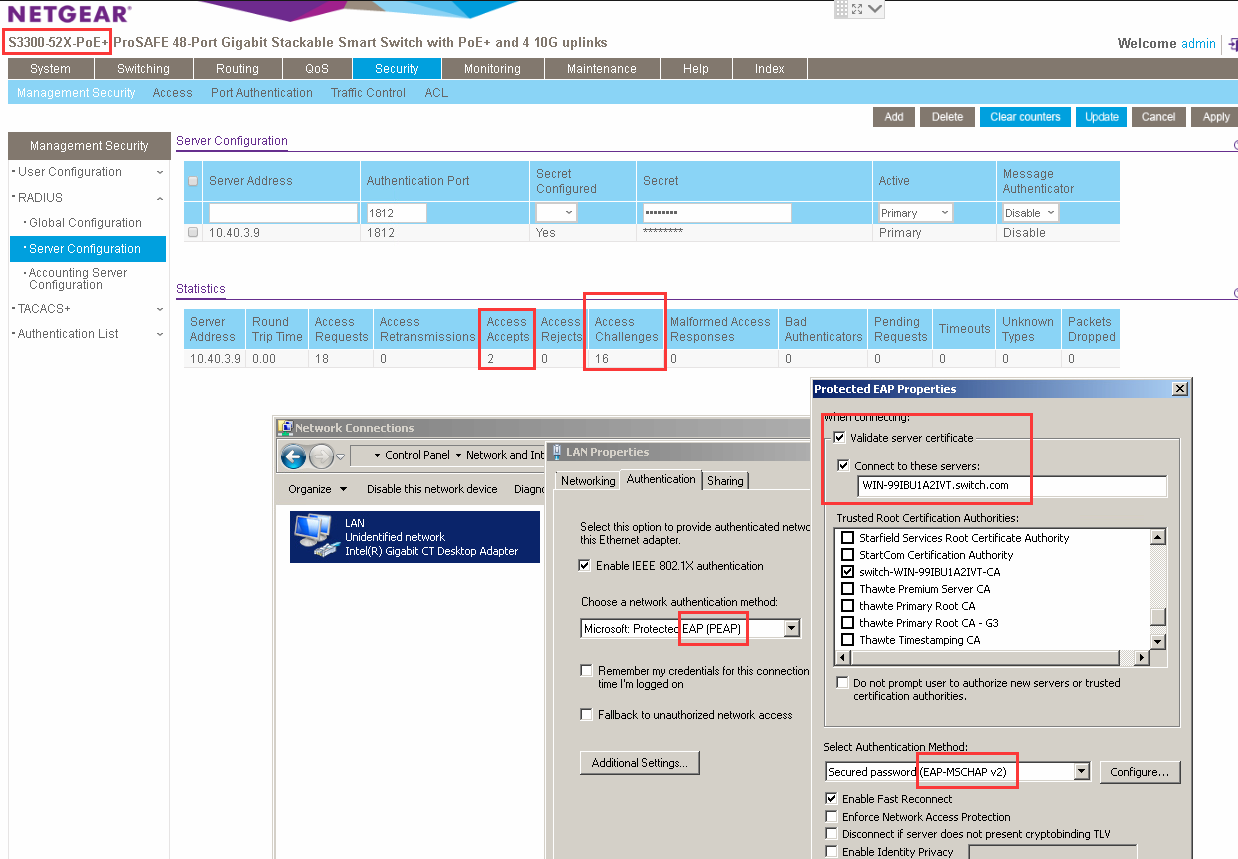
I have tried the EAP-MSCHAP v2 on my S3300 with windows 2012 R2 NAP radius server.
Everythink work correct without any timeout.
My topology:
PC---S3300--windows 2012 Radius server
Could you please double check the configuration on windows 2012 radius server?
Which topology did you use for 802.1X?
Gear-Head
May 31, 2017Aspirant
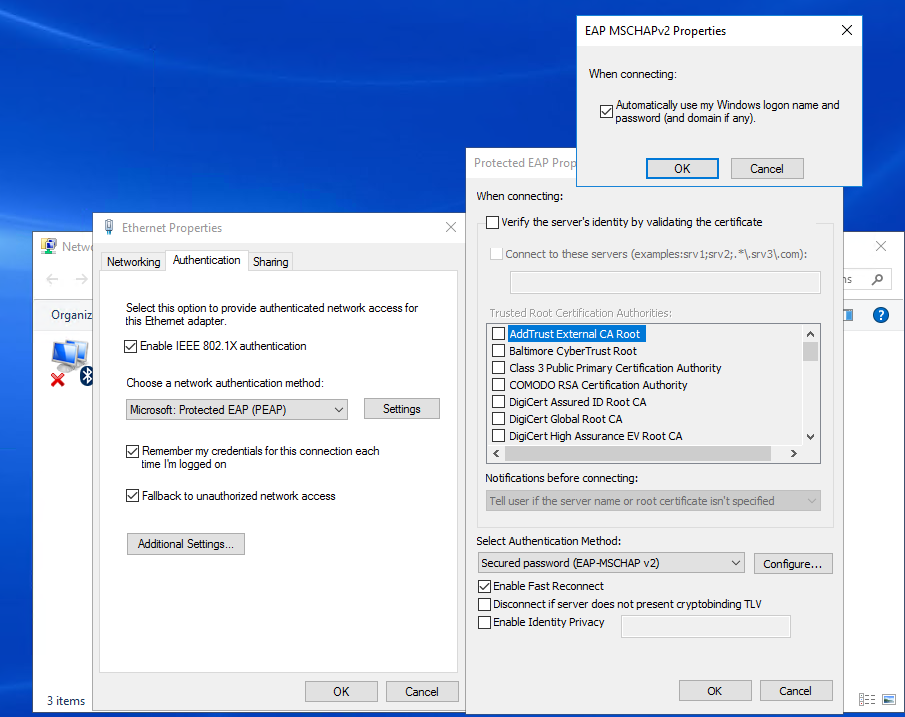
I have reset the switch to default and reconfigured from scratch. Seeing the errors or lack of below buit not seeing the timeout. Also Curious if the below also might effect this S3300 Firmware? https://community.netgear.com/t5/Managed-Switches/Latest-firmware-11-0-0-28-kills-all-switches/td-p/1216458
Client - EventViewer - WiredAutoConfig
Wired 802.1X Authentication failed.
Network Adapter: Intel(R) Ethernet Connection (2) I219-LM
Interface GUID: {3d2f27b0-f417-434e-887f-095be80778b8}
Peer Address: 08BD436F3340
Local Address: D481D765D950
Connection ID: 0x6
Identity: host/client1.local.mydomain.com
User: -
Domain: -
Reason: 0x50005
Reason Text: Server rejected client authentication, due unexpected TLV or value mismatch for a TLV.
Error Code: 0x34D
RADIUS Server:
"Radius-Server","IAS",05/31/2017,14:39:59,1,"host/Client1.local.mydomain.com","MYDOMIAN\Client1$","08-bd-43-6f-33-42","d4:81:d7:65:d9:50",,,"08-bd-43-6f-33-40","192.168.1..4",20,0,"192.168.1.4","sw0-ord",,,15,,,,11,"Secure Wired (Ethernet) Connections",0,"311 1 192.168.1.19 05/26/2017 20:19:31 1932",,,,"Microsoft: Secured password (EAP-MSCHAP v2)",,,,,,,,,,,,,,,,,,,,,,,,,,,,,,"Secure Wired (Ethernet) Connections",1,,,,
"Radius-Server","IAS",05/31/2017,14:39:59,2,,"MYDOMIAN\Client1",,,,,,,,0,"192.168.1.4","switch1-switch",,,,,1,2,11,"Secure Wired (Ethernet) Connections",0,"311 1 192.168.1.19 05/26/2017 20:19:31 1932",,,,"Microsoft: Secured password (EAP-MSCHAP v2)",,,,,,,,,,,,,,,,,,,,,,,,,,,"0x014E494E4A41545241444552",,,"Secure Wired (Ethernet) Connections",1,,,,
S3300 Switch: Memory Log - Severity Filter =Debug
| <14> May 31 19:39:59 sw0-ord-1 RADIUS[radius_task]: radius.c(1586) 13915 %% RADIUS: MS attribute type =26 |
| <14> May 31 19:39:59 switch1-switch-1 RADIUS[radius_task]: radius.c(1586) 13914 %% RADIUS: MS attribute type =10 |
| <15> May 31 19:39:59 switch1-switch-1 RADIUS[dot1xTask]: radius_api.c(961) 13913 %% RADIUS: radiusAccessRequestMsgSend(): Server index 255 |
| <15> May 31 19:39:59 switch1-switch-1 RADIUS[dot1xTask]: radius_api.c(961) 13912 %% RADIUS: radiusAccessRequestMsgSend(): Server index 255 |
| <15> May 31 19:39:59 switch1-switch-1 RADIUS[dot1xTask]: radius_api.c(961) 13911 %% RADIUS: radiusAccessRequestMsgSend(): Server index 255 |
| <15> May 31 19:39:59 switch1-switch-1 RADIUS[dot1xTask]: radius_api.c(961) 13910 %% RADIUS: radiusAccessRequestMsgSend(): Server index 255 |
| <15> May 31 19:39:59 switch1-switch-1 RADIUS[dot1xTask]: radius_api.c(961) 13909 %% RADIUS: radiusAccessRequestMsgSend(): Server index 255 |
| <15> May 31 19:39:59 switch1-switch-1 RADIUS[dot1xTask]: radius_api.c(961) 13908 %% RADIUS: radiusAccessRequestMsgSend(): Server index 255 |
| <15> May 31 19:39:59 switch1-switch-1 RADIUS[dot1xTask]: radius_api.c(961) 13907 %% RADIUS: radiusAccessRequestMsgSend(): Server index 255 |
| <15> May 31 19:39:59 sswitch1-switch-1 RADIUS[dot1xTask]: radius_api.c(961) 13906 %% RADIUS: radiusAccessRequestMsgSend(): Server index 255 |
| <15> May 31 19:39:59 switch1-switch-1 RADIUS[dot1xTask]: radius_api.c(961) 13905 %% RADIUS: radiusAccessRequestMsgSend(): Server index 255 |
| <15> May 31 19:39:43 switch1-switch-1 RADIUS[dot1xTask]: radius_api.c(961) 13904 %% RADIUS: radiusAccessRequestMsgSend(): Server index 255 |
Wireshark on Client:
Frame 173: 60 bytes on wire (480 bits), 60 bytes captured (480 bits) on interface 0
Interface id: 0 (\Device\NPF_{3D2F27B0-F417-434E-887F-095BE80778B8})
Encapsulation type: Ethernet (1)
Arrival Time: May 31, 2017 14:04:15.662465000 Central Daylight Time
[Time shift for this packet: 0.000000000 seconds]
Epoch Time: 1496257455.662465000 seconds
[Time delta from previous captured frame: 0.010373000 seconds]
[Time delta from previous displayed frame: 0.010373000 seconds]
[Time since reference or first frame: 4.224931000 seconds]
Frame Number: 173
Frame Length: 60 bytes (480 bits)
Capture Length: 60 bytes (480 bits)
[Frame is marked: False]
[Frame is ignored: False]
[Protocols in frame: eth:ethertype:eapol:eap]
Ethernet II, Src: Netgear_6f:33:40 (08:bd:43:6f:33:40), Dst: Dell_65:d9:50 (d4:81:d7:65:d9:50)
Destination: Dell_65:d9:50 (d4:81:d7:65:d9:50)
Source: Netgear_6f:33:40 (08:bd:43:6f:33:40)
Type: 802.1X Authentication (0x888e)
Padding: 000000000000000000000000000000000000000000000000...
802.1X Authentication
Version: 802.1X-2001 (1)
Type: EAP Packet (0)
Length: 4
Extensible Authentication Protocol
Code: Failure (4)
Id: 12
Length: 4
I WiFI clients using the same RADIUS Server successfully, the RADIUS server has the valid cert.
- Gear-HeadJun 14, 2017Aspirant
Anyone have any ideas, what I might be missing? Haven't had time to look of too much lately but I have another RADIUS server that is woking this way with some GS752TP switches.
I can follow the authentication.
Not Working - Client --> Switch --> RADIUS --> Switch
Working - Client --> Switch --> RADIUS --> Switch --> Client
All of the devices are getting the same reponses that the client is authenticated but the client on the "Not working" setup is getting the follwing error - The authenticator is no longer present.
Any ideas?
- Gear-HeadJun 14, 2017Aspirant
Looking at the guide again, I see it stats that below should be enabled? http://www.downloads.netgear.com/files/GDC/S3300/S3300_SWA_EN.pdf
Are there really required for 802.1x w/ RADIUS to work on the S3300?
3. In the VLAN Assignment Mode field, select Enable. When enabled, this feature allows a port to be placed into a particular VLAN based on the result of the authentication or type of 802.1X authentication a client uses when it accesses the device. The authentication server can provide information to the device about which VLAN to assign the supplicant.
4. Next to Dynamic VLAN Creation Mode, select Enable. If RADIUS-assigned VLANs are enabled, the RADIUS server is expected to include the VLAN ID in the 802.1X tunnel attributes of its response message to the device. If dynamic VLAN creation is enabled on the device and the RADIUS-assigned VLAN does not exist, then the assigned VLAN is dynamically created. This implies that the client can connect from any port and can get assigned to the appropriate VLAN. This feature gives flexibility for clients to move around the network without much additional configuration required.
5. Next to EAPOL Flood Mode, select Enable. Extensible Authentication Protocol (EAP) over LAN (EAPOL) flood support is enabled on the switch.
Related Content
NETGEAR Academy

Boost your skills with the Netgear Academy - Get trained, certified and stay ahead with the latest Netgear technology!
Join Us!
