NETGEAR is aware of a growing number of phone and online scams. To learn how to stay safe click here.
Forum Discussion

wmpooler
Feb 23, 2017Tutor
Opening Nat types for PS4 2017
I am trying to open my NAT type but I dont even have the option to change the type. I have followed the instructions but I dont have the option to change it. I followed the instructions @ https://kb.netgear.com/23020.
18 Replies
- wmpoolerTutorDoes mine have the option? I tried all of the mentioned steps, none worked.
- ElaineMNETGEAR Employee Retired
If you do not see it then yours doesn't have it.
If your NAT is still strict verify if you can get it working without a router.You might have a double NAT issue.
- wmpoolerTutorI followed the instructions previously and the games work but some features are limited due to the Nat Type be set as strict. I connect using the wired method.
- ElaineMNETGEAR Employee Retired
Did you try playing without using the router?
What's the brand and model of your modem?
- wmpoolerTutorThe game works, I just can't join other players lobby due to the strict Nat type
- ElaineMNETGEAR Employee Retired
Right, I understand that but I want to see if it's the same if you'll play it without a router.
As far as the router is concerned, you can do Port Forwarding or try use DMZ.
- wmpoolerTutorI guess I will have to play around with the dmz again, nothing else is working and this is unresolved.
Does your modem have a router built into it? If yes, then you have double NAT and no amount of port forwarding on the Netgear is going to work. You either need to enable bridge mode on the modem or convert your Netgear into an Access Point. This will eliminate double NAT. Then you can focus on setting up port forwarding on whichever device is functioning as a router.
- wmpoolerTutor
This device does not allow me to go into bridge mode also.
- wmpoolerTutorI have no idea how to do that
I didn't realize that you have a cable modem/router. I don't always pay attention to which board I'm reading. My bad.
The easiest thing to do is to go to ADVANCED > Advanced Setup > UPnP and turn on UPnP. This is basically automatic port forwarding. You should also go to ADVANCED > Setup > LAN Setup and assign an IP address to your PS4 to keep it from changing. Some people consider UPnP unsafe, so caveat emptor.
An alternatively, configure port forwarding manually under ADVANCED > Advanced Setup > Port Forwarding/Port Triggering. You'll have to find out which port to forward for each game.
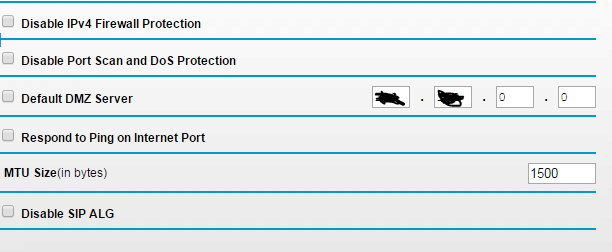
The last option is to put the PS4 in the router's DMZ. The picture you posted shows the DMZ Server setting. You would enter the IP address of your PS4, there. As with UPnP, you should to go ADVANCED > Setup > LAN Setup and assign an IP address to your PS4. Using the DMZ can also be considered unsafe for your PS4 since it will be unprotected by your router's firewall.
- wmpoolerTutorI did all of the following
- wmpoolerTutorRather I did those things. I will try again
Which NAT type is your PS4 reporting? Type 2(Moderate) is the best you can hope for behind a router. But that should be fine for most people (source).
- wmpoolerTutorIt's reporting strict. I can't join other players who are on my friends list due to it

