NETGEAR is aware of a growing number of phone and online scams. To learn how to stay safe click here.
Forum Discussion

LaszloFolgerts
Aug 21, 2015Aspirant
Cannot move files on share / cannot activate HTTP on RN102
Hardware: RN102, firmware 6.2.5
PC: Win7 X64
Ok, so as of late, I'm having trouble moving files within the same share (drag 'n drop in Win7 X64), which was never a problem before. When I try to move a file from one folder to the other within the same share, I get this message:
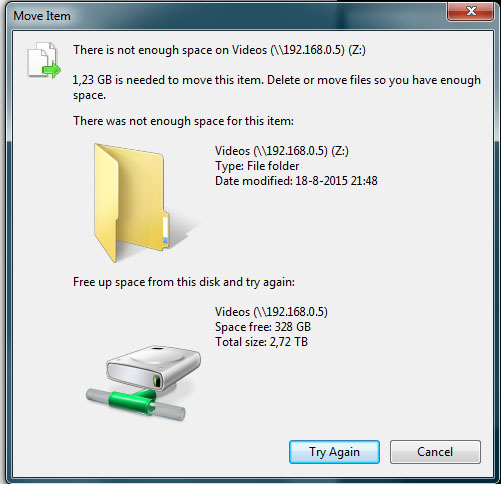
So basically it's telling me that there isn't enough space while at the same time showing me that there's losts of space. I would guess this should be pretty irrelevant anyway, because I´m moving, not copying.
Also, the above pop-up keeps flashing every few seconds. If I keep hitting "try again" over and over, SOMETIMES a file gets copied. But most of the time it doesn't.
I saw on a thread regarding a similar problem someone mentioning that HTTP should be turned on, on the share. So I tried that on the web UI, but then I got this message:
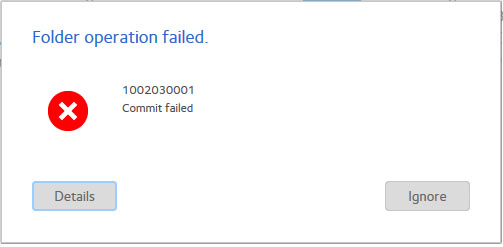
Does anyone know what's going on or how to fix this? Any help will be greatly appreciated.
Kind regards,
Laszlo
of course it's
# df -h /data
I figured that out, eventally ;) but thanks!
I kinda just followed this thread: https://community.netgear.com/t5/Using-your-ReadyNAS/No-available-diskspace-but-admin-page-reports-1-tb-free/td-p/942637
after correcting some typos, it worked. After running the balance, I now have double the amount of totally allotted metadata space, yay! :)
EskenderNG: hah, goog thing I didn't go through with it, then ;)
EskenderNG, StephenB, vandermerwe: Thank you guys so much for responding to my questions; I wouldn't have otherwise been able to solve it! :)
23 Replies
Replies have been turned off for this discussion
- vandermerweMaster
I see something similar when trying to write to windows network drives. It always responds to remounting the network drive. The other method to try is to open the share via windows Network, your nas should be displayed there and you should be able to open up the relevant share. Try the move like that without using the Z drive .
In the nas settings is http on as a service?
 LaszloFolgertsAspirant
Hi, thanks for the reply.
I have no trouble accessing the share, either via the web UI or via the network. I have trouble moving files within the share.
I can't seem to get HTTP turned on. Every time I toggle HTTP on via the web UI, I hit apply or save and then the aforementioned pop-up appears, thus telling me it failed to turn on HTTP.
I can't download anything anymore either. When I upload a NZB file to SABnzbd, I get the warning: ERROR: Failed making (/data/Videos/SABnzbd/filename)
- vandermerweMaster
Do you have ssh access?
 EskenderNGNETGEAR Employee Retired
Hi,
have you also received any other alerts from the ReadyNAS indicating that space is running out?
What happens if you try to upload a file using the ReadyNAS web GUI?
Have you run a balance (Admin page > Settings > Volume Schedule > Add > Action: Balance) lately?
Bye,
Eskender
- LaszloFolgertsAspirant
Hi, thanks for your reply.
A couple days earlier I got messages that there wasn't enough space available but after deleting all the snapshots I got a couple hundred gigs back.
If I try to upload a file through the web UI, it fails.
As far as I know, I have not run a balance (at least not on purpose.)
I though that it might be a permissions thing, but when it acts like this, I can't even change or reset permissions on a share.
I do remember messing around with accounts and user groups or something in win7. I can't remember exactly what it was anymore but I thought i returned everything back to its original settings again but maybe I overlooked something. Could this have something to do with it?
Thanks in advance,
Laszlo
- EskenderNGNETGEAR Employee Retired
Using SSH please try to run the following commands:
btrfs fi show
and
btrfs fi df /data
and post the output here. In case your volume is not called "data", please replace "data" with the appropriate name.
Bye,
Eskender
- LaszloFolgertsAspirant
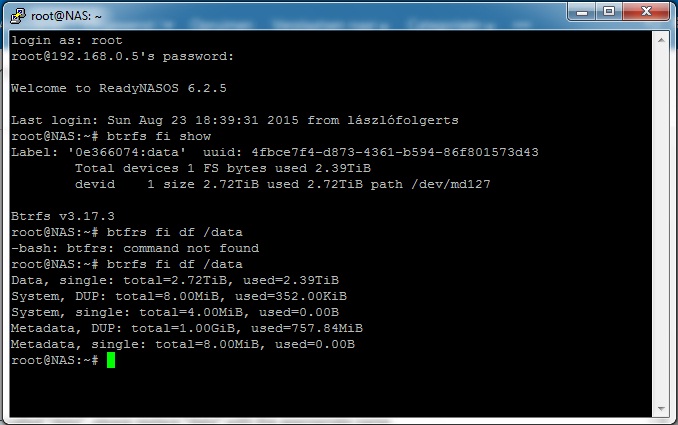
For reasons unbeknownst to me, I am now able to add and move files again. I've had the NAS off for a while, but I'm not sure that had anything to do with it, because that's happened before and it didn't do anything then, so I'm not sure how long this will last.
Anyway, here's the screenshot:
I hope I did it right ;)
Thanks for the help anyway!
Cheers,
Laszlo
- EskenderNGNETGEAR Employee Retired
Hello,
the problem seems to be the following. Although the ReadyNAS / Windows report 400 GB of free space this space is not free in the ordinary sense. This is a particular of the filesystem Btrfs. Space previously allocated to meta data (see Metadata, DUP) can only used for meta data again once it is freed. The same is true for space allocated for data (Data, single).
The first command you entered shows that there is no more free space on the ReadyNAS that has never been used before. All remaining free space has previously been used for meta data / data and can only be used for the same again.
Of this space the majority has been used for data and only very little remains for meta data.
You will need to run a balance to allow some of the space reserved for data to be used for meta data. (Admin Page > Settings > Volume Schedule > Add > Balance)
Bye,
Eskender
- LaszloFolgertsAspirant
I see, so the data I freed from the snapshots would then only be available again for snapshots or other meta-data related things?
And by running a "balance", I can re-allocate that freed up space from meta-data to regular data?
Just checking if I understand correctly.
Thanks,
Laszlo
- EskenderNGNETGEAR Employee Retired
Almost. Metadata has nothing to do with snapshots. Snapshots are basically just pointers pointing to data blocks. If deleting snapshots gives you an increased amount of free space then the files the snapshots were made of were already deleted before. If any of the two still exists, the file or the snapshot of a file, the space will not be freed upon deletion of the other. So, by deleting the snapshots you have finally released the space formerly occupied by the data (that is space for metadata and space for data).
As mentioned before this free space is only returned in a "used" state. So, since I am guessing that you were running out of meta data space before you gained some new meta data space from the data the snapshots was pointing to.
What you want to do now is the opposite of what you mentioned. You actually want to free up data allocated space so it can be used for metadata by running a balance.
Bye,
Eskender
- EskenderNGNETGEAR Employee Retired
Preferably try to free more space before running the balance. There was just another user running into problems because of balancing with too little space left. The advice was to increase free space to 80 - 85%.
Eskender
- LaszloFolgertsAspirant
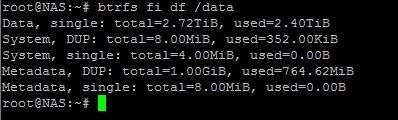
Ok, after working ok again for a while, its gone into "no more disk space available" mode again.
I ran a balance, but it didn't free up any meta data space. Here's what putty said:
What I also don't understand is that I was able to add/move files around when there was far less space available on the disks. Way before I deleted a bunch of files and snapshots.
And I don't really feel like emptying my drives for 80-85% That means losing allmost all of my data.
Thanks,
Laszlo
- LaszloFolgertsAspirant
Going through the log files, it shows that the balance was ended as soon as it started, which leads me to suspect that he balance didn't really run at all
I saw somewhere that you can run a balance through putty as well, but the how-to was a bit confusing to me.
# df -h data
gives me: "no such file or directory"
Thanks,
Laszlo


Related Content
NETGEAR Academy

Boost your skills with the Netgear Academy - Get trained, certified and stay ahead with the latest Netgear technology!
Join Us!
