NETGEAR is aware of a growing number of phone and online scams. To learn how to stay safe click here.
Forum Discussion

pong1
Apr 17, 2013Aspirant
Problems OS6 and AFP?
after years of finding lots of useful information here i finally gave up guest and registered.
i'm not sure this is the right part of the forum but in fact for me os 6 it looks a lot like beta after i sold my first rnd314, got it back from an angry customer after 2 days, tried it myself and sent it back to distribution after hours of frustration.
did somebody tried afp with these new boxes? for us it worked ok with sthe standard shares and guest account but as soon as you start using user/groups with different rights things get really crazy.
you can log in but the share is not displayed correctly in the finder sidebar, when you click on it after logging in you get a authorisation failed. only way to access it is over go to folder /Volumes/sharename
as a cosmetic glitch you get always NAS, NAS(AFP) and NAS(CIFS) in the sidebar, even after disabling smb and time machine.
the point where i lost patience and sent the puppy back was when i called our dealer support at netgear and they said "no, we know nothing about problems, the box is new so we don't have any information". very helpful. don't think this os is ready for primetimes.
first i was angry to have no official way to upgrade my own pro6 and also feared discussion with our customers. know i'm glad there are hurdles and i didn't upgrade already.
i'm not sure this is the right part of the forum but in fact for me os 6 it looks a lot like beta after i sold my first rnd314, got it back from an angry customer after 2 days, tried it myself and sent it back to distribution after hours of frustration.
did somebody tried afp with these new boxes? for us it worked ok with sthe standard shares and guest account but as soon as you start using user/groups with different rights things get really crazy.
you can log in but the share is not displayed correctly in the finder sidebar, when you click on it after logging in you get a authorisation failed. only way to access it is over go to folder /Volumes/sharename
as a cosmetic glitch you get always NAS, NAS(AFP) and NAS(CIFS) in the sidebar, even after disabling smb and time machine.
the point where i lost patience and sent the puppy back was when i called our dealer support at netgear and they said "no, we know nothing about problems, the box is new so we don't have any information". very helpful. don't think this os is ready for primetimes.
first i was angry to have no official way to upgrade my own pro6 and also feared discussion with our customers. know i'm glad there are hurdles and i didn't upgrade already.
21 Replies
Replies have been turned off for this discussion
 pong1Aspirantyep, you're right, when you're connecting with the finder menu it works also with users as i wrote. the problem is, that if you close your finder window with the share, the mount is associated with the wrong item in the sidebar and as soon as you try to go there you get an authorisation failed. so then you have to go over the finder menu "go to folder "/volumes/share" to get access again. not a very user friendly workaround and our customer didn't accept this (which i can understand).
but it's good to hear that there is a internal 6.05 where this is perhaps fixed.
anyways i can't understand how this could slip through quality testing. i found this glitch minutes after first time installation so it's not really a hard to find bug. jeffreylAspirantI have a readynas 516 and can also confirm that AFP simply does not work with any newly created accounts. Authorization failed is the constant error. Also have a ReadyNas Pro and AFP works fine on that. I have called in to level 2 support and have spoken with Janice Bongbong and she confirmed that they have seen the same problem on their end. I've done everything from recreating new volume, reinstall of OS, multiple reboots, problem is always the same. OS X 10.8.3. How netgear released this without testing AFP is beyond me. Very disappointed, as I have only recommended these boxes since the infrant days.
Further, the genie system is non-functional. After logging in, all you get is the spinning animation.- pong1Aspirantuntil they release an update you can take the workaround "finder menu/connect to server" and then don't close the window as written above ;-)
so let's hope there will be an update soon, at least they now could reproduce the problem. when i called tech support, it was totally new for them, so it seems there's some progress.  LeiaNETGEAR Employee Retired
pong wrote: until they release an update you can take the workaround "finder menu/connect to server" and then don't close the window as written above ;-)
so let's hope there will be an update soon, at least they now could reproduce the problem. when i called tech support, it was totally new for them, so it seems there's some progress.
Actually, no need to do this, please refer to the screenshot:
Tick "Connected servers" in Finder->Preferences->General. Then command+K and login the nas share. A icon for the share will appear in your desktop. You just need to double click to access it.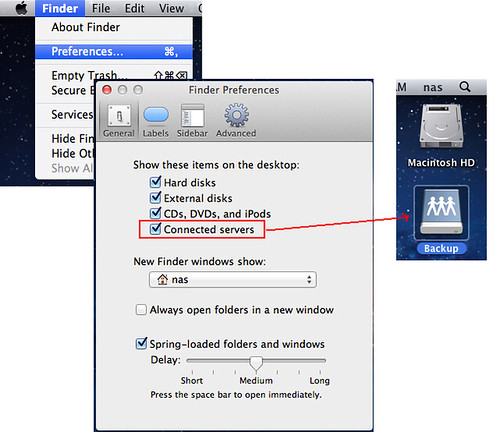
And cannot login from sidebar issue has been fixed and will be included in 6.0.5.- pong1Aspirantwith 6.05 out now i did some testing again (thanks chirpa, vm and update works great):
the problem with the sidebar ist gone and user rights seem to work at least for new folders you create.
strange enough there seems to be a problem with the folders created automaticaly (backup, documents, music, ...)
even if you disable anonymous access and also group "everyone" you can see all folders when connecting to the box as guest and you can also access them. is this by design?
btw is it possible to disable the user folders for each created user? - jeffreylAspirantOS 6.0.5 update has NOT resolved the issue. It is unbelievable that Netgear has the audacity to release this beta software as final. Also, as previously mentioned, Janice Bongbong, level 2 tech at netgear, confirmed that she had the same problem of AFP not functioning on their lab unit. She wanted me to give ssh and full access to my 516 so I could be test dummy instead of using their own equipment, knowing they have the same problem on all units. I refused, so she simply closed the case and essentially shut the door on me.
What awful support from netgear. Let this be a warning to any potential buyers, DO NOT BUY ANY OF THE NEW OS 6 BASED READYNAS PRODUCTS until netgear gets their act together and fixes the many, many bugs in their OS 6 software.
DISGRACEFUL! - LeiaNETGEAR Employee Retired
pong wrote:
strange enough there seems to be a problem with the folders created automaticaly (backup, documents, music, ...)
even if you disable anonymous access and also group "everyone" you can see all folders when connecting to the box as guest and you can also access them. is this by design?
Which protocol you set permissions for?
If you disable anonymous for SMB, then login with guest via SMB, you can get all shares list, but double click to access it, will be failed.
For AFP, the guest only can see the shares he has at least read right.
Cloud you please describe detail steps?pong wrote:
btw is it possible to disable the user folders for each created user?
Do you mean you want to not create home directories for users? - LeiaNETGEAR Employee Retired
jeffreyl wrote: OS 6.0.5 update has NOT resolved the issue. It is unbelievable that Netgear has the audacity to release this beta software as final. Also, as previously mentioned, Janice Bongbong, level 2 tech at netgear, confirmed that she had the same problem of AFP not functioning on their lab unit. She wanted me to give ssh and full access to my 516 so I could be test dummy instead of using their own equipment, knowing they have the same problem on all units. I refused, so she simply closed the case and essentially shut the door on me.
What awful support from netgear. Let this be a warning to any potential buyers, DO NOT BUY ANY OF THE NEW OS 6 BASED READYNAS PRODUCTS until netgear gets their act together and fixes the many, many bugs in their OS 6 software.
DISGRACEFUL!
Cloud you please just give me the case number? I can take a look for you. I guess the L2 tech support just wants to see what happend with your box. - pong1Aspirantsmb was not enabled, only afp. i created a new folder and set the right for my test user, without any right for anybody else, so no guest and no rights for users. it worked as expected. as a guest i can't see the folder, it'S visible only after login. then i set the same rights for the default folders (no guest, no group, only test user) but the folders are all visible and i can also write to backup as a guest, which is strange, because anon access is disabled.
so you mean there are different rights for each protocol? i can configure write access for user test for afp but no rights over smb?
i only found one access setting in the pane.
and yes, i mean disable home folders for users, which is often wanted by our customers. - LeiaNETGEAR Employee Retired
pong wrote: smb was not enabled, only afp. i created a new folder and set the right for my test user, without any right for anybody else, so no guest and no rights for users. it worked as expected. as a guest i can't see the folder, it'S visible only after login. then i set the same rights for the default folders (no guest, no group, only test user) but the folders are all visible and i can also write to backup as a guest, which is strange, because anon access is disabled.
so you mean there are different rights for each protocol? i can configure write access for user test for afp but no rights over smb?
i only found one access setting in the pane.
and yes, i mean disable home folders for users, which is often wanted by our customers.
You can see in Shares->Settings->Access page, there're several tags like SMB/AFP/NFS/FTP/RSYNC/HTTP, click each tag you can go the specific page for each protocol, and you can set whatever permissions you want for the users or groups. So yes, of course you can set a user has write permission for the share via AFP but no rights via SMB. All you need to do is goto the protocol tag, turn it on for this share, and set the user permission.
For disable home folders, it's just no support this now. But we have a plan to enhance home folders thing. I can tell our RD customers want this feature.
Related Content
NETGEAR Academy

Boost your skills with the Netgear Academy - Get trained, certified and stay ahead with the latest Netgear technology!
Join Us!
