NETGEAR is aware of a growing number of phone and online scams. To learn how to stay safe click here.
easy plus and smart
76 Topics
GS316EP: Port mirroring fails to capture traffic between two ports isolated in their own VLAN
Setup: I have two VLANs configured: VLAN 1 (default): most ports, including my normal LAN traffic VLAN 10: exactly two ports (Port 3 and Port 4), used for an isolated point-to-point link between my cable modem and router’s WAN port Port mirroring is configured with sources = Ports 1, 3, 4 and destination = Port 16. Port 16 is a tagged member of both VLAN 1 and VLAN 10. The problem: Mirroring from Port 1 (VLAN 1) to Port 16 works perfectly — I can see all that traffic clearly on the destination. Mirroring from Ports 3/4 (the isolated VLAN 10) to Port 16 captures nothing — not even a single packet — despite: Port statistics confirming heavy, continuous real traffic on both Port 3 and Port 4 Port mirroring config showing all three ports (1, 3, 4) correctly listed as sources Port 16 confirmed as a tagged member of both VLAN 1 and VLAN 10 Testing both untagged (tcpdump -i <iface> -n) and VLAN-tagged (tcpdump -i <iface> -n vlan) captures on the destination — zero packets either way, even during extended (60-90 second) active traffic generation What I suspect: Since VLAN 10 has exactly two ports and all traffic between them is essentially point-to-point, I suspect the switch ASIC may be using some kind of hardware fast-path/shortcut for this traffic pattern that bypasses the mirroring engine — but I can’t confirm this and haven’t found it documented anywhere. Questions: Is this a known limitation/behavior of this switch (or its chipset) for isolated two-port VLANs specifically? Is there a configuration workaround (different VLAN mode, different port count in the isolated VLAN, disabling some hardware acceleration feature) that would make this mirror correctly? Has anyone successfully mirrored traffic on a similarly isolated VLAN segment on this or a similar NETGEAR model?SolvedProblems with Isolating a VLAN
I’m trying to isolate a laptop with the scenario that there may be a possible malware or infection. Currently my major problem is that we’re not getting our expected results. Our goal is that we have 3 PC’s that we want to restrict traffic so that one of those pcs can communicate to and from the other pc.186Views0likes11CommentsSwitches indicate receiving signal, not detecting devices
I have had a GS316EP for 4 years. It was used to power 2 PoE cameras and for my home office. About a month ago, it stopped working. When I plug the Cat 5e from the router into each port, they light up and I can check the status when I access the switch via the IP address. It shows 1 connection, despite there being at least 3 others attempting to pull/send data. I purchased a GS3116PP Unmanaged Switch to replace it, thinking it was a dead switch, and it is doing the same thing. I have changed the cord from the router, trying a different cat 5e and a cat 6. No improvement. Firmware has been updated on the managed device. The unmanaged device was left plugged in for over an hour, despite instructions claiming it should only take 2 minutes. Any help would be appreciated.
Connecting Netgear GS728TXPv3 to Cisco CBS350-48P-4X
I'm connecting a Netgear GS728TXPv3 to a Cisco CBS350-48P-4X and its currently connected via a single daisy chain (cascading) configuration. Unfortunately, I"m no expert in interoperability between these 2 and I"m wondering if anyone can shed light on the issues I'm seeing. The core of my network is a Sophos XGS and the core switch is currently the Cisco and the 2nd switch is the Netgear. The config on both switches is not altered much from the defaults and both are supposedly on VLAN 1. Connectivity is working but it takes forever for some devices to reconnect when either switch reboots. Some management interfaces and devices become unavailable on the Netgear from time to time. When I try to set the Netgear switch to a static IP it becomes inaccessible. I have 2 core questions: Is there something I need to configure to get them to play nice and interoperate? Is there any interoperability documentation on this? Can I switch the uplink to the SPF uplink between the 2? Is there any documentation on setting this up? TIANetgear GS748Tv6 port issues
Hello all! My company installed a brand new Netgear GS748Tv6 (version 7.0.0.14) switch on Sunday and had some issues with a sluggish infrastructure since then. After so many test, we found a smoking gun with the built-in cable testing feature. The cable test shows the length for our port 3 of 0m - 178m, when the cable plugged into the port is only about 2FT long. All other ports show normal lengths. I switched out the cable to test, and the test still shows a long cable length. I mimicked the settings on this port over to an unused one, and now everything is working perfect. The cable test even shows normal results. Obviously, it sounds like a bad port on this brand-new switch, but I can't find any errors about the port 3 at all. We have some Linux servers connected to this switch, so doing the cable test messes with them. Has anyone experienced these issues or had luck in finding an actual red flag besides the cable testing? Thank you!After the insight app update i am no longer able to connect to my switches.
After the insight app update i am no longer able to connect to my switches. The app comes back with "device not registered to the network. Please contact your administrator" message on all 4 of my ProSafe switches. The app sees the switches and some of the data of them, but it just don't let me connect.System name
Hallo GS728TXPv3 with firmware: 6.2.2.40 This is a new switch and i just did the basic setup wenn i hung it in a DC. Besecly the old switch was still in use. Now that one is gone and i want to continue. But i can not change the name or system contact. The way i did: login -management. On a other netgear switch is a purple button but not on this one. I know normaly this is easy to do but... On some Cisco switches it is a brouwser thingy then it log in with a Microsoft brouser and you see the compleet interface. But never saw this on a Netgear. Anbody know of this???SolvedAdding SFP to conenct from GS752TPPv3 to LG TV ... Help!!
Evening all, I have 2 GS752TPP's in a home environment. They were new last year and I have Insight installed. We have RJ45 cat 5e to Cat 6 flood wired throughout the property which works very solidly connecting things like TVs, Sonos boxes, PoE cameras, streaming boxes etc. There is also an Orbi wifi system for mobile devices, laptops etc. I'm currently re-wiring a room to facilitate a new up to date TV and Sonos home theatre system and have the opportunity to install fiber HDMI and fiber to the TV. It's not strictly necessary but given the roof and walls are stripped out and I can install a conduit, it seems worthwhile to grab the opportunity Have looked at articles and can see roughly what I might need but I'm having trouble translating this into Netgear products. The switches are in a room approximately 10 meters from the TV. The area behind the TV has been channelled out such that I can install a hub or media converter, cables and power. I know I need an SFP module at the switch. Currently there are none fitted. If I read correctly, it is the ideal to have the SFP module at each end. But past that, I'm a bit in the dark. Would appreciate any advice, product suggestions, how I could connect the 752TPP to the TV in fiber to get the fastest, more robust, future proofed connection and configuration please. I've read about third party SFP's that are brand independent but would prefer keep the entire home network Netgear if humanly possible. Appreciate any advice so that I can get it right first time. Many thanksIPv6 / DHCPv6 with S350 Smart Switches (GS324T / GS348T)
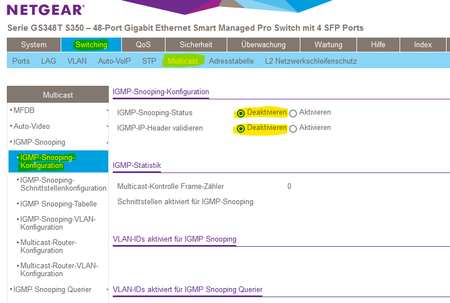
Wie Renefw in diesem Thread gemeldet hat funktioniert die IPv6 Adressvergabe von z.B. FritzBox Routern nicht über S350 Smart Switches. Die Clients erhalten keine IPv6 Adresse und können somit keine IPv6 Seiten im Internet öffnen. Ich hatte das gleiche Problem an meinem GS348T und konnte das Problem durch Deaktivieren der IGMP-Snooping-Konfiguration lösen. Ich habe diverse IGMP-Snooping-Konfigurationen getestet aber alles ohne Erfolg. Nur das Deaktivieren der IGMP-Snooping-Konfiguration hat letztendlich geholfen. Viel Glück, wenn Ihr das gleiche Problem habt. ✌6.5KViews0likes24CommentsMS510TXM Firmware authenticity validation
Netgear does not digitally sign firmware updates nor are any hash values (such as SHA-256) provided for the firmware. This seems very irresponsible and highly unprofessional. It makes it essentially impossible for a customer to validate the authenticity of the firmware. Why doesn't Netgear provide these basic protections for their customers?