NETGEAR is aware of a growing number of phone and online scams. To learn how to stay safe click here.
Forum Discussion

Kitias
Apr 05, 2011Aspirant
Windows 7 NV+ Compatibility/Support
Has there been any update on when the NV+ will support Windows 7?
Mine is sitting collecting dust. It's almost to the point of ditching it completely and getting one from a company that supports a current OS.
Mine is sitting collecting dust. It's almost to the point of ditching it completely and getting one from a company that supports a current OS.
16 Replies
Replies have been turned off for this discussion
 PapaBear1ApprenticeGee, that's funny. I have been using my NV+ with three PC's, two desktops and a laptop all running Windows 7 Home Premium 64bit. It might help if you would post what problems you are encountering.
What is the version of RAIDiator and the version of RAIDar. Current version of RAIDiator is 4.1.7, although I am running 4.1.6.
What browser and version are you using as well. KitiasAspirantHere are my current specs.
Windows 7 Ultimate 64bit (With all updates applied.)
Firefox 4.42.0.0
NV+ RAIDiator Ver 4.1.7
ReadyNAS Remote Addon Ver 1.0.9.51
ReadyNAS Remote Ver 1.6.5.11
I have tried all the known fixes.
Network security: LAN Manager authentication level - Send LM & NTLM - use NTLMv2 session security if negotiated.
Minimum session security for NTLM SSP - Disable Require 128-bit encryption
Disabled Windows Firewall and Uninstalled Anti-Virus.
Checked Routes all appear to be correct.
Disabled IPv6
Changed homegroup setting.
Enabled network discovery
Enabled file and printer sharing
Changed Encryption form 128bit to lower.
I have also tried the ReadyNas remote setup. I have an active account that shows that it was able to log in and connect to the NAS. If you try to connect all it does is failout and open My Documents.
Just to make sure I wasn't missing I did a factory reset on the ReadyNas and then upgraded to the latest version of each. I also reinstalled ReadyNas remote also.
I can connect without issue with my XP box.
Please let me know if know of any other options.
-Edit added browser and version.- PapaBear1ApprenticeI still don't understand what the problems are. Are you not able to connect via Frontview?
Are you not able to run RAIDar?
Are you not able to access shares when in Windows Explorer?
Firefox 4.42.0.0? I am trying out Firefox 4.0 R2 which was released on March 18. I also have on this laptop 3.6.15.
As said, I am not running any add-ons. You are apparently running the Remote Add-on. I am not sure if the Windows version on the PC has an effect on add-ons on the NAS or not. While my primary and secondary NAS (NAS1 and NAS2 are NVX units, however, for the first 8 months I was running Windows 7, my NV+ was my only NAS (now NAS3 in a backup role). - Kirbz252AspirantI'm stuck in the same boat as well. Windows 7 64bit with NV+ and its just terrible. Full gigabit network, with jumbo frames enabled and im lucky to get above 12 Mb/sec.
Most commonly, I'll be browsing my shares, and when I click to go back the page just locks up and the green browser bar keeps loading. Then it just all of a sudden works.
This is causing much grief as one of the computers crashed this evening. Lost pretty much all the files, and the NAS has an old copy of them. Network issues prevented the backups. - sdouekGuideI am with papabear I am using windows 7 prof 64 bit on 2 laptops a ibm and a dell no problems here. Using ie 9 and firefox 3.6.16 with no problems. And have both the nv and nv+.
What is you problem with the unit ?
What router and switch are you using?
Have you tried to connect via another computer running windows 7 ?
Try disabling jumbo frames. If jumbo frames is not set up properly you will get drops. Some older nics don't have the ability to do jumbo frames. My IBM laptop will only do 4k frames and no higher.
It sounds odd to me but remove the addons from windows 7 machine also and see if that helps. - PapaBear1ApprenticeKitias and Kirbz252 - you should do a direct connection between the NV+ and your PC to determine if it is the PC's operating system. This takes all the other network devices out of the loop.
I was directed to this when I bought my first NVX and discovered that while file transfer to the NVX was 50+ MB/s, transferring that same file back to the PC was less than 1KB/s, that is not a typo, it was less than 1KB/s! Netgear support was ready to issue an RMA so I could use that fact to return the unit to the vendor when a direct connection provided 50+ MB/s in both directions. The culprit was an incompatible switch to which both the NVX (and NV+) and the PC were connected.
Transfers at 12MB/s indicate that something is connection at Fast Ethernet (100 Mb/s) rather than Gigabit Ethernet (1000 Mb/s) for some reason. If you have a Cat 5 cable in the path that could do it as you need to make sure that the cables are Cat 5e or Cat 6 and in good condition. Some of the ethernet cables that come with NAS units are Cat 5. - KitiasAspirantSorry about the delay on replying. My job took me out of town for a little while.
My main issue is that I can't use any of the shares on the Readynas.
I can connect with Raidar and do all the setup and upgrades. I have already listed what I tried to get it working. Just to add more information I reloaded my main comp with XP and I had no issues connecting to the Readynas. Then I put Windows 7 64bit back on my box and same issue as before. This was with the nas connected directly to my comp. No router in the way.
When I try the readynas remote config it says it is online and able to see the ip that is assigned. When you try to use the connect to readynas option it opens my docs.
Per your advice I disabled jumbo frames and there was no change.
Also this isn't a case of slow connection or transfer speeds. - PapaBear1ApprenticeAre you using any third party Anti-Malware such as McAfee or Symantic?
Are you using any third party firewalls?
Since you can connect with RAIDar and then use the Setup in RAIDiator, I am not sure why you cannot connect to the shares.
Do you perhaps have a user name and a password set up on the shares? If so, is the user name and password the same as you used for Windows 7?
If you go into Windows Explorer (or Computer) in Win 7, in the lower portion of the left hand window (folder tree) all network connections should be shown. Your NAS should be shown. If you click on the arrow ahead of the NAS name, it will show the shares. In the image below in the left hand pane, you should see my NAS3 and the 5 shares. In the right hand window the 5 network connections with drive letters are the 5 mapped shares of NAS1 (NVX BE).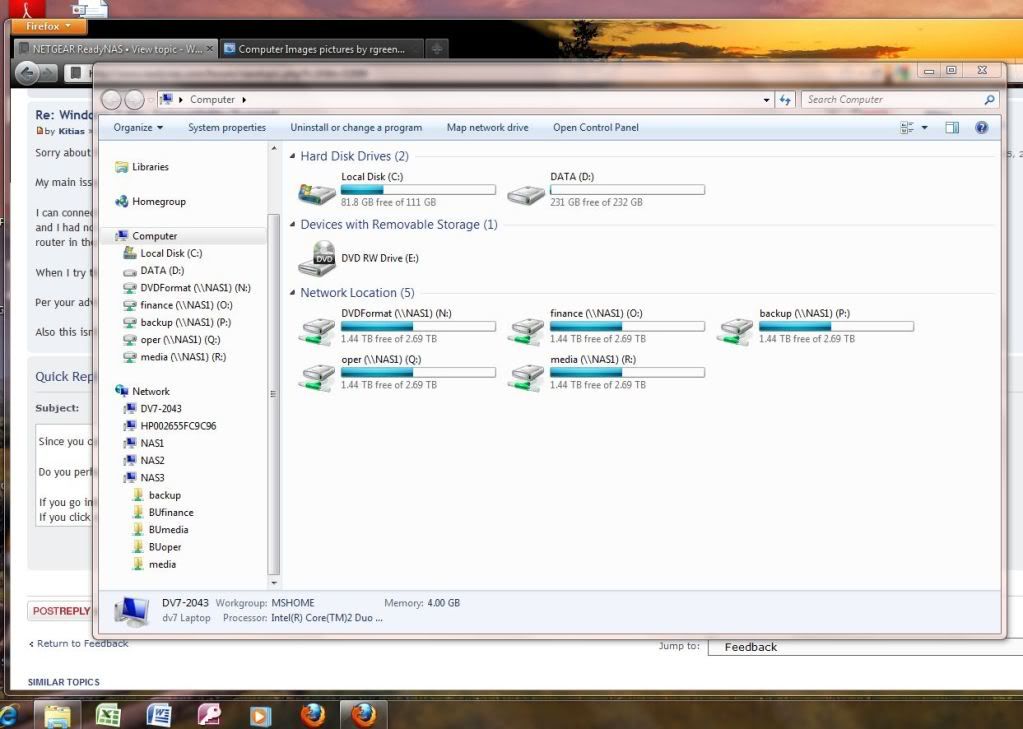
From the time Windows 7 came out on Oct 22, 2009 until I got my first NVX in June, 2010 the only NAS I had was my NV+ and had no problem accessing the files or mapping the shares.
Can you perhaps tell us how you are trying to access the files and/or shares?
From the tree in Computer or the same tree in Windows Explorer you should be able to drill all the way down to an individual file listing and then by double clicking on the file, open it with the application that created it. If you cannot, what error messages are you getting?
By the way, if you have a spare hard drive, you do not need to reload/reinstall the various operating systems. On my main machine (custom build with a Gigabyte brand MB) I currently have Win7HP 64bit, VistaHP 32bit and XP Pro 32bit, each installed on it's own hard drive. I then use the Boot Menu to select the drive (and OS) I want to boot from. I have a 5 year old HP that I have a similar arrangement between Vista and Win7, but since it is a manufactured machine, I have to use the BIOS setup to select the boot drive. So the next time you want to change Operating Systems, just disconnect the cables to the current drive with Win7 and connect the new drive and install XP. I have a triple boot because I sometimes need to open the older versions to answer questions on another forum. If you install the second OS on a second drive make sure you disconnect the other drive during the OS install. Otherwise it will affect the boot manager of the other drive. Once installed you can connect both drives and either OS can see the files on the other drive.  samjoconnorAspirant
Kitias wrote: Sorry about the delay on replying. My job took me out of town for a little while.
My main issue is that I can't use any of the shares on the Readynas.
I can connect with Raidar and do all the setup and upgrades. I have already listed what I tried to get it working. Just to add more information I reloaded my main comp with XP and I had no issues connecting to the Readynas. Then I put Windows 7 64bit back on my box and same issue as before. This was with the nas connected directly to my comp. No router in the way.
When I try the readynas remote config it says it is online and able to see the ip that is assigned. When you try to use the connect to readynas option it opens my docs.
Per your advice I disabled jumbo frames and there was no change.
Also this isn't a case of slow connection or transfer speeds.
Any solution onthe opening My Docs issue? I am experiencing that on my Win 7 64 bit machine. Netgear Tech Support have no solution for my problem.- PapaBear1Apprentice1. Do you have a password set on the ReadyNAS?
2. Do you have a password set on the PC?
3. Are the user id and password the same on both? (Ignore if no password set on NAS.
4. What anti-malware suite are you running? If no suite, what individual applications (FWIW I am using Avast! and SuperAntiSpyware, although have used AVG in the past with no problems).
5. Have you tried a direct connection?
6. You placed your document folder on the NAS rather than individual data folders? Did you establish the Documents folder with Win7 on this machine or another machine?

Related Content
NETGEAR Academy

Boost your skills with the Netgear Academy - Get trained, certified and stay ahead with the latest Netgear technology!
Join Us!
